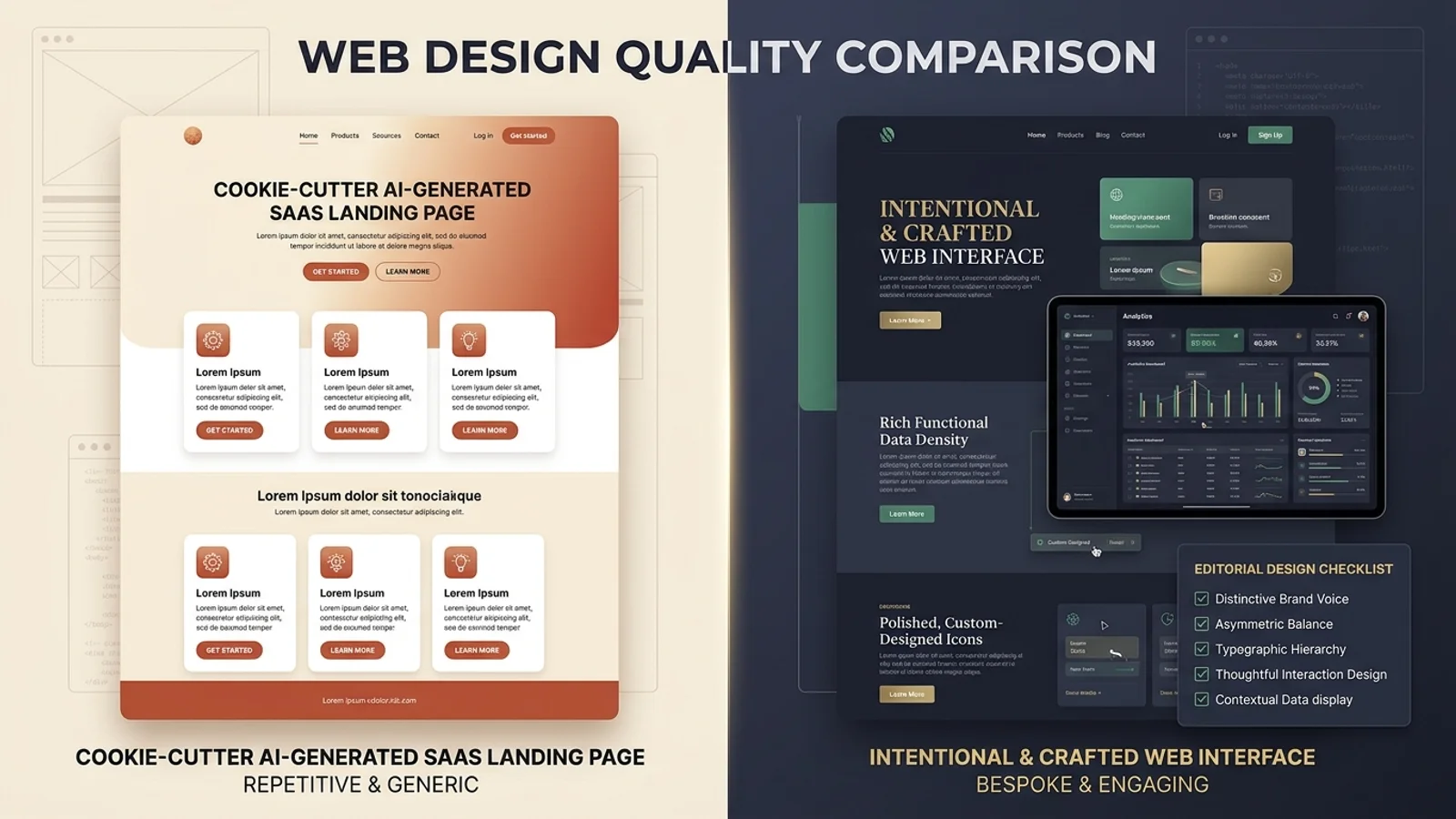
If you have asked Claude Code, Cursor, Codex, or Windsurf to build a modern landing page or dashboard recently, you have likely encountered the "AI Slop" aesthetic:
A centered hero heading wrapped in a tiny pill badge (New: Introducing AI v2.0), a warm cream-to-terracotta or dark indigo gradient background, a symmetrical three-column card grid with generic Lucide icons, and three fictional testimonials praising an unspecified "seamless workflow."
The code compiles without syntax errors. The Tailwind classes are valid. The responsive flexbox wraps smoothly. Yet the resulting page feels fundamentally generic—a hollow imitation of a 2024 SaaS template that lacks brand personality, functional depth, and contextual usability.
In late 2026, frontend developer Hassan El Mghari (Nutlope) introduced [Hallmark](https://github.com/Nutlope/hallmark), an open-source design skill for AI coding assistants. Within weeks, Hallmark became one of the most discussed agent extensions across GitHub and developer communities, sparked by a shared developer frustration: how do we stop AI coding agents from generating identical, generic websites?
This guide provides an evidence-based technical evaluation of Hallmark and the broader challenge of AI frontend design quality. We examine the root causes of repetitive AI interfaces, break down how agent skills work under the hood, explore Hallmark's four operational modes, compare reusable skills against detailed prompts and design systems, propose a fair evaluation protocol, and provide a practical quality checklist for engineering teams.
---
1. Why Do AI Coding Agents Generate Generic Websites?
To understand why tools like Hallmark emerged, we must first analyze why frontier models—despite exceptional performance on algorithmic benchmarks and full-stack architecture—consistently revert to predictable UI patterns.
┌─────────────────────────────────────────────────────────────────────────────────────────┐
│                           THE ANATOMY OF "AI SLOP" WEB INTERFACES                       │
├──────────────────────────────┬─────────────────────────────┬────────────────────────────┤
│ 1. PREDICTABLE HEROES        │ 2. SYMMETRICAL CARD KITS    │ 3. SHALLOW INTERACTIONS   │
├──────────────────────────────┼─────────────────────────────┼────────────────────────────┤
│ • Centered <h1> + gradient   │ • Symmetrical 3-card grid   │ • Hover transforms without │
│ • All-caps badge pill        │ • Generic rounded rects     │   active or focus rings    │
│ • "Get Started" + "Learn     │ • Abstract SVG line icons   │ • Incomplete form submits  │
│   More" dual button cluster  │ • Identical paragraph len   │ • Zero keyboard traps/ARIA │
│ • Fictional metrics ("99.9%")│ • Repeated benefit blurbs   │ • Missing loading skeletons│
└──────────────────────────────┴─────────────────────────────┴────────────────────────────┘
The recurrence of generic AI design is driven by four structural characteristics of generative language models:
1. Statistical Regression to the Training Mean
Large language models are probabilistic token predictors trained on millions of public repositories, template marketplaces, and UI boilerplates. When prompted with a broad instruction—such as *"Build a high-converting landing page for a developer analytics platform"*—the model samples tokens that maximize likelihood across its training corpus.
The mathematical average of modern frontend web code is:
- Inter or system sans-serif typography.
- Neutral slate-900 or zinc-950 dark backgrounds.
- 12-column CSS grids broken into three equal cards (
col-span-4). - Centered hero blocks with primary and secondary call-to-action buttons.
Unless specifically constrained, the model does not make controversial, idiosyncratic, or domain-specific aesthetic choices because those choices carry lower statistical probability.
2. Lack of Contextual Audience Grounding
Human designers do not begin by choosing button colors; they begin by diagnosing the user's operational context:
- Is this an emergency incident response tool requiring high information density and stark contrast?
- Is this a luxury boutique requiring generous whitespace, asymmetric margins, and editorial serif typography?
- Is this a developer CLI tool that should prioritize monospace tables, keybindings, and terminal outputs?
AI coding agents typically receive brief, functional prompts (*"Create a dashboard for monitoring API latency"*). Lacking explicit instruction to interrogate the audience and brand voice, the agent applies its default "modern SaaS" template regardless of whether that template suits the application.
3. Visual Polish vs. Functional Correctness
A generated component can look polished in a static 1440px desktop preview while failing fundamental engineering criteria:
- Missing Interaction States: Buttons have subtle hover opacity changes but lack
:focus-visiblefocus rings, active press states, or disabled loading spinners. - Fragile Mobile Layouts: Multi-column comparison tables overflow horizontally without responsive scrolling or collapsible cards.
- Dead Interactive Elements: Search bars, filtering dropdowns, and form submits render visually but contain no underlying state management or synthetic data bindings.
4. Overuse of Meaningless Visual Flourishes
When an agent is prompted to *"make the design look premium"*, it frequently responds by layering cosmetic effects:
- Unnecessary CSS backdrop filters (
backdrop-blur-md). - Multi-color radial gradient blobs that degrade GPU rasterization performance.
- Over-animated cards with spring physics that distract users and violate accessibility expectations for users with vestibular disorders.
---
2. What Is Hallmark?
[Hallmark](https://github.com/Nutlope/hallmark) is an open-source instructional design skill created by Hassan El Mghari (Nutlope) and maintained under the MIT license at usehallmark.com.
Rather than a standalone application, browser extension, or SaaS subscription, Hallmark is packaged as an agent skill compatible with modern coding assistants such as Anthropic's Claude Code, Cursor, Codex, and Windsurf.
┌─────────────────────────────────────────────────────────────────────────────────────────┐
│                                 HALLMARK REPOSITORY OVERVIEW                            │
├──────────────────────────────┬──────────────────────────────────────────────────────────┤
│ Attribute                    │ Specification Details                                    │
├──────────────────────────────┼──────────────────────────────────────────────────────────┤
│ Author / Creator             │ Hassan El Mghari (@Nutlope)                              │
│ Repository URL               │ https://github.com/Nutlope/hallmark                      │
│ Official Website             │ https://www.usehallmark.com                              │
│ License                      │ MIT License                                              │
│ Distribution Standard        │ Skills CLI (`npx skills add nutlope/hallmark`)           │
│ Primary Core File            │ `skills/hallmark/SKILL.md`                                │
│ Core Operational Modes       │ 4: Default (Build), Audit, Redesign, Study               │
│ Primary Focus                │ Eliminating generic AI-generated frontend UI patterns    │
└──────────────────────────────┴──────────────────────────────────────────────────────────┘
The core philosophy of Hallmark is simple: treat frontend design as a rigorous engineering discipline rather than a cosmetic afterthought.
Instead of allowing an AI assistant to immediately emit JSX with default Tailwind classes, Hallmark forces the agent through a structured pre-flight evaluation, injects explicit typographic and architectural constraints, mandates complete interaction states, and executes a pre-output self-critique to catch visual clichés before code is written to disk.
---
3. What Does an AI Coding-Agent Skill Actually Do?
To evaluate Hallmark objectively, developers must dispel a common misconception: an agent skill is NOT a fine-tuned model, a custom checkpoint, or an executable binary.
┌─────────────────────────────────────────────────────────────────────────────────────────┐
│                         HOW AGENT SKILLS OPERATE IN RUNTIME CONTEXT                     │
├─────────────────────────────────────────────────────────────────────────────────────────┤
│                                                                                         │
│   USER PROMPT: "Build a billing overview table with filtering and export"              │
│                                      │                                                  │
│                                      ▼                                                  │
│   ┌─────────────────────────────────────────────────────────────────────────────────┐   │
│   │                      AGENT CONTEXT WINDOW INJECTION                             │   │
│   ├─────────────────────────────────────────────────────────────────────────────────┤   │
│   │ • Base System Prompt (Claude Code / Cursor / Windsurf harness)                  │   │
│   │ • Project Instructions (AGENTS.md / .cursorrules / CLAUDE.md)                   │   │
│   │ • ACTIVE SKILL: Hallmark (SKILL.md)                                             │   │
│   │     - Pre-flight design context interrogative rules                             │   │
│   │     - Typography pairing & hierarchy constraints                                │   │
│   │     - Layout diversity & asymmetry guidelines                                   │   │
│   │     - Required interaction states (:hover, :focus-visible, :active, :disabled)  │   │
│   │     - Anti-pattern checklist (No cliché cards, no ungrounded gradients)        │   │
│   │     - Pre-output self-critique reflection loop                                  │   │
│   └─────────────────────────────────────────────────────────────────────────────────┘   │
│                                      │                                                  │
│                                      ▼                                                  │
│   ┌─────────────────────────────────────────────────────────────────────────────────┐   │
│   │                       FRONTIER LLM REASONING & GENERATION                       │   │
│   │           (Claude 3.5 Sonnet / GPT-4o / Gemini 2.0 Flash / Pro)                 │   │
│   └─────────────────────────────────────────────────────────────────────────────────┘   │
│                                      │                                                  │
│                                      ▼                                                  │
│   RESULTING CODE: Distinct, contextual layout respecting responsive & state rules       │
│                                                                                         │
└─────────────────────────────────────────────────────────────────────────────────────────┘
The Architectural Anatomy of a Skill
In the emerging agent ecosystem standardized by tools like the Skills CLI, a skill consists of:
- Instructional Markdown (`SKILL.md`): System-level guidelines that dictate how the agent should reason, plan, and format its response.
- Context Prompts & Heuristics: Step-by-step procedures the agent must execute before generating code (e.g., asking clarifying questions, formulating a design brief).
- Reference Data & Anti-Patterns: Concrete positive and negative examples illustrating what constitutes high quality versus unacceptable output.
- Audit Gates: Self-evaluative checklists that the model must review against its candidate output before finalizing its tool calls.
Installing Hallmark does not alter the underlying model's weights. The agent still relies on Claude 3.5 Sonnet, GPT-4o, or Gemini for language understanding, logic synthesis, and syntax generation. Hallmark modifies the prompt environment and operational guardrails within which that reasoning occurs.
---
4. How Hallmark Works: The Four Operational Modes
According to Hallmark's official SKILL.md specification, the skill organizes frontend design tasks into four discrete modes of operation:
┌─────────────────────────────────────────────────────────────────────────────────────────┐
│                                HALLMARK'S FOUR OPERATIONAL MODES                        │
├────────────────────┬────────────────────┬────────────────────┬──────────────────────────┤
│ 1. DEFAULT (BUILD) │ 2. AUDIT           │ 3. REDESIGN        │ 4. STUDY                 │
├────────────────────┼────────────────────┼────────────────────┼──────────────────────────┤
│ `hallmark <brief>` │ `hallmark audit    │ `hallmark redesign │ `hallmark study          │
│                    │  <target>`         │  <target>`         │  <image | url>`          │
│ Full greenfield    │ Read-only heuristic│ In-place visual &  │ Deconstructs reference   │
│ generation with    │ review; outputs    │ hierarchy overhaul;│ structure & principles   │
│ contextual design  │ prioritized issues │ preserves routes & │ without copying pixels   │
│ pre-flight & rules │ without file edits │ business logic     │ or CSS verbatim          │
└────────────────────┴────────────────────┴────────────────────┴──────────────────────────┘
Mode 1: Default (Greenfield Interface Build)
When invoked for a new interface (hallmark build a customer analytics dashboard), the skill executes a structured four-stage pipeline:
Stage 1: Design-Context Pre-Flight
Before generating a single line of JSX or CSS, the agent must determine three foundational parameters:
- Audience & Tone: Who is using this interface, and what emotional register is appropriate? (e.g., *technical, analytical, restrained* vs. *playful, consumer-facing, vibrant*).
- Core User Job: What is the primary operational task the user must complete within 5 seconds of loading the screen?
- Information Density: Does the task require compact, high-density data presentation (enterprise tooling) or generous whitespace and guided sequencing (onboarding flow)?
Stage 2: Structural Diversity Enforcement
Hallmark explicitly forbids the model from defaulting to symmetrical three-card grids. It requires the agent to consider:
- Asymmetric layouts (e.g., a dominant 60% master view paired with a 40% contextual inspector).
- Split-screen workflows with persistent navigation rails.
- Data-driven table-first or canvas-first architectures.
Stage 3: Typographic & Spatial Hierarchy
The skill imposes strict constraints on type selection and spacing:
- Distinct contrast between display headings, section titles, and body copy.
- Pairing font personalities deliberately (e.g., pairing a geometric display face with an ultra-readable neutral sans-serif or monospace numerical tables).
- Eliminating arbitrary padding (
p-7,m-13) in favor of a cohesive, mathematical spacing scale (4px,8px,16px,24px,32px,48px,64px).
Stage 4: Pre-Output Self-Critique
Before presenting code to the developer, the agent must internally verify its implementation against an anti-pattern blacklist:
- *Did I include a fake, ungrounded pill badge in the hero?*
- *Are all interactive states (:hover, :focus-visible, :active, :disabled) implemented?*
- *Did I respect user motion preferences via
@media (prefers-reduced-motion)?* - *Does color contrast meet minimum WCAG AA standards?*
---
Mode 2: `hallmark audit <target>`
In audit mode, Hallmark inspects an existing component, page, or URL and generates an objective diagnostic report without modifying any files.
# Example invocation in Claude Code or Cursor
hallmark audit src/components/BillingDashboard.tsx
The audit evaluates the target against six specific dimensions:
- Visual Hierarchy: Does the eye immediately land on the primary action, or do competing cards create visual noise?
- Typographic Rhythm: Are font sizes, line heights, and weights applied consistently across sections?
- Interactive Completeness: Are form fields accompanied by clear labels, error states, and keyboard navigation rings?
- Layout Originality: Does the page rely on recognizable template clichés?
- Accessibility Baselines: Are color contrast ratios sufficient, touch targets at least 44x44px, and interactive elements focusable?
- Mobile Adaptability: Does the layout gracefully restructure for narrow viewports without horizontal text clipping?
The output is categorized into High, Medium, and Low priority issues with actionable remediation recommendations.
---
Mode 3: `hallmark redesign <target>`
Redesigning existing applications with AI coding agents is notoriously risky because agents frequently overwrite existing routing, refactor business state, or break API integration contracts.
Hallmark's redesign mode establishes strict boundaries:
┌─────────────────────────────────────────────────────────────────────────────────────────┐
│                           HALLMARK REDESIGN BOUNDARY MATRIX                             │
├────────────────────────────────────────────┬────────────────────────────────────────────┤
│ PERMITTED MODIFICATIONS                    │ STRICTLY PRESERVED ARCHITECTURE            │
├────────────────────────────────────────────┼────────────────────────────────────────────┤
│ • Layout restructuring & grid realignment  │ • Route definitions & URL parameters       │
│ • Typographic scale & font assignments     │ • Component props & interface contracts    │
│ • Color palette & surface contrast tokens  │ • State management hooks & store bindings  │
│ • Spacing, padding, and margin refinement  │ • API queries, mutations, & event handlers │
│ • Complete interactive & focus state styling│ • Existing analytics & tracking tags     │
└────────────────────────────────────────────┴────────────────────────────────────────────┘
When executing hallmark redesign src/app/settings/page.tsx, the agent is instructed to retain the component's data model and event handlers verbatim while transforming the layout, typography, and visual ergonomics.
---
Mode 4: `hallmark study <screenshot | URL>`
Copying a design pixel-for-pixel results in copyright infringement and mismatched brand identity. Hallmark's study mode enables structural reverse-engineering:
# Studying a reference interface
hallmark study https://linear.app/features/insights
Instead of copying CSS declarations, the agent deconstructs the underlying design principles:
- How does the reference manage visual density and contrast?
- What is the ratio between sidebar navigation and workspace content?
- How are borders and subtle shadows used to establish depth?
- What rhythm governs font sizes between card headers and metadata labels?
The agent synthesizes these insights into abstract design rules that can then be applied to your project's unique brand and features.
---
5. Installation and Usage: Step-by-Step
Hallmark is distributed via the open-source Skills CLI, making installation uniform across supported agent environments.
┌─────────────────────────────────────────────────────────────────────────────────────────┐
│                                 INSTALLATION & WORKFLOW                                 │
└─────────────────────────────────────────────────────────────────────────────────────────┘
Step 1: Install Hallmark via Skills CLI
In your project root (or within your global agent configuration directory), run:
# Install the official Hallmark skill from Hassan El Mghari's repository
npx skills add nutlope/hallmark
This command downloads the skill specification into your agent's recognized skill registry (typically under .agents/skills/hallmark/ or .cursor/skills/hallmark/ depending on your environment).
Step 2: Verify Active Installation
Verify that your agent recognizes the skill by checking its loaded skills list or reviewing your workspace instructions:
# In Claude Code
/skills

# In Cursor / Windsurf
# Check that .cursorrules or project instructions list 'hallmark' under active skills
Step 3: Run a Greenfield Build Task
When generating new components, invoke the skill explicitly to ensure the design heuristics activate:
Use hallmark to build a customer health monitoring dashboard in React and Tailwind CSS.
Context:
- Target Audience: Enterprise customer success managers.
- Core Job: Identify accounts at risk of churn within 30 seconds.
- Tone: High-density, professional, calm urgency. Monospace numerical data, dark mode.
- Avoid cliché symmetrical 3-card layouts. Create an asymmetrical split view with an active incident queue.
Step 4: Run an In-Place Audit
Before merging generated UI into a release branch, run an audit pass:
hallmark audit src/components/analytics/ChurnOverview.tsx
Focus specifically on keyboard focus visibility, mobile breakpoint transitions, and interactive empty states.
---
6. Can a Design Skill Beat a Detailed Prompt?
A common question among senior engineers is: *Can't I achieve the same results simply by writing a longer, more detailed system prompt in my .cursorrules or CLAUDE.md?*
The answer depends on how your team manages prompt consistency, context window overhead, and maintenance.
┌─────────────────────────────────────────────────────────────────────────────────────────┐
│                 FRONTEND DESIGN INTERVENTION COMPARISON MATRIX                          │
├──────────────────────┬─────────────┬──────────────┬──────────────┬──────────────────────┤
│ APPROACH             │ EFFORT TO   │ CONTEXT COST │ REPEATABILITY│ ARCHITECTURAL        │
│                      │ IMPLEMENT   │ PER QUERY    │ ACROSS TEAM  │ ENFORCEMENT          │
├──────────────────────┼─────────────┼──────────────┼──────────────┼──────────────────────┤
│ 1. One-Off Detailed  │ High        │ High         │ Poor (100%   │ None (relies on      │
│    User Prompt       │ (ad-hoc)    │ (manual)     │ individual)  │ prompt diligence)    │
├──────────────────────┼─────────────┼──────────────┼──────────────┼──────────────────────┤
│ 2. Project Rules     │ Low         │ Constant     │ High         │ Moderate (static     │
│    (.cursorrules)    │ (one-time)  │ (every turn) │ (repo-wide)  │ instruction block)   │
├──────────────────────┼─────────────┼──────────────┼──────────────┼──────────────────────┤
│ 3. Reusable Skill    │ Low         │ Dynamic      │ High         │ High (procedural     │
│    (Hallmark)        │ (1 command) │ (on-demand)  │ (versioned)  │ modes & audit gates) │
├──────────────────────┼─────────────┼──────────────┼──────────────┼──────────────────────┤
│ 4. Design System     │ Very High   │ Variable     │ Absolute     │ Absolute (strict     │
│    (Tokens & React)  │ (months)    │ (tokens)     │ (code-level) │ component imports)   │
└──────────────────────┴─────────────┴──────────────┴──────────────┴──────────────────────┘
Comparing the Four Approaches
1. One-Off Custom Prompts
Writing a bespoke 500-word design prompt (*"Use a 60/40 split, Inter 600 headings, JetBrains Mono numbers, ensure :focus-visible rings..."*) works well for an isolated task. However, it requires individual developer discipline, wastes manual typing time, and fails to scale across engineering teams.
2. Static Project Rules (`.cursorrules` / `CLAUDE.md`)
Adding design guidelines directly to project rule files ensures every team member benefits. However, static rules consume precious context window tokens on every single interaction—including backend SQL queries, bug fixes, and DevOps scripts that have nothing to do with frontend UI.
3. Agent Skills (Hallmark)
Skills offer the optimal balance of modularity and procedural depth. The agent loads the full design instruction set when building, auditing, or redesigning interfaces, without polluting the context of unrelated backend tasks. Furthermore, skills provide structured multi-step commands (audit, redesign, study) that cannot be replicated with a passive text prompt.
4. Mature Design Systems
A reusable design skill is not an alternative to a design system. In a large enterprise codebase with established React component libraries (e.g., Shadcn UI, Radix Primitives, Mantine, or an internal design system), the agent should be instructed to import pre-existing <Button>, <Dialog>, and <Table> components.
The ideal workflow combines both: the design system provides the tokens and components, while the design skill instructs the agent how to compose them into distinct, non-cliché layouts.
---
7. Practical Evaluation Protocol: A Fair Benchmark Test
Rather than relying on subjective opinions or marketing demonstrations, engineering teams should evaluate Hallmark using a standardized, reproducible benchmark.
┌─────────────────────────────────────────────────────────────────────────────────────────┐
│                            BENCHMARK EVALUATION WORKFLOW                                │
├─────────────────────────────────────────────────────────────────────────────────────────┤
│                                                                                         │
│   ┌─────────────────────────────────────────────────────────────────────────────────┐   │
│   │ 1. FROZEN TASK SPECIFICATION                                                    │   │
│   │ • Page: Developer Documentation Portal Home                                     │   │
│   │ • Viewport: 1440px desktop & 375px mobile                                       │   │
│   │ • Requirements: Search bar, API status badge, 4 guide categories, code preview  │   │
│   └─────────────────────────────────────────────────────────────────────────────────┘   │
│                                      │                                                  │
│                     ┌────────────────┴────────────────┐                                 │
│                     ▼                                 ▼                                 │
│   ┌──────────────────────────────────┐ ┌──────────────────────────────────┐             │
│   │ RUN A: UNASSISTED BASELINE       │ │ RUN B: HALLMARK-ASSISTED         │             │
│   │ • Claude 3.5 Sonnet / Cursor     │ │ • Same model & repo context      │             │
│   │ • Standard brief without skill   │ │ • Hallmark skill activated       │             │
│   └──────────────────────────────────┘ └──────────────────────────────────┘             │
│                     │                                 │                                 │
│                     └────────────────┬────────────────┘                                 │
│                                      ▼                                                  │
│   ┌─────────────────────────────────────────────────────────────────────────────────┐   │
│   │ 3. STANDARDIZED EVALUATION SCORECARD                                            │   │
│   │ • Layout Originality (1-5)       • Mobile Responsiveness (1-5)                  │   │
│   │ • Interactive Completeness (1-5) • Contrast & Accessibility (1-5)               │   │
│   │ • Information Density (1-5)      • Reduced Motion Compliance (Pass/Fail)        │   │
│   └─────────────────────────────────────────────────────────────────────────────────┘   │
│                                                                                         │
└─────────────────────────────────────────────────────────────────────────────────────────┘
The 6-Point Evaluation Scorecard
When comparing unassisted baseline code against Hallmark-assisted output, evaluate the results across these objective criteria:
| Evaluation Dimension | What to Inspect in Code | Failure Indicators |
|---|---|---|
| 1. Layout Originality | Grid structure, column asymmetry, header placement | Symmetrical 3-card grid; generic hero badge; centered buttons. |
| 2. Interactive States | :hover, :active, :focus-visible, :disabled classes | Hover color shifts only; missing outline rings; no disabled cursors. |
| 3. Mobile Adaptability | Breakpoints (sm:, md:, lg:), horizontal scrolling | Truncated titles; horizontal window overflow; unstacked flex rows. |
| 4. Typographic Hierarchy | Line height ratios, tracking (tracking-tight), weight scale | Uniform font weights; identical sizes for section titles and card titles. |
| 5. Accessibility Baselines | Contrast ratios (WCAG AA 4.5:1), ARIA labels, semantic HTML | Muted gray text on dark backgrounds (text-zinc-600 on bg-zinc-900); non-semantic <div> buttons. |
| 6. Motion & Performance | @media (prefers-reduced-motion) handling | Continuous spinning CSS animations without motion reduction wrappers. |
Code Comparison: Baseline vs. Hallmark-Assisted
To illustrate the concrete difference in emitted code, consider an account security status card:
Unassisted AI Baseline Output
// Typical unassisted AI output: generic card, low contrast, missing focus ring
export function SecurityCard() {
  return (
    <div className="p-6 bg-white dark:bg-zinc-900 rounded-xl shadow-md border border-zinc-200 dark:border-zinc-800 hover:scale-105 transition-all">
      <div className="w-10 h-10 rounded-full bg-blue-100 flex items-center justify-center text-blue-600 mb-4">
        <ShieldCheckIcon className="w-6 h-6" />
      </div>
      <h3 className="text-lg font-semibold text-zinc-900 dark:text-zinc-100">Two-Factor Authentication</h3>
      <p className="text-sm text-zinc-500 mt-2">Protect your account with extra security layers.</p>
      <button className="mt-4 px-4 py-2 bg-blue-600 hover:bg-blue-700 text-white rounded-lg text-sm font-medium">
        Enable 2FA
      </button>
    </div>
  );
}
*Defects:* Cliché hover:scale-105 motion, missing :focus-visible focus ring for keyboard navigation, no disabled state, generic centered layout, and arbitrary color selection.
Hallmark-Assisted Output
// Hallmark-assisted output: intentional density, complete states, accessible tokens
export function SecurityStatusCard({ isEnabled = false, onToggle }: { isEnabled?: boolean; onToggle?: () => void }) {
  return (
    <article className="group relative flex flex-col justify-between p-5 rounded-lg border border-slate-200 dark:border-slate-800/80 bg-slate-50/50 dark:bg-slate-900/40 hover:border-slate-300 dark:hover:border-slate-700 transition-colors motion-reduce:transition-none">
      <div className="flex items-start justify-between gap-4">
        <div className="space-y-1">
          <div className="flex items-center gap-2">
            <span className="font-mono text-xs font-medium uppercase tracking-wider text-slate-500 dark:text-slate-400">
              Auth Security
            </span>
            <span
              className={`inline-flex items-center px-2 py-0.5 rounded text-[11px] font-medium font-mono ${
                isEnabled
                  ? 'bg-emerald-500/10 text-emerald-700 dark:text-emerald-400 border border-emerald-500/20'
                  : 'bg-amber-500/10 text-amber-800 dark:text-amber-400 border border-amber-500/20'
              }`}
            >
              {isEnabled ? 'Active' : 'Action Required'}
            </span>
          </div>
          <h3 className="text-base font-medium tracking-tight text-slate-900 dark:text-slate-100">
            Two-Factor Authentication (TOTP)
          </h3>
          <p className="text-sm leading-relaxed text-slate-600 dark:text-slate-400">
            Require a time-based authenticator passcode in addition to your master password when signing in.
          </p>
        </div>
      </div>

      <div className="mt-5 pt-4 border-t border-slate-200/60 dark:border-slate-800/60 flex items-center justify-between">
        <span className="text-xs text-slate-500 dark:text-slate-400 font-mono">
          Last verified: 14 days ago
        </span>
        <button
          type="button"
          onClick={onToggle}
          className="inline-flex items-center justify-center px-3 py-1.5 text-xs font-medium rounded-md text-slate-900 dark:text-slate-100 bg-white dark:bg-slate-800 border border-slate-300 dark:border-slate-700 hover:bg-slate-50 dark:hover:bg-slate-750 active:bg-slate-100 dark:active:bg-slate-700 focus-visible:outline-none focus-visible:ring-2 focus-visible:ring-indigo-500 focus-visible:ring-offset-2 dark:focus-visible:ring-offset-slate-900 disabled:opacity-50 disabled:cursor-not-allowed transition-all"
        >
          {isEnabled ? 'Configure Method' : 'Enable TOTP'}
        </button>
      </div>
    </article>
  );
}
*Improvements:* Contextual status badges with semantic color tokens, clear typography hierarchy, separate header and action zones, complete :hover, :active, :focus-visible, and :disabled states, and motion preference respect via motion-reduce:transition-none.
---
8. Limitations and Failure Modes
While Hallmark substantially raises the baseline quality of AI-generated interfaces, developers must maintain realistic expectations regarding its boundaries:
┌─────────────────────────────────────────────────────────────────────────────────────────┐
│                              HALLMARK FAILURE MODES & TRADE-OFFS                        │
├──────────────────────────────┬─────────────────────────────┬────────────────────────────┤
│ 1. HEURISTICS ≠ COMPLIANCE   │ 2. VISUALS ≠ PRODUCT UX     │ 3. RISK OF RE-SKINNING     │
├──────────────────────────────┼─────────────────────────────┼────────────────────────────┤
│ An audit gate checks basic   │ A stunning card layout      │ In redesign mode, agents   │
│ contrast ratios, but cannot  │ can still have broken form  │ may inadvertently replace  │
│ replace automated Axe-core   │ validation, dead API hooks, │ established brand tokens   │
│ or screen reader testing.    │ or confusing user journeys. │ with unapproved themes.    │
└──────────────────────────────┴─────────────────────────────┴────────────────────────────┘
1. Heuristics Do Not Guarantee Accessibility Compliance
Hallmark's instructions remind the model to respect WCAG contrast guidelines and add focus rings. However, LLMs cannot execute visual rendering passes or calculate pixel-level relative luminance.
A generated color pairing like text-slate-400 on bg-slate-800 may be approved by the agent's self-critique while failing automated WCAG AA checks in a real browser. Teams with strict accessibility mandates must still run automated testing tools (such as Playwright with @axe-core/playwright).
2. Confusing Visual Polish with Product Usability
A page that looks like an editorial masterpiece can still suffer from severe user experience defects:
- An overly dense analytics table that overwhelms non-technical users.
- Beautiful custom dropdowns that lack keyboard navigation (
ArrowUp/ArrowDown/Escapehandling). - Non-functional forms that serialize inputs into empty objects without error feedback.
Visual distinctiveness is only one aspect of frontend engineering; functional reliability, error resilience, and task completion speed remain paramount.
3. Accidental Overwriting of Brand Guidelines
If an engineering team already maintains a strictly defined design system (with customized brand colors, specific border radii, and tailored typefaces), running a tool like Hallmark without explicit guardrails can result in the agent introducing unauthorized design tokens.
When working in an existing codebase, always explicitly instruct the agent: *"Apply Hallmark's layout and interaction rules, but use our existing design tokens from tailwind.config.ts exclusively."*
---
9. When Should Developers Use Hallmark?
To determine whether adding Hallmark to your development workflow makes sense, review the following decision matrix:
┌────────────────────────────────────────────────────────────────────────────────────────┐
│                              ADOPTION DECISION MATRIX                                  │
├───────────────────────────────────┬────────────────────────────────────────────────────┤
│ SCENARIO                          │ RECOMMENDATION & RATIONALE                         │
├───────────────────────────────────┼────────────────────────────────────────────────────┤
│ Rapid Prototyping & MVP Builds    │ HIGH VALUE: Dramatically elevates greenfield UI    │
│                                   │ above the standard "cookie-cutter" template feel.  │
├───────────────────────────────────┼────────────────────────────────────────────────────┤
│ Solo Full-Stack Engineers         │ HIGH VALUE: Acts as an in-context design partner   │
│                                   │ for developers without formal UI/UX training.      │
├───────────────────────────────────┼────────────────────────────────────────────────────┤
│ Auditing Existing Components      │ MODERATE VALUE: `hallmark audit` quickly uncovers  │
│                                   │ missing interaction states and contrast defects.   │
├───────────────────────────────────┼────────────────────────────────────────────────────┤
│ Strict Enterprise Design Systems  │ CONDITIONAL: Use for layout diversity, but lock    │
│ (with established component kits) │ token usage to prevent brand inconsistency.        │
├───────────────────────────────────┼────────────────────────────────────────────────────┤
│ Backend / Systems Engineering     │ ZERO VALUE: Disable for non-UI tasks to preserve   │
│ (APIs, databases, CLI tools)      │ agent context window budget and speed.             │
└───────────────────────────────────┴────────────────────────────────────────────────────┘
---
10. The 10-Point AI Frontend Quality Checklist
Whether you choose to install Hallmark or prefer crafting custom project instructions, use this 10-point checklist before committing any AI-generated user interface to your repository:
┌─────────────────────────────────────────────────────────────────────────────────────────┐
│                      PRE-COMMIT AI FRONTEND QUALITY CHECKLIST                           │
├────┬─────────────────────────────────┬──────────────────────────────────────────────────┤
│ #  │ INSPECTION ITEM                 │ VERIFICATION STANDARD                           │
├────┼─────────────────────────────────┼──────────────────────────────────────────────────┤
│ 01 │ Singular User Problem           │ Does the screen solve one distinct user task?    │
│ 02 │ Layout Originality              │ Is the layout free of generic 3-card clichés?   │
│ 03 │ Typographic Hierarchy           │ Are line heights, sizes, and weights distinct?   │
│ 04 │ Mathematical Spacing            │ Does spacing follow an 8pt or 4pt scale?         │
│ 05 │ Complete Interactive States     │ Are :hover, :active, and :focus-visible styled?  │
│ 06 │ Form Functional Completeness    │ Do inputs handle loading, errors, & validation?  │
│ 07 │ Mobile Breakpoint Integrity     │ Does the UI adapt cleanly without clipping?      │
│ 08 │ Motion & Accessibility Baselines│ Is prefers-reduced-motion respected?             │
│ 09 │ Realistic Domain Content        │ Are labels, metrics, and data realistic?         │
│ 10 │ Human Review & Browser Test     │ Has an engineer physically tested all clicks?    │
└────┴─────────────────────────────────┴──────────────────────────────────────────────────┘- Singular User Problem: Does the page or component solve one clear user objective, rather than bundling every possible feature into a single cluttered view?
- Layout Originality: Has the agent used an asymmetric layout or domain-appropriate hierarchy instead of the standard centered hero and three identical cards?
- Typographic Hierarchy: Is there clear visual distinction between headers, labels, numerical data, and body copy? Are font pairings intentional?
- Mathematical Spacing Scale: Are margins and padding locked to a consistent spatial scale rather than arbitrary values?
- Complete Interactive States: Does every clickable element provide visible
:hover,:active, and keyboard:focus-visiblefeedback? - Form Functional Completeness: Do forms include client-side validation, clear field labels (not just placeholders), disabled submit states, and error messaging?
- Mobile Breakpoint Integrity: Has the layout been physically tested at 375px and 768px viewports? Do multi-column tables wrap or collapse gracefully?
- Motion and Accessibility Baselines: Are CSS animations wrapped in
motion-reduce:transition-none? Do text colors pass minimum contrast thresholds? - Realistic Domain Data: Has generic placeholder copy (*"Lorem ipsum"*, *"Seamless collaboration"*) been replaced with realistic domain terminology and believable metrics?
- Human Review and Browser Execution: Has a frontend engineer loaded the interface in a real browser, navigated via keyboard (
Tab/Shift+Tab), and verified component state transitions?
---
Conclusion: The Future of AI-Assisted Frontend Engineering
The rise of tools like Hallmark highlights a pivotal shift in how the software industry views AI coding assistants. In 2024 and 2025, the novelty was that language models could write working code at all. In 2026, the standard has matured: working code is table stakes; visual quality, architectural integrity, and accessible craft are what distinguish professional software.
Skills like Hallmark represent an elegant, modular step forward. By codifying design wisdom, anti-pattern detection, and procedural audit gates into reusable agent instructions, they help bridge the gap between backend logic and frontend design.
However, technology cannot automate taste. The most effective frontend workflows combine the speed of AI code generation with the disciplined oversight of human engineers who understand their users, their brand, and their craft. To master modern component architecture, responsive design, and CSS layout foundations, follow the Pathubs Frontend Developer Roadmap and explore role expectations in our Career Comparison Guide.
---
*Explore related engineering guides on Pathubs: learn about TanStack AI 1.0 vs Vercel AI SDK, dive into CI/CD workflows for AI coding agents with Dagger 1.0, or inspect our Browser JavaScript Sandbox Security guide.*