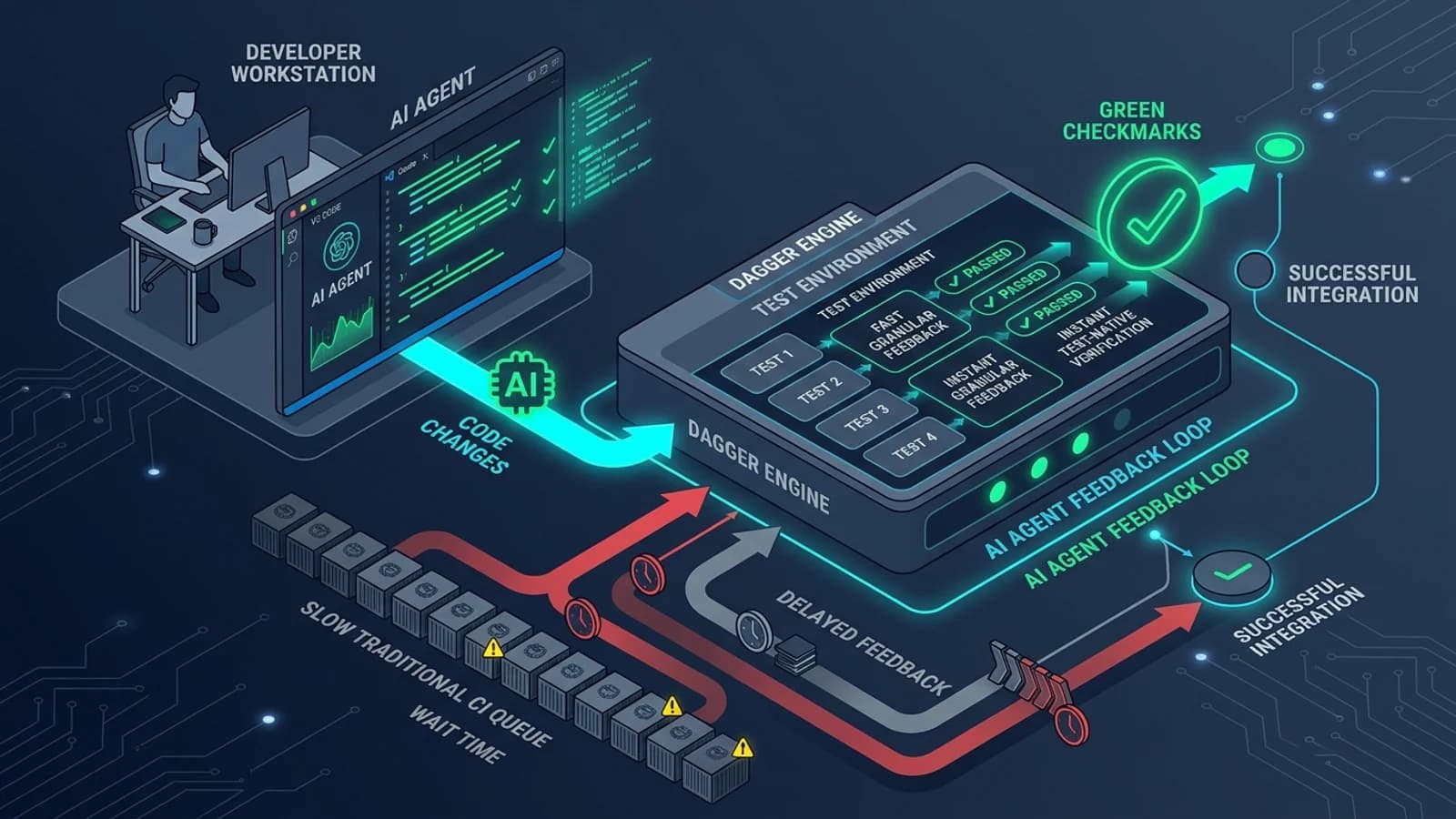
On 23 October 2026, after five years of 0.x iterations, the team at Dagger officially published the Dagger 1.0 Beta. The release introduces a unified configuration model (dagger.toml), an ecosystem of official modules, remote execution, native GitHub integration, and a dedicated focus on test-native CI.
In software engineering, CI/CD pipelines have traditionally been designed around human developer work rhythms: write code for several hours, push a Git branch, wait 10 to 20 minutes for a cloud runner (such as GitHub Actions or GitLab CI) to process the build, and review the status check.
However, the rise of autonomous AI coding agents—including Claude Code, Cursor, Devin, GitHub Copilot Workspace, and OpenCode—is breaking that model. Agents do not write code in large, batched pull requests once a day. They operate in tight, iterative loops: generating a diff, running tests, analyzing failures, applying micro-fixes, and repeating the cycle dozens of times per task. When paired with traditional cloud CI engines, this rapid feedback loop stalls against queued virtual machines, redundant dependency downloads, and opaque console logs.
Can Dagger 1.0 Beta resolve this bottleneck? This guide provides an evidence-based technical analysis. We examine what Dagger 1.0 Beta actually changes, explore why AI coding agents struggle with traditional CI, compare Dagger against GitHub Actions across ten architectural dimensions, walk through a practical TypeScript example, and provide a migration checklist for engineering teams.
---
1. Answer the Question Immediately: What Dagger 1.0 Beta Actually Is
To evaluate Dagger objectively, we must strip away marketing claims and look at its core architecture.
┌─────────────────────────────────────────────────────────────────────────────────────────┐
│                           DAGGER 1.0 BETA ARCHITECTURAL MODEL                           │
├─────────────────────────┬───────────────────────────────┬───────────────────────────────┤
│ 1. PIPELINE DEFINITIONS │ 2. THE DAGGER ENGINE          │ 3. EXECUTION ENVIRONMENTS     │
├─────────────────────────┼───────────────────────────────┼───────────────────────────────┤
│ • Written in Code:      │ • Client-Server Daemon        │ • Local Workstation (Docker)  │
│   TypeScript, Python, Go│ • BuildKit Container Core     │ • GitHub Actions Hosted Runner│
│ • dagger.toml Workspace │ • Directed Acyclic Graph (DAG)│ • Self-Hosted Cloud Instances │
│ • Official Modules      │ • Sub-second Caching & Memory │ • Dagger Cloud Remote Workers │
└─────────────────────────┴───────────────────────────────┴───────────────────────────────┘
Dagger is a programmable execution engine that packages development pipelines into reproducible container graphs. Instead of writing custom YAML syntax with platform-specific string interpolation, you write standard functions in TypeScript, Python, or Go using Dagger SDKs.
In the 1.0 Beta release, Dagger formalizes three architectural shifts:
- Workspaces & Unified Configuration: Replaces ad-hoc
dagger.jsonsetups withdagger.tomland pinneddagger.lockdependency trees. - Test-Native CI: Moves beyond treating test suites as opaque
npm testshell commands inside a container. Dagger can now discover, isolate, and selectively execute individual tests within the execution graph. - Local & Cloud Symmetry: The exact same pipeline command (
dagger call test) executes with identical environment variables, dependencies, and filesystem boundaries on a local MacBook, a Linux terminal, or a GitHub Actions runner.
Who Should Investigate Dagger 1.0 Beta?
- Teams running AI coding agents locally or in sandboxes: Where agents need to run real integration tests before committing, without waiting for remote CI queues.
- Polyglot teams with complex build dependencies: Projects that require multi-service orchestration (e.g., a Next.js frontend, Python FastAPI microservice, PostgreSQL, and Redis) running simultaneously during testing.
- Engineers frustrated by "works on my machine, fails in CI" syndrome: Workflows where debugging CI failures requires pushing dozens of "fix typo in yaml" commits.
Who Should Keep Their Current CI Setup?
- Small teams with standard monorepos: If your GitHub Actions workflow completes in under 3 minutes using simple caching actions, adopting Dagger adds unnecessary architectural layers.
- Organizations dependent on specialized GitHub Marketplace Actions: Teams whose compliance, code scanning, or deployment pipelines rely heavily on proprietary third-party GitHub Actions with no container equivalents.
---
2. What Changed in Dagger 1.0 Beta?
Dagger 1.0 Beta represents the stabilization of core concepts developed over the 0.x series, alongside newly introduced capabilities:
┌────────────────────────────────┬────────────────────────────────────────────────────────┐
│ CAPABILITY                     │ WHAT 1.0 BETA INTRODUCES / STABILIZES                  │
├────────────────────────────────┼────────────────────────────────────────────────────────┤
│ Configuration Model            │ dagger.toml replaces dagger.json; dagger.lock pins     │
│                                │ dependency manifests and external module lookups.      │
├────────────────────────────────┼────────────────────────────────────────────────────────┤
│ Test-Native Execution          │ Granular test discovery and individual test execution   │
│                                │ reporting instead of monolithic container pass/fail.   │
├────────────────────────────────┼────────────────────────────────────────────────────────┤
│ Self-Orchestrating Tests       │ Tests dynamically spin up ephemeral service dependencies│
│                                │ (databases, caches) via code rather than Docker Compose│
├────────────────────────────────┼────────────────────────────────────────────────────────┤
│ Official Module Registry       │ Curated, maintained modules for Node.js, Go, Python,   │
│                                │ Docker, Helm, Git, and major cloud CLI runtimes.       │
├────────────────────────────────┼────────────────────────────────────────────────────────┤
│ Interactive Shell Inspection   │ dagger shell allows dropping into the container state  │
│                                │ at the exact step of a failure for instant diagnosis.  │
├────────────────────────────────┼────────────────────────────────────────────────────────┤
│ Native GitHub Integration      │ Direct GitHub checks integration without bloated YAML  │
│                                │ wrapper actions; reports step metrics to PR timelines. │
└────────────────────────────────┴────────────────────────────────────────────────────────┘
1. Workspaces (`dagger.toml`)
In 0.x, module configuration, SDK selection, and source directories were fragmented. In 1.0 Beta, every project initializes a Workspace governed by a standard dagger.toml file. This file records:
- The workspace name and engine version.
- Installed external modules and their pinned Git revisions.
- Local ignore patterns and source exclusion rules.
- Pinned cryptographic hashes in
dagger.lock, ensuring reproducible execution across team members.
2. Test-Native CI
Historically, CI runners treated testing as a binary operation: exit code 0 or 1. If a suite with 500 unit tests encountered a single failure on test #498, rerunning the pipeline required executing all 500 tests again.
Dagger 1.0 Beta introduces Test-Native CI. The Dagger engine inspects test frameworks (such as Jest, Vitest, pytest, or Go test) to map individual test cases into the execution DAG. If test #498 fails:
- The output clearly highlights the failing test assertion.
- An AI coding agent or developer can ask Dagger to re-run *only* that specific test node.
- Upstream dependencies (compilation, database migrations, seed data) are served from cache in milliseconds.
3. Self-Orchestrating Test Dependencies
Running integration tests that require a live database often leads to flaky CI pipelines. Developers typically resort to background Docker Compose services or shared mock databases that suffer from race conditions.
In Dagger 1.0 Beta, test scripts can invoke Dagger SDKs directly to spin up their own isolated, ephemeral services:
[Test Runner Function]
       │
       ├──► Requests Ephemeral PostgreSQL Container (Dagger Module)
       ├──► Runs Database Migrations on Isolated Socket
       ├──► Executes Integration Assertions
       └──► Tears Down Container Automatically on Completion
Because this logic is packaged as code, it executes identically whether triggered by an AI agent inside a local terminal or on an automated GitHub Actions runner.
---
3. What Is the CI Bottleneck for AI Coding Agents?
To understand why traditional CI architectures create friction for AI coding assistants, we must examine the AI Agent Feedback Loop.
┌────────────────────────────────────────────────────────────────────────────────────────┐
│                        AI CODING AGENT ITERATIVE FEEDBACK LOOP                         │
├────────────────────────────────────────────────────────────────────────────────────────┤
│                                                                                        │
│   ┌───────────────┐       1. Write Code        ┌───────────────┐                       │
│   │   AI Agent    ├───────────────────────────►│ Codebase Diff │                       │
│   │ (Claude/Cursor│                            └───────┬───────┘                       │
│   └───────▲───────┘                                    │ 2. Trigger Test               │
│           │                                            ▼                               │
│           │ 4. Parse Error                     ┌───────────────┐                       │
│           │    Diagnostics                     │ CI/CD Pipeline│                       │
│           └────────────────────────────────────┤   Execution   │                       │
│                                                └───────────────┘                       │
│                                                                                        │
└────────────────────────────────────────────────────────────────────────────────────────┘
When a human developer uses an AI coding agent, the interaction proceeds through several stages:
- Instruction: The user gives the agent a goal ("Refactor the payment webhook handler to support idempotent retries").
- Drafting: The agent inspects files and writes a code modification.
- Verification: The agent triggers the test suite to verify its work.
- Diagnosis: If tests fail, the agent reads the error output, reasons through the bug, and applies a fix.
- Convergence: The process repeats until all assertions pass.
The 4 Failure Modes of Traditional CI for Agents
1. High Latency Stalls the Agent
In a standard GitHub Actions setup, verifying a change requires:
- Committing and pushing to a remote branch (5–10s).
- Waiting for runner allocation in the GitHub Actions queue (15–60s).
- Spinning up a fresh virtual machine (30–60s).
- Downloading and unpacking dependencies (
npm install/pip install) (30–90s). - Executing the full test suite (2–5 minutes).
A simple one-line fix can take 4 to 8 minutes to verify. If the agent requires four iterations to resolve edge cases, the task consumes 30 minutes of wall-clock time, during which the developer is blocked.
2. Full-Suite Reruns Waste Compute
Traditional CI scripts execute npm test across the entire repository. If an agent modifies a single utility function in src/utils/currency.ts, the CI runner executes all 1,200 tests in the project, rather than re-evaluating only the tests dependent on that utility.
3. Log Pollution and Token Exhaustion
When a CI job fails in GitHub Actions, the output log often spans 5,000 to 20,000 lines of console text, including package installation warnings, compile logs, progress bars, and stack traces. When an agent attempts to diagnose the issue, feeding these massive unstructured logs into the model's context window:
- Incurs significant API token costs.
- Increases the risk of prompt truncation.
- Distracts the LLM from the actual root-cause assertion failure.
4. The "Works Locally, Fails in CI" Divergence
Agents running on a developer's laptop often succeed in local tests because local dependencies, environment variables, or background databases are already running. When pushed to the clean environment of a remote GitHub runner, the pipeline fails due to missing environment variables or differing operating system libraries. The agent cannot inspect the remote runner directly, leading to blind debugging cycles.
---
4. Dagger vs GitHub Actions: Detailed Comparison
While marketing narratives often present new tools as "replacements," Dagger and GitHub Actions operate on fundamentally different architectural layers.
┌─────────────────────────┬────────────────────────────────────────┬────────────────────────────────────────┐
│ DIMENSION               │ DAGGER 1.0 BETA                        │ GITHUB ACTIONS                         │
├─────────────────────────┼────────────────────────────────────────┼────────────────────────────────────────┤
│ Configuration Language  │ General-purpose code: TypeScript, Go,  │ Declarative YAML workflows with custom │
│                         │ Python (dagger.toml workspace)         │ expression syntax (${{ ... }})         │
├─────────────────────────┼────────────────────────────────────────┼────────────────────────────────────────┤
│ Execution Environment   │ Isolated OCI containers managed by     │ Ephemeral virtual machines (Ubuntu,    │
│                         │ BuildKit-powered Dagger Engine daemon  │ macOS, Windows) or self-hosted runners │
├─────────────────────────┼────────────────────────────────────────┼────────────────────────────────────────┤
│ Local / CI Parity       │ 100% parity: 'dagger call' runs        │ No native local runner; tools like     │
│                         │ identically on laptops and CI servers  │ 'act' approximate but lack exact parity│
├─────────────────────────┼────────────────────────────────────────┼────────────────────────────────────────┤
│ Caching Granularity     │ Sub-second, cryptographic layer-level  │ Action-level or directory-level file   │
│                         │ DAG cache; only modified nodes rerun   │ tarball caching (actions/cache)        │
├─────────────────────────┼────────────────────────────────────────┼────────────────────────────────────────┤
│ Test-Level Visibility   │ Test-native: discovers and reports on  │ Job-level: treats test execution as a  │
│                         │ individual test cases inside the graph │ monolithic shell command exit code     │
├─────────────────────────┼────────────────────────────────────────┼────────────────────────────────────────┤
│ Interactive Debugging   │ dagger shell allows live container     │ Requires SSH third-party actions       │
│                         │ inspection at the point of failure     │ (e.g., tmate) or log reconstruction    │
├─────────────────────────┼────────────────────────────────────────┼────────────────────────────────────────┤
│ Ecosystem & Marketplace │ Growing official module registry       │ Vast community marketplace with tens   │
│                         │ and community SDK functions            │ of thousands of pre-built actions      │
├─────────────────────────┼────────────────────────────────────────┼────────────────────────────────────────┤
│ Infrastructure Overhead │ Requires Docker / container runtime    │ Zero infrastructure setup for public/  │
│                         │ on runners or Dagger Cloud engine      │ enterprise hosted cloud runners        │
├─────────────────────────┼────────────────────────────────────────┼────────────────────────────────────────┤
│ GitHub UI Integration   │ Integrates via GitHub Checks API       │ Native, deeply embedded UI with status │
│                         │ or lightweight runner wrapper step     │ badges, summaries, and PR annotations  │
└─────────────────────────┴────────────────────────────────────────┴────────────────────────────────────────┘
The Best of Both: The Hybrid Architecture
The most practical architecture in modern software engineering is not abandoning GitHub Actions, but running Dagger inside GitHub Actions.
# .github/workflows/ci.yml
name: Continuous Integration
on: [push, pull_request]

jobs:
  dagger-ci:
    runs-on: ubuntu-latest
    steps:
      - name: Checkout Source Code
        uses: actions/checkout@v4

      - name: Install Dagger CLI
        uses: dagger/dagger-for-github@v7
        with:
          version: "1.0.0-beta"

      - name: Run Test Pipeline via Dagger
        run: dagger call test
        env:
          DAGGER_CLOUD_TOKEN: ${{ secrets.DAGGER_CLOUD_TOKEN }}
In this hybrid setup:
- GitHub Actions handles repository triggers, branch security policies, pull request approvals, and deployment permissions.
- Dagger executes the actual build and test logic inside containerized DAGs, leveraging sub-second layer caching across runs and ensuring developers (and local AI agents) can run
dagger call testlocally with guaranteed identical results.
---
5. Practical Example: Setting Up a Dagger 1.0 Beta Workspace
To understand how Dagger 1.0 Beta functions in practice, let us examine a documentation-based example of initializing a workspace and configuring a pipeline for a TypeScript/Node.js application.
dagger.toml and official modules.Step 1: Install the Dagger CLI
On macOS or Linux, install the Dagger CLI binary:
# Install the latest Dagger 1.0 Beta CLI
curl -fsSL https://dl.dagger.io/dagger/install.sh | BIN_DIR=/usr/local/bin sh

# Verify installation
dagger version
Step 2: Initialize a Workspace (`dagger init`)
Inside your project repository, run dagger init to create the workspace configuration:
dagger init --source=.This command generates a dagger.toml file at your repository root:
# dagger.toml
name = "my-web-app"
engineVersion = "v1.0.0-beta"

[workspace]
# Ignore local temporary files and development caches
ignore = [
  ".git",
  "node_modules",
  ".next",
  "dist",
  "coverage"
]
Step 3: Install an Official Module
Instead of writing raw Dockerfiles or shell scripts to install Node.js and dependencies, install the official Node.js module from the Dagger registry:
dagger install github.com/dagger/modules/nodejs@v1.0.0Dagger records the installed module in dagger.toml and locks the Git commit in dagger.lock.
Step 4: Define a Test Pipeline in TypeScript
Inside your .dagger directory or module folder, define your pipeline using the TypeScript SDK:
// .dagger/src/index.ts
import { dag, Container, Directory, object, func } from "@dagger/dagger"

@object()
export class MyWebApp {
  /**
   * Run lint checks and automated unit tests inside an isolated container
   */
  @func()
  async test(source: Directory): Promise<string> {
    // 1. Build an ephemeral container with Node.js 22
    const base = dag
      .container()
      .from("node:22-alpine")
      .withDirectory("/app", source, {
        exclude: ["node_modules", ".next", "dist"],
      })
      .withWorkdir("/app")

    // 2. Install dependencies (cached at the container layer)
    const installed = base
      .withMountedCache("/root/.npm", dag.cacheVolume("npm-cache"))
      .withExec(["npm", "ci"])

    // 3. Execute linting
    const linted = installed.withExec(["npm", "run", "lint"])

    // 4. Execute test suite with structured output
    const tested = linted.withExec(["npm", "test", "--", "--runInBand"])

    // Return the execution standard output
    return await tested.stdout()
  }
}
Step 5: Execute the Pipeline Locally
Run the pipeline directly from your terminal:
dagger call test --source=.If an error occurs, you can inspect the exact failing container state interactively:
# Drop into an interactive container shell at the point of test failure
dagger shell
---
6. Should You Adopt Dagger 1.0 Beta or Wait?
Adopting a new infrastructure tool involves real engineering trade-offs. The decision matrix below helps evaluate whether Dagger fits your team's current phase.
┌────────────────────────────────────────────────────────────────────────────────────────┐
│                              ADOPTION DECISION MATRIX                                  │
├───────────────────────────────────┬────────────────────────────────────────────────────┤
│ SITUATION                         │ RECOMMENDATION & RATIONALE                         │
├───────────────────────────────────┼────────────────────────────────────────────────────┤
│ Heavy AI Agent Development        │ ADOPT (Pilot Phase): Local execution and layer     │
│ (Claude Code, Cursor workflows)   │ caching drastically reduce agent feedback latency. │
├───────────────────────────────────┼────────────────────────────────────────────────────┤
│ Large Monorepo with Slow CI       │ ADOPT: Dagger's granular caching prevents          │
│ (15+ min builds, repeated setups) │ re-executing untouched modules across PR checks.   │
├───────────────────────────────────┼────────────────────────────────────────────────────┤
│ Simple Web App on GitHub Actions  │ WAIT: If your pipeline runs in under 3 minutes,    │
│ (Standard Next.js / React app)    │ the complexity of Dagger outweighs the benefits.   │
├───────────────────────────────────┼────────────────────────────────────────────────────┤
│ Regulated Enterprise Environments │ EVALUATE CAREFULLY: Verify container daemon        │
│ (Strict compliance, audited tools)│ security, private registry access, and beta SLA.   │
└───────────────────────────────────┴────────────────────────────────────────────────────┘
The Pragmatic Evaluation Path
If your team is experiencing friction with AI coding agent latency, do not attempt a high-risk "all-at-once" migration. Instead:
- Target One Annoying Pipeline: Pick your slowest or flakiest test job (e.g., end-to-end integration tests that need a database).
- Implement in Dagger Locally: Build a Dagger module for that specific workflow and verify that developers can run it on their laptops.
- Hook into GitHub Actions as a Single Step: Call
dagger call testinside an existing GitHub Actions runner. - Measure Results: Compare failure diagnosis time, cache hit rates, and total execution duration before expanding adoption.
---
7. Migration Notes: Moving from Dagger 0.x to 1.0
If your team experimented with earlier versions of Dagger, upgrading to 1.0 Beta involves several breaking changes:
1. `dagger.json` Is Deprecated
The legacy JSON configuration format is replaced by TOML:
- Workspace root:
dagger.toml - Pinned hashes:
dagger.lock
Use the automated migration command:
# Migrate legacy configuration to 1.0 workspace schema
dagger workspace migrate
2. Module Manifest Adjustments
In 0.x, module references could be informal. In 1.0 Beta, all module dependencies must specify explicit versions or Git tags. Untagged references will fail verification in production workspaces.
3. CLI Command Standardization
Several command-line flags have been streamlined:
- Inspecting available functions:
dagger functions - Running a function:
dagger call <function-name> - Interactive debugging:
dagger shell
---
8. The Engineering Evaluation Checklist
Before introducing Dagger 1.0 Beta into your production development pipelines, run through this concise evaluation checklist:
┌────────────────────────────────────────────────────────────────────────┐
│                  DAGGER 1.0 EVALUATION CHECKLIST                       │
├─────┬──────────────────────────────────────────────────────────────────┤
│ [ ] │ 1. BASELINE: Measure average CI duration & queue wait times      │
│ [ ] │ 2. RUNTIME PREREQUISITES: Confirm Docker/OCI daemon availability │
│ [ ] │ 3. ISOLATE WORKFLOW: Select one test job for a pilot evaluation  │
│ [ ] │ 4. LOCAL PARITY: Confirm 'dagger call' runs on developer laptops │
│ [ ] │ 5. CACHE HIT RATE: Verify layer reuse on repeated runs          │
│ [ ] │ 6. SECRET HANDLING: Ensure credentials pass via secret mounts    │
│ [ ] │ 7. HYBRID TRIGGER: Run Dagger via GitHub Actions wrapper action   │
│ [ ] │ 8. AGENT VERIFICATION: Test whether AI assistants (e.g. Cursor)  │
│     │    can execute 'dagger call' in terminal sessions successfully   │
└─────┴──────────────────────────────────────────────────────────────────┘
---
9. Frequently Asked Questions
What is Dagger 1.0 Beta, and how does it differ from traditional CI/CD engines?
Dagger 1.0 Beta is an open-source, programmable CI/CD runtime that executes development pipelines inside isolated containerized DAGs (Directed Acyclic Graphs). Unlike traditional CI systems like GitHub Actions or Jenkins that rely on proprietary YAML configurations and remote virtual machines, Dagger allows developers to write pipelines as software using standard languages (TypeScript, Python, Go) and execute them identically on a local developer laptop or any remote CI server.
How does Dagger compare directly with GitHub Actions?
GitHub Actions is a hosted workflow orchestrator configured via YAML files that run on ephemeral hosted runners. Dagger is a containerized execution engine that runs pipelines locally or on any server. Dagger excels in local-to-CI environment parity, multi-layer caching, test-level granularity, and programmatic composability. GitHub Actions excels in native GitHub UI integration, an expansive marketplace of turn-key community actions, zero runner infrastructure management for public repositories, and familiar workflow triggers.
What is "test-native CI" in Dagger 1.0 Beta?
In traditional CI, the pipeline treats a test suite as a single monolithic shell command inside a container. Dagger 1.0 Beta introduces test-native capabilities where the engine discovers, executes, and reports on individual tests within the dependency graph. If a single test fails, developers or AI agents can inspect structured failure diagnostics and re-execute solely the failing test without repeating the entire test suite setup.
Why are AI coding agents particularly affected by traditional CI bottlenecks?
Autonomous AI coding agents generate frequent, incremental code modifications and need rapid feedback to verify whether changes compile and pass tests. Traditional CI pipelines introduce high latency (1–3 minutes of VM provisioning, fresh dependency downloads, full-suite reruns) and produce thousands of lines of unstructured console logs. This delays agent progress, burns API token budgets on log parsing, and stalls development velocity.
What are the major breaking changes when migrating from Dagger 0.x to 1.0?
The primary structural change in 1.0 is the transition from legacy dagger.json configuration to dagger.toml for workspace management, accompanied by dagger.lock for pinning dependencies. Dagger provides automated migration commands (such as dagger workspace migrate and dagger setup) to assist teams in updating their workspace schemas.
Should teams replace their entire GitHub Actions setup with Dagger immediately?
No. Dagger 1.0 is currently in Beta and should be evaluated cautiously. A recommended approach is hybrid adoption: keep GitHub Actions as the top-level trigger and status reporter on pull requests, but invoke Dagger inside a single step to execute the actual test and build steps. This delivers local-to-CI parity and caching benefits without dismantling existing repository permissions, compliance checks, or deployment configurations.