On 21 October 2026, LiteLLM—one of the most widely adopted open-source AI proxy and gateway engines in the Python ecosystem—suffered a critical software supply-chain compromise. Attackers gained unauthorized access to the project's release pipeline and published trojanized packages to the Python Package Index (PyPI) and official container registries (Docker Hub and GitHub Container Registry / GHCR).
The malicious release, labeled version 1.107.0, contained a sophisticated infostealer and second-stage remote access backdoor. Critically, the malware utilized low-level Python runtime startup hooks (.pth files and sitecustomize.py). This architectural mechanism executes arbitrary code the moment any Python process starts, even if the host application never imports or calls the LiteLLM library.
National cybersecurity bodies, including the Indian Computer Emergency Response Team (CERT-In Advisory CIAD-2026-0053), alongside detailed independent technical investigations from Microsoft Security Research and Datadog Security Labs, rapidly documented the attack chain. While the malicious packages were quarantined within hours, environments that downloaded the artifacts during the active window remain at severe risk of ongoing credential abuse.
This guide provides an authoritative, evidence-based incident-response breakdown. We detail the exact affected artifacts, provide UTC and India Standard Time (IST) exposure windows, explain how the attack operated, highlight a critical safety warning regarding Python command execution, and outline a step-by-step recovery checklist for engineering teams.
litellm==1.107.0 or pulled Docker tags v1.107.0, latest, main-latest, or main-stable between 11:39:51 UTC and 13:23:00 UTC on 21 October 2026 (17:09:51 to 18:53:00 IST), treat the host as fully compromised. Do NOT run python or pip on the suspected machine to check for infection—Python startup hooks execute the malware automatically. Isolate the instance, rotate all model and cloud credentials from a separate clean machine, and rebuild from clean artifacts.---
1. What Happened and Why It Matters
To understand the severity of this compromise, developers must understand the role of LiteLLM in modern AI application architecture.
LiteLLM acts as an abstraction gateway: thousands of engineering teams and autonomous AI agents route their calls to OpenAI, Anthropic, Google Gemini, AWS Bedrock, and open-source models through a single LiteLLM interface. Consequently, host machines running LiteLLM or storing its configuration frequently possess high-privilege access keys, including production LLM provider tokens, cloud infrastructure credentials, and backend database connection strings.
┌─────────────────────────────────────────────────────────────────────────────────────────┐
│                        THE SUPPLY-CHAIN DISCONNECT IN 1.107.0                           │
├─────────────────────────┬───────────────────────────────┬───────────────────────────────┤
│ 1. LEGITIMATE SOURCE    │ 2. TAMPERED PIPELINE          │ 3. PUBLISHED ARTIFACTS        │
├─────────────────────────┼───────────────────────────────┼───────────────────────────────┤
│ GitHub: BerriAI/litellm │ Stolen GitHub CLI OAuth Token │ PyPI: litellm==1.107.0        │
│ Tag: v1.107.0           │              │                │ (7 Compromised Wheels)        │
│ [SOURCE WAS CLEAN]      │              ▼                │                               │
│                         │ Redirected Build to Fork:     │ Docker Hub & GHCR:            │
│                         │ "Berri-AI/litellm" (Typosquat)│ tags: v1.107.0, latest, etc.  │
│                         │              │                │ [CONTAINED BACKDOOR HOOKS]    │
└─────────────────────────┴──────────────┴────────────────┴───────────────────────────────┘
The Source vs. Artifact Discrepancy
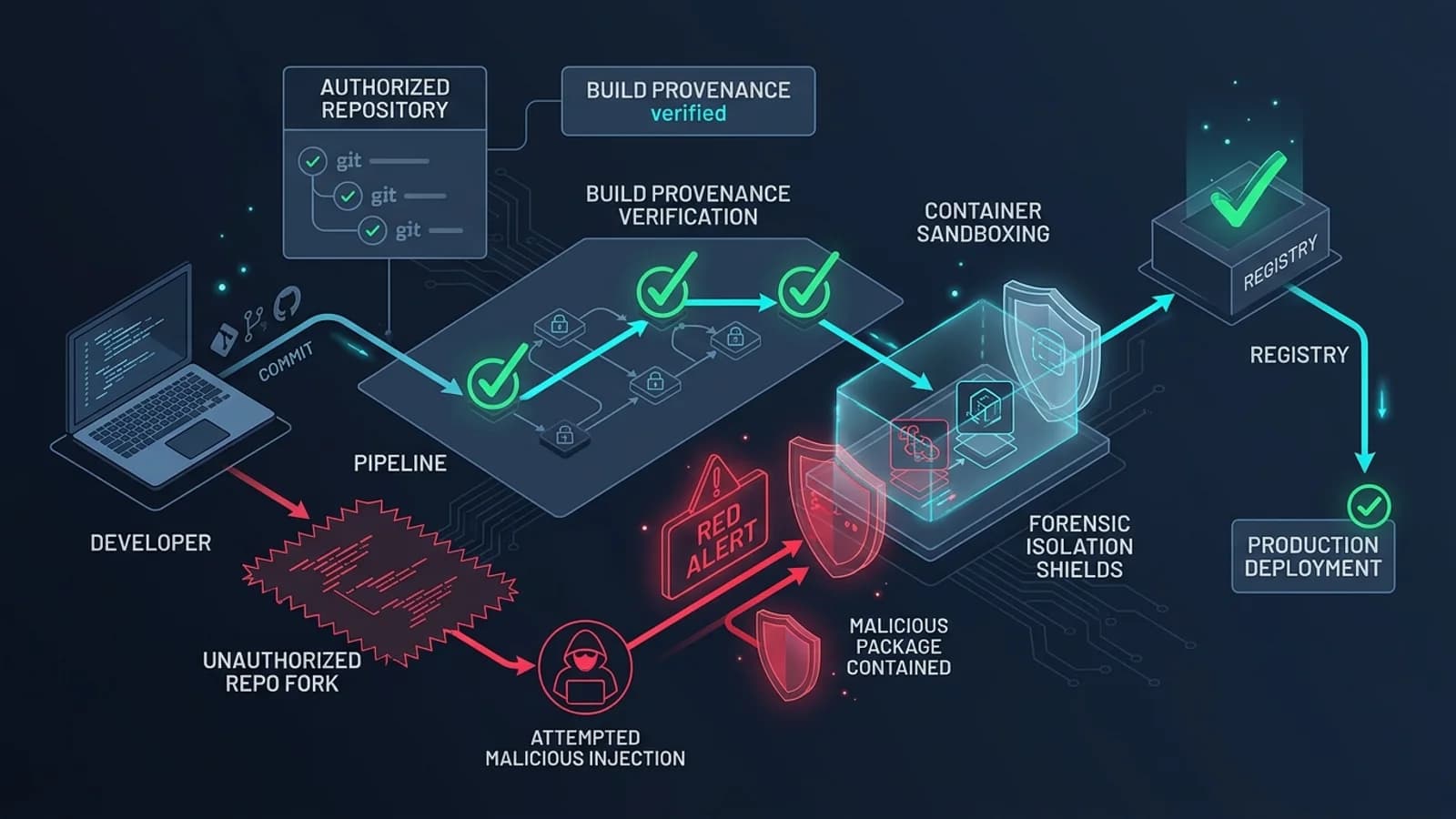
A critical characteristic of this supply-chain attack is that the official source code repository was never modified with malicious code.
Developers reviewing the official GitHub repository (BerriAI/litellm) saw a clean codebase and standard release commits. However, software supply chains do not deploy source code directly; they deploy compiled artifacts (wheels on PyPI, container layers on Docker Hub).
The attackers obtained a maintainer's GitHub CLI OAuth credential, accessed the automated GitHub Actions release workflow, and redirected the build source to a lookalike repository fork: Berri-AI/litellm (spelled with an added hyphen). The workflow built malicious binary wheels and container images from the rogue fork, signed them with the maintainer's pipeline authority, and published them directly to official registry endpoints.
Inspecting a Git repository is therefore insufficient to prove that an installed binary is authentic. Security boundaries must verify the cryptographic provenance of the installed artifact itself.
---
2. Affected Packages, Tags, and Exposure Windows
The malicious artifacts were available across public registries for a bounded window before being yanked by PyPI security administrators and the LiteLLM maintainers.
The table below details the verified exposure windows. For teams in India and surrounding regions, UTC times have been converted to India Standard Time (IST, UTC+5:30).
┌─────────────────┬───────────────────────────────┬───────────────────────────────┬───────────────────────────────┐
│ REGISTRY        │ COMPROMISED IDENTIFIER / TAG  │ ACTIVE EXPOSURE WINDOW (UTC)  │ ACTIVE EXPOSURE WINDOW (IST)  │
├─────────────────┼───────────────────────────────┼───────────────────────────────┼───────────────────────────────┤
│ PyPI            │ litellm==1.107.0              │ 21 Oct 2026, 11:39:51 UTC to  │ 21 Oct 2026, 17:09:51 IST to  │
│                 │ (7 compiled binary wheels)    │ 21 Oct 2026, 13:23:00 UTC     │ 21 Oct 2026, 18:53:00 IST     │
├─────────────────┼───────────────────────────────┼───────────────────────────────┼───────────────────────────────┤
│ Docker Hub      │ v1.107.0, latest,             │ 21 Oct 2026, ~12:05:00 UTC to │ 21 Oct 2026, ~17:35:00 IST to │
│                 │ main-latest, main-stable      │ 21 Oct 2026, ~14:15:00 UTC    │ 21 Oct 2026, ~19:45:00 IST    │
├─────────────────┼───────────────────────────────┼───────────────────────────────┼───────────────────────────────┤
│ GitHub Container│ ghcr.io/berriai/litellm       │ 21 Oct 2026, ~12:10:00 UTC to │ 21 Oct 2026, ~17:40:00 IST to │
│ Registry (GHCR) │ (matching release tags)       │ 21 Oct 2026, ~14:15:00 UTC    │ 21 Oct 2026, ~19:45:00 IST    │
└─────────────────┴───────────────────────────────┴───────────────────────────────┴───────────────────────────────┘
Who Needs to Investigate?
You must conduct a formal forensic audit if any of the following events occurred within your organization during or after the exposure window:
- An automated CI/CD pipeline, container build, or ephemeral test job ran
pip install litellmwithout a pinned minor version or with an unpinnedlitellm>=1.100.0constraint. - A developer initialized a new Python virtual environment or ran a dependency update on 21 October 2026.
- A Kubernetes cluster, Docker Compose stack, or cloud container service pulled Docker tags
latest,main-latest, orv1.107.0without pinning an immutable SHA256 image digest. - An internal private package registry or proxy mirror (e.g., Artifactory, Nexus, AWS CodeArtifact) cached the
1.107.0wheel before it was removed from PyPI.
Environments running pinned releases prior to 1.107.0 (such as 1.106.2) that did not execute update commands during the window were not exposed.
---
3. How the Attack Worked: The Python Startup Hook Mechanism
Unlike conventional application exploits that require an attacker to send an HTTP payload to a listening web server, supply-chain package compromises execute inside the victim's execution trust boundary.
According to technical forensic reports from Microsoft Security Research and Datadog, the attackers leveraged a specialized feature of the Python runtime: startup hook execution.
┌────────────────────────────────────────────────────────────────────────────────────────┐
│                        PYTHON STARTUP HOOK EXECUTION VECTOR                            │
├────────────────────────────────────────────────────────────────────────────────────────┤
│                                                                                        │
│   [Any Command Triggered: python, pip, pytest, celery, uvicorn]                        │
│                           │                                                            │
│                           ▼                                                            │
│   [Python Interpreter Initialization Phase]                                            │
│                           │                                                            │
│                           ▼                                                            │
│   [Site-Packages Directory Scanned for .pth Files]                                     │
│                           │                                                            │
│                           ▼                                                            │
│   [cook.pth Parsed] ────► Automatically executes arbitrary Python code                 │
│                           │                                                            │
│                           ▼                                                            │
│   [sitecustomize.py Executed] ──► Runs stealth payload without "import litellm"        │
│                           │                                                            │
│                           ▼                                                            │
│   ┌────────────────────────────────────────────────────────────────────────────┐       │
│   │ 1. Harvests Cloud Tokens (AWS, GCP, Azure, Kubernetes ServiceAccounts)     │       │
│   │ 2. Steals LLM Provider Keys (OpenAI, Anthropic, Gemini, Groq, Mistral)     │       │
│   │ 3. Dumps LiteLLM Proxy Database (Up to 500 stored upstream API secrets)    │       │
│   │ 4. Establishes Hourly RAT Beacon to dead-drop infrastructure (litellm.dev) │       │
│   └────────────────────────────────────────────────────────────────────────────┘       │
│                                                                                        │
└────────────────────────────────────────────────────────────────────────────────────────┘
The Role of `.pth` and `sitecustomize.py`
In standard Python installations, files with a .pth extension located in the site-packages directory are designed to append directories to sys.path. However, Python's site module includes a behavior: any line beginning with import inside a .pth file is executed as active Python code during interpreter startup.
The compromised litellm-1.107.0 distribution delivered two malicious startup files alongside the library code:
- `cook.pth`: Injected into
site-packages, triggering an import ofcook.py. - `sitecustomize.py`: A standard Python hook file that the Python interpreter executes automatically on launch if present in the module path.
Because of this mechanism, the application did not need to call `import litellm`. If a developer created a virtualenv and ran pip install litellm==1.107.0, any subsequent invocation of python, pip list, pytest, or an unrelated background daemon automatically fired the malware.
Dual-Stage Malware Capabilities
The malware operated across two distinct functional layers:
1. Information Harvesting & Exfiltration
The payload scanned local environment variables, filesystems, and process memory for:
- Cloud Provider Credentials: AWS metadata service (
169.254.169.254),~/.aws/credentials, Azure Managed Identity tokens, and GCP service account JSON files. - AI Model Keys: Environment variables matching
OPENAI_API_KEY,ANTHROPIC_API_KEY,GEMINI_API_KEY,GROQ_API_KEY, and related endpoints. - LiteLLM Database Secrets: For deployments operating the LiteLLM Proxy with an internal PostgreSQL backend, the malware attempted to query the database table directly to extract up to 500 stored upstream provider keys.
- Host & Developer Data: Read
~/.ssh/id_rsa,~/.bash_history,~/.zsh_history, and browser session stores.
Collected data was encoded and transmitted via HTTP POST requests to attacker-controlled command-and-control (C2) domains.
2. Second-Stage Remote Access Trojan (RAT)
On Linux and macOS hosts, the script installed a background process that executed an hourly beacon to external endpoints (including domains like litellm.dev). This channel was designed to retrieve and execute arbitrary secondary shell payloads, granting persistent remote access to the host.
---
4. CRITICAL SAFETY WARNING: Do NOT Run Python or pip to Inspect Suspected Hosts
This is the most critical operational directive for security and DevOps teams responding to this incident:
> [!CAUTION]
> DO NOT RUN `python` OR `pip` ON A SUSPECTED HOST: Because the malicious cook.pth and sitecustomize.py files execute automatically during Python startup, running standard diagnostic commands like python -c "import litellm; print(litellm.__version__)", pip list, or pip show litellm will trigger the payload again. You must never attempt to test for infection by running Python on the suspected host.
┌────────────────────────────────────────────────────────────────────────────────────────┐
│                          DANGEROUS VS. SAFE INSPECTION METHODS                         │
├───────────────────────────────────┬────────────────────────────────────────────────────┤
│ DANGEROUS (Executes Payload!)     │ SAFE (Static Non-Python Inspection)                │
├───────────────────────────────────┼────────────────────────────────────────────────────┤
│ ❌ python -m pip list             │ ✅ grep -rn "1.107.0" /path/to/site-packages/      │
│ ❌ python --version               │ ✅ find /path/to/venv/ -name "cook.pth"            │
│ ❌ pip install --upgrade litellm  │ ✅ Inspect requirements.lock from external editor  │
│ ❌ pytest                         │ ✅ Mount disk read-only on separate forensic VM    │
└───────────────────────────────────┴────────────────────────────────────────────────────┘
Why `pip install --upgrade litellm` Fails as First Aid
Many developers instinctively attempt to remediate a package vulnerability by immediately running:
# DANGEROUS: DO NOT RUN ON INFECTED HOST
pip install --upgrade litellm
On a system where 1.107.0 is already installed, invoking pip spins up the Python interpreter. The interpreter loads cook.pth before pip parses its command-line arguments. The malware executes its harvesting routines in memory before the upgrade completes.
Furthermore, simply installing a newer version does not guarantee the removal of lingering .pth files or persistence scripts left in system directories. Remediation requires environment destruction and rebuilding, not in-place package upgrades.
---
5. Could My Environment Be Affected? Triage & Detection
Use the following triage workflow to assess exposure across your infrastructure.
┌────────────────────────────────────────────────────────────────────────────────────────┐
│                             EXPOSURE TRIAGE DECISION TREE                              │
├────────────────────────────────────────────────────────────────────────────────────────┤
│                                                                                        │
│   Did your environment install or pull LiteLLM on 21 October 2026?                     │
│                        │                                                               │
│          ┌─────────────┴─────────────┐                                                 │
│          ▼ NO                        ▼ YES                                             │
│   [Not Exposed via          Did it pull litellm==1.107.0 or unpinned Docker tags       │
│    Registry Artifacts]      (latest, main-latest) during the active window?            │
│                                      │                                                 │
│                        ┌─────────────┴─────────────┐                                   │
│                        ▼ NO                        ▼ YES                               │
│                 [Not Exposed]               [CONFIRMED EXPOSURE]                       │
│                                             1. Isolate network immediately             │
│                                             2. Assume all host credentials stolen      │
│                                             3. Rotate secrets from clean device        │
│                                             4. Destroy and rebuild environment         │
│                                                                                        │
└────────────────────────────────────────────────────────────────────────────────────────┘
Static Indicators of Compromise (IoCs)
To safely detect the presence of the compromised artifact without invoking Python, use standard shell utilities from outside the virtual environment:
1. Check Filesystem for Artifact Directories
Inspect your virtual environment or container filesystem statically:
# Search for the compromised dist-info folder statically
find / -path "*/site-packages/litellm-1.107.0.dist-info" 2>/dev/null

# Search for the malicious startup hook files
find / -name "cook.pth" -o -name "cook.py" 2>/dev/null
2. Check Package Lockfiles and Build Logs
Examine your continuous integration build logs and lockfiles for downloads that occurred during the incident window:
# Check poetry, uv, or pip-compile lockfiles for the exact version
grep -rn "litellm.*1\.107\.0" ./poetry.lock ./uv.lock ./requirements*.txt
If your build logs show litellm-1.107.0-py3-none-any.whl being downloaded between 11:39 UTC and 13:23 UTC on 21 October 2026, the environment executed the compromised binary.
---
6. What to Do If an Affected Artifact Was Run: The 8-Step Recovery Workflow
If you confirm that litellm==1.107.0 was installed or executed in your environment, treat the incident as a confirmed credential compromise. Follow this disciplined containment and recovery procedure.
┌────────────────────────────────────────────────────────────────────────────────────────┐
│                   8-STEP COMPROMISED ENVIRONMENT RECOVERY PLAN                         │
├───────┬──────────────────────────┬─────────────────────────────────────────────────────┤
│ STEP  │ ACTION                   │ PRIMARY OBJECTIVE                                   │
├───────┼──────────────────────────┼─────────────────────────────────────────────────────┤
│ 1     │ Network Isolation        │ Sever outbound C2 and prevent lateral pivot         │
│ 2     │ Secret Revocation        │ Revoke and rotate all accessible credentials        │
│ 3     │ Audit Provider Logs      │ Search for abnormal API token usage and exfil       │
│ 4     │ Destroy Environment      │ Terminate containers, delete infected virtualenvs   │
│ 5     │ Purge Internal Caches    │ Invalidate proxy caches (Artifactory, Nexus, AWS)   │
│ 6     │ Rebuild Clean Artifacts  │ Pin known-safe releases (e.g. 1.106.2 or 1.107.1+) │
│ 7     │ Image Digest Pinning     │ Pin immutable SHA256 hashes in Docker/K8s manifests │
│ 8     │ Post-Recovery Monitoring │ Monitor cloud audit trails (CloudTrail, IAM access) │
└───────┴──────────────────────────┴─────────────────────────────────────────────────────┘
Step 1: Immediate Network Containment
Sever network access for the affected host, virtual machine, or container pod:
- In Kubernetes: Delete the affected pods and isolate the deployment namespace using a default-deny
NetworkPolicy. - On cloud VMs: Modify security group rules to drop all outbound internet egress immediately, preventing the second-stage RAT from contacting C2 domains.
- Do not power down the machine if your security team requires volatile memory acquisition for forensic analysis.
Step 2: Credential Revocation (Execute from a Clean Device)
Assume every secret residing in environment variables, configuration files, or local storage was exfiltrated. Log in to provider dashboards from a clean, separate machine and execute full credential rotation:
- LLM Provider Keys: Immediately delete and re-issue all keys for OpenAI, Anthropic, Google Cloud Vertex AI, Groq, Mistral, and Cohere.
- Cloud IAM Tokens: Revoke AWS access keys, rotate Azure client secrets, and delete GCP service account keys that were mounted or accessible in the environment.
- Database Passwords: Change the administrative and connection passwords for PostgreSQL databases used by the LiteLLM Proxy.
- SSH & Git Keys: Rotate SSH keys (
id_rsa) and revoke GitHub/GitLab personal access tokens associated with accounts logged into the affected host.
Step 3: Audit Cloud and Provider Telemetry
Review API audit logs from 21 October 2026 forward:
- Check OpenAI and Anthropic organization usage dashboards for anomalous token spikes, unexpected IP origins, or fine-tuning job submissions.
- Check AWS CloudTrail and Azure Activity Logs for unauthorized
sts:GetCallerIdentity,s3:GetObject, orsecretsmanager:GetSecretValuecalls originating from unfamiliar external IPs.
Step 4: Destroy the Infected Environment
Do not attempt to selectively remove files. Completely decommission the environment:
- For virtual environments: Delete the entire directory (
rm -rf /path/to/venv). - For container deployments: Terminate the container instances and prune local Docker image layers:
# Remove cached container images on worker nodes
docker rmi -f $(docker images -q litellm)
docker system prune -a --volumes
Step 5: Purge Package Mirrors and Internal Caches
If your organization operates an internal PyPI proxy or artifact repository (such as JFrog Artifactory, Sonatype Nexus, or AWS CodeArtifact):
- Search for and permanently purge any cached copies of
litellm-1.107.0*. - Invalidate CI/CD dependency caches (e.g., GitHub Actions
actions/cacheor GitLab CI runner caches) that may retain installed wheels.
Step 6: Rebuild from a Verified Safe Release
When provisioning replacement environments, pin your dependencies to a verified safe release:
- Verified Clean Patch: Upgrade to version `litellm>=1.107.1` (which incorporates pipeline security hardening and removed startup hooks).
- Known-Good Rollback: Alternatively, pin to the release immediately preceding the incident: `litellm==1.106.2`.
# pyproject.toml / requirements.txt
# Pin to verified safe release
litellm == 1.106.2
Step 7: Pin Immutable Container Image Digests
In Dockerfiles and Kubernetes manifests, stop deploying mutable tags like :latest or :v1.107.0. Pin the immutable SHA256 content digest:
# Deploy with immutable digest pinning
FROM ghcr.io/berriai/litellm@sha256:verified_clean_digest_hash_here
Step 8: Conduct Post-Incident Monitoring
Monitor cloud billing dashboards and authentication logs for a minimum rolling window of 30 days. Threat actors who harvest credentials frequently store them for delayed lateral movement or batch resale.
---
7. Software Supply-Chain Security Lessons for Developers
The LiteLLM 1.107.0 incident provides vital architectural lessons for engineering teams operating modern AI stacks:
┌────────────────────────────────────────────────────────────────────────┐
│                  SUPPLY-CHAIN DEFENSIVE PRINCIPLES                     │
├───────────────────────┬────────────────────────────────────────────────┤
│ VULNERABILITY FACTOR  │ MODERN DEFENSIVE ARCHITECTURE                  │
├───────────────────────┼────────────────────────────────────────────────┤
│ Unpinned Dependencies │ Immutable Lockfiles (uv.lock, poetry.lock)     │
│ Mutable Docker Tags   │ Cryptographic SHA256 Image Digest Pinning      │
│ Long-Lived CI Secrets │ OpenID Connect (OIDC) & Short-Lived Tokens     │
│ Blind Source Trust    │ SLSA Build Provenance & Artifact Signatures    │
│ Shared Runtime Keys   │ Ephemeral Least-Privilege IAM Roles            │
└───────────────────────┴────────────────────────────────────────────────┘- Clean Source Code Does Not Equal Clean Binaries: The attacker did not touch the source tree on GitHub; they hijacked the build pipeline to compile a rogue fork into official registry artifacts. Build provenance (such as SLSA provenance and Sigstore signatures) is essential to verify that a binary was built from the legitimate Git commit.
- Eliminate Long-Lived Pipeline Secrets: The compromise originated from a maintainer's stolen GitHub token. Modern release workflows should leverage OpenID Connect (OIDC) to obtain short-lived, ephemeral publishing tokens directly from PyPI (Trusted Publishing), eliminating static API tokens and long-lived OAuth credentials.
- Never Deploy Mutable Tags in Production: Deploying
:latestor unpinned version ranges leaves infrastructure vulnerable to upstream registry poisoning. All production deployments must reference exact cryptographic hashes (@sha256:...). - Enforce Egress Filtering on AI Gateway Hosts: LLM gateways need network access to specific API endpoints (e.g.,
api.openai.com,api.anthropic.com). Implementing default-deny outbound network firewalls on gateway clusters prevents exfiltration scripts from beaconing to unknown external IP addresses.
Software supply-chain defense is an essential component of broader defense-in-depth engineering. To learn how to secure web runtime environments, manage environment variables safely, and implement OWASP-compliant access controls, explore our practical guide on Web Application Security Fundamentals.
---
8. Actionable Recovery Checklist
Use this checklist to record and verify your team's containment and remediation efforts:
┌────────────────────────────────────────────────────────────────────────┐
│                   LITELLM 1.107.0 RECOVERY CHECKLIST                   │
├─────┬──────────────────────────────────────────────────────────────────┤
│ [ ] │ 1. AUDIT: Review build logs between 11:39 and 13:23 UTC (21 Oct) │
│ [ ] │ 2. STATIC CHECK: Scan site-packages for 'cook.pth' without python│
│ [ ] │ 3. CONTAIN: Sever network access to suspected infected hosts     │
│ [ ] │ 4. SECRET ROTATION: Rotate all LLM provider keys (clean device)  │
│ [ ] │ 5. CLOUD ROTATION: Revoke AWS, GCP, and Azure credentials        │
│ [ ] │ 6. DATABASE: Change LiteLLM proxy PostgreSQL passwords           │
│ [ ] │ 7. DESTROY: Delete infected virtual environments and containers  │
│ [ ] │ 8. PURGE: Remove 1.107.0 wheels from internal package caches     │
│ [ ] │ 9. REBUILD: Deploy verified release (1.106.2 or 1.107.1+)       │
│ [ ] │ 10. DIGEST PIN: Enforce sha256 digests in container manifests    │
│ [ ] │ 11. TELEMETRY: Audit provider logs for unauthorized token usage  │
│ [ ] │ 12. ESCALATE: Engage incident response if sensitive data exposed │
└─────┴──────────────────────────────────────────────────────────────────┘
---
9. Frequently Asked Questions
What happened during the LiteLLM 1.107.0 supply-chain incident?
On 21 October 2026, threat actors utilized stolen GitHub CLI OAuth tokens belonging to a project maintainer to tamper with LiteLLM's automated release workflow. The workflow was redirected to build artifacts from an unauthorized lookalike repository (Berri-AI/litellm instead of the legitimate BerriAI/litellm). This injected a stealth credential stealer and remote access backdoor into the official PyPI wheels for litellm==1.107.0 and several Docker Hub / GHCR container tags before the malicious release was detected and removed.
Which specific versions and container tags were compromised?
On PyPI, the affected release was strictly version 1.107.0 (seven compiled binary wheels published between 11:39:51 UTC and 13:23:00 UTC on 21 October 2026). On container registries (Docker Hub and GHCR), compromised image manifests were pushed under tags v1.107.0, latest, main-latest, and main-stable during an overlapping window. Versions prior to 1.107.0 (such as 1.106.2) and subsequent verified clean releases (1.107.1+) were not affected.
Can the malware execute if my application never imported or called LiteLLM?
Yes. The malware utilizes Python startup hooks—specifically .pth files (such as cook.pth) and sitecustomize.py placed inside Python's site-packages directory. The Python interpreter automatically parses and executes .pth files and sitecustomize.py upon startup. Merely running any Python command—such as python --version, pip list, or running an unrelated script inside an infected virtual environment—triggers the payload without ever executing import litellm.
Why must responders NOT run 'pip install --upgrade' or 'python' inside a suspected environment?
Because Python automatically executes site-packages startup hooks before running user scripts or package manager logic, executing python or pip on an infected host triggers the malicious payload again, potentially re-initiating credential exfiltration or backdoor beaconing. Responders should isolate the host from the network, inspect filesystem directories using static, non-Python tools (such as grep, find, or external disk mounts), and rebuild clean environments from scratch.
If my environment pulled the affected package, what credentials should I rotate?
You must assume all credentials accessible to that environment were exfiltrated. This includes all LLM provider API keys (OpenAI, Anthropic, Gemini, Groq, Mistral), cloud credentials (AWS IAM keys/roles, Azure service principals, GCP service account tokens), database connection strings (especially internal PostgreSQL tables used by LiteLLM Proxy), SSH private keys, and GitHub access tokens. Rotation must occur from a known-clean machine.
Does a clean GitHub source tag mean my installed package is safe?
No. In this incident, the legitimate GitHub source repository tag (v1.107.0 on BerriAI/litellm) remained clean because the attacker redirected the build pipeline to fetch code from a lookalike fork. Software supply-chain attacks frequently exploit discrepancies between clean public source repositories and compromised registry binaries. Trust must be established through artifact checksums and build provenance, not source code browsing alone.