Executive Summary: Programmatic Video in the Agentic Era
Programmatic video generation—the practice of synthesizing motion graphics, product walkthroughs, and personalized dynamic media entirely through source code—has transitioned from an experimental niche into standard engineering infrastructure. For years, Remotion has stood as the gold standard in this space, enabling developers to build video compositions using the declarative power of React components, TypeScript, and the npm ecosystem.
However, the rapid rise of autonomous AI coding agents (such as Claude Code, Cursor, Codex, and terminal assistants) has introduced a new architectural requirement: authoring friction. While React is an expressive abstraction for interactive user interfaces, its component lifecycle, JSX compilation requirements, hydration constraints, and hooks introduce complexity when an autonomous coding agent needs to generate, inspect, validate, and debug short-form motion sequences on the fly.
┌──────────────────────────────────────────────────────────────────────────────────┐
│                     PROGRAMMATIC VIDEO LANDSCAPE AT A GLANCE                     │
├───────────────────────────────┬──────────────────────────────────────────────────┤
│ HyperFrames                   │ Remotion                                         │
├───────────────────────────────┼──────────────────────────────────────────────────┤
│ • Native HTML5, CSS3, JS/GSAP │ • React 19 Component Hierarchy & JSX             │
│ • Apache 2.0 Open Source      │ • Source-Available (Free <3 staff, Paid Tiers)   │
│ • Agent-native skill suite    │ • Deep React UI component reuse                  │
│ • Zero transpilation required │ • Mature AWS Lambda cloud rendering              │
│ • Local CLI & Docker runner   │ • Interactive in-browser <Player /> component    │
└───────────────────────────────┴──────────────────────────────────────────────────┘
Enter HyperFrames (heygen-com/hyperframes), an open-source framework developed by HeyGen. HyperFrames takes an alternative architectural approach: instead of requiring a React runtime, it embraces standard semantic HTML, CSS, JavaScript, and seekable animations (such as GSAP timelines), orchestrating headless Chromium and FFmpeg to output deterministic MP4 files.
This article provides an evidence-based technical evaluation of HyperFrames and Remotion. We will explore how HTML translates into video, deconstruct the strict mechanics of deterministic rendering, examine AI coding-agent workflows, walk through a verified hands-on example, dissect licensing and cost structures, and provide an evaluation framework for your team's media infrastructure.
---
What is HyperFrames and How Does It Turn HTML into Video?
HyperFrames is an open-source, CLI-driven framework designed to author, preview, lint, and render deterministic videos using standard web technologies. At its core, HyperFrames operates on a straightforward thesis: the modern web browser is already the world's most versatile graphics and layout engine. Modern browsers natively support flexbox, CSS grid, sub-pixel typography, SVG vector morphing, Canvas 2D, WebGL shaders, and high-performance audio synthesis.
However, capturing a web page as a fluid video is historically difficult because web browsers are optimized for real-time human interaction, not frame-accurate rendering. If a heavy WebGL shader drops frames during screen recording, those dropped frames become permanent stutter in the resulting MP4.
┌─────────────────────────────────────────────────────────────────────────────────┐
│                    HYPERFRAMES 6-STAGE COMPILATION PIPELINE                     │
└─────────────────────────────────────────────────────────────────────────────────┘
                                        │
                                        ▼
   ┌───────────────────────────────────────────────────────────────────────────┐
   │ 1. COMPOSITION AUTHORING                                                  │
   │    Standard HTML/CSS layout marked with `data-composition-id`             │
   │    JavaScript binds animations to an explicit seekable timeline (GSAP).   │
   └─────────────────────────────────────┬─────────────────────────────────────┘
                                        │
                                        ▼
   ┌───────────────────────────────────────────────────────────────────────────┐
   │ 2. ASSET PRE-FLIGHT & PRE-CACHE GATE                                      │
   │    All fonts (FontFaceSet.ready), remote images, audio buffers, and       │
   │    video textures must reach 100% resolution before Frame 0 is captured.  │
   └─────────────────────────────────────┬─────────────────────────────────────┘
                                        │
                                        ▼
   ┌───────────────────────────────────────────────────────────────────────────┐
   │ 3. STATIC LINT & RUNTIME BROWSER GATE                                     │
   │    `hyperframes lint` validates structural attributes and track overlaps; │
   │    `hyperframes check` detects console errors, layout overflow, contrast. │
   └─────────────────────────────────────┬─────────────────────────────────────┘
                                        │
                                        ▼
   ┌───────────────────────────────────────────────────────────────────────────┐
   │ 4. DETERMINISTIC DISCRETE TIME ADVANCEMENT                                │
   │    Engine disables wall clock (Date.now) and steps frame-by-frame:        │
   │    time = floor(frame) / fps. Puppeteer explicitly calls seekFrame(n).    │
   └─────────────────────────────────────┬─────────────────────────────────────┘
                                        │
                                        ▼
   ┌───────────────────────────────────────────────────────────────────────────┐
   │ 5. ATOMIC FRAME CAPTURE                                                   │
   │    HeadlessExperimental.beginFrame captures pixel-perfect raw buffers     │
   │    directly from Chrome's compositor without tearing or frame drops.      │
   └─────────────────────────────────────┬─────────────────────────────────────┘
                                        │
                                        ▼
   ┌───────────────────────────────────────────────────────────────────────────┐
   │ 6. FFMPEG MULTIPLEXING & ENCODING                                         │
   │    Pipes raw pixel stream to FFmpeg 7, interleaving audio tracks,          │
   │    applying color profiles (H.264, WebM, ProRes), and finalizing MP4.     │
   └───────────────────────────────────────────────────────────────────────────┘
The Six Stages of HTML-to-Video Transformation
- Composition Declaration: Developers or AI agents declare elements using standard semantic tags (
<div>,<span>,<svg>,<canvas>) decorated with HyperFrames tracking attributes (such asdata-composition-id="intro"anddata-duration="15"). - Timeline Binding: Motion is defined via seekable timeline libraries—predominantly GSAP (GreenSock) or standard Web Animations API—where animations expose a deterministic
.seek(time)or.progress(ratio)method. - Asset Pre-flighting: The framework mounts the DOM inside headless Chrome and halts execution until all external assets—custom typography, WebGL textures, static images, and audio buffers—are fully hydrated in memory.
- Virtual Frame Stepping: The framework completely decouples the browser from real-world time. Rather than running at 60 FPS in real time, the virtual clock advances discretely:
frame 0,frame 1,frame 2... up to the final target frame. - Atomic Compositor Extraction: At each discrete frame, HyperFrames instructs Chrome's
HeadlessExperimentalAPI to capture the exact rendered state of the viewport as an uncompressed raw pixel buffer. - FFmpeg Multiplexing & Assembly: The raw frame buffers are piped directly into an underlying FFmpeg 7 process, which encodes the visual stream into H.264/H.265 (MP4), VP9/AV1 (WebM), or ProRes (MOV), while synchronizing audio waveforms to exact millisecond boundaries.
t = frame / fps, renders a static image of that exact state, and compiles thousands of discrete images into an encoded video stream.---
Determinism: The Golden Rule of Programmatic Media
When rendering web pages as video, the single most critical engineering principle is determinism. A video rendering pipeline is deterministic if and only if:
$$\text{Code} + \text{Assets} + \text{Frame Index } n \implies \text{Exact Pixel Buffer } P_n$$
Every execution on every machine must produce identical bits. In real-time web development, developers frequently rely on dynamic primitives that break determinism. If your video generation pipeline allows any of these non-deterministic behaviors, your rendered output will jitter, drift, or exhibit audio-video desynchronization.
The Four Pillars of Video Determinism
┌────────────────────────────────────────────────────────────────────────┐
│                     THE FOUR PILLARS OF DETERMINISM                    │
├───────────────────────────────┬────────────────────────────────────────┤
│ 1. INTEGER FRAME CLOCKS       │ 2. SEEDED PSEUDO-RANDOMNESS            │
│ No Date.now() or performance. │ Math.random() is forbidden.            │
│ now(). Time is strictly:      │ Use deterministic PRNG algorithms      │
│ time = floor(frame) / fps     │ (e.g., mulberry32, splitmix32).        │
├───────────────────────────────┼────────────────────────────────────────┤
│ 3. ASSET LOCK BEFORE FRAME 0  │ 4. ISOLATED RUNTIME CONTAINER          │
│ No dynamic fetch() mid-video. │ Font rasterization varies across OSs.  │
│ Web fonts and assets must be  │ Docker containerization enforces       │
│ 100% pre-cached in memory.    │ bit-level font and shader parity.      │
└───────────────────────────────┴────────────────────────────────────────┘
1. Discrete Time Math vs. Wall Clocks
In standard JavaScript, animations often query performance.now() or Date.now(). In a rendering pipeline, if frame 45 takes 800 milliseconds to calculate due to CPU contention, querying the system clock will cause the animation to skip ahead 48 frames, creating massive visual glitches. HyperFrames solves this by intercepting time:
// FORBIDDEN: Breaks determinism
const currentElapsed = (Date.now() - startTime) / 1000;

// REQUIRED: Discrete deterministic frame advancement
function calculateStateAtFrame(frameIndex, fps = 60) {
  const deterministicTimeInSeconds = Math.floor(frameIndex) / fps;
  return deterministicTimeInSeconds;
}
2. Seeded Randomness vs. `Math.random()`
If an animated title card generates particle effects or organic motion using unseeded Math.random(), rendering the video twice will generate two completely different videos. To achieve reproducible builds, all stochastic motion must use deterministic pseudo-random number generators (PRNG) initialized with a static seed:
// Deterministic 32-bit PRNG (Mulberry32)
function createDeterministicRandom(seed) {
  return function() {
    let t = seed += 0x6D2B79F5;
    t = Math.imul(t ^ (t >>> 15), t | 1);
    t ^= t + Math.imul(t ^ (t >>> 7), t | 61);
    return ((t ^ (t >>> 14)) >>> 0) / 4294967296;
  };
}
const rng = createDeterministicRandom(20261028);
const particleOffset = rng() * 100; // Always identical across builds
3. Asset Hydration Gate
In a web application, fonts and images can stream in asynchronously, displaying layout shifts or system fallback fonts until network transfer completes. In video rendering, if a web font takes 200ms to download over the network, frames 0 through 12 will render with the fallback system font, suddenly popping into the custom font at frame 13. HyperFrames enforces an explicit asset barrier: headless Chrome will not trigger seekFrame(0) until document.fonts.ready resolves and all media tags report readyState >= 4.
4. Cross-Platform Font & Shader Parity
Sub-pixel font antialiasing (such as DirectWrite on Windows vs. FreeType on Linux vs. CoreText on macOS) means that identical HTML/CSS can render with subtle multi-pixel line wrap variations across different operating systems. For enterprise production pipelines requiring bit-for-bit parity across CI/CD workers, HyperFrames provides an isolated Docker environment:
# Render inside a deterministic Linux Chromium container
npx hyperframes render --docker --output production-artifact.mp4
---
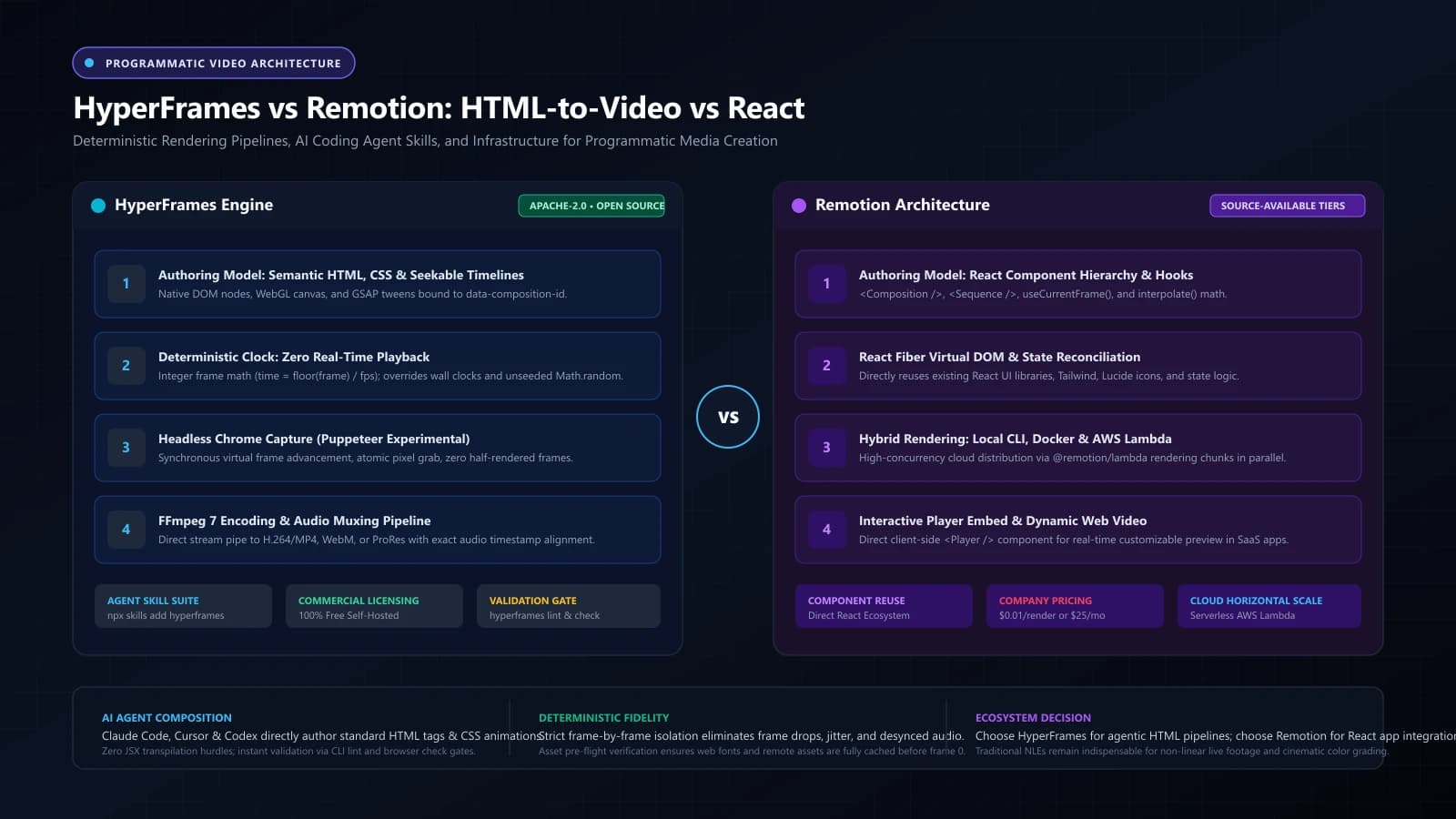
HyperFrames vs Remotion: Detailed Architectural Comparison
Choosing between HyperFrames and Remotion requires understanding where each framework sits within your application architecture. Remotion is built for developers who think in React components and declarative UI states. HyperFrames is built for developers (and AI coding agents) who want to leverage vanilla web files, seekable animation engines, and permissive open-source licensing.
┌────────────────────────────────────────────────────────────────────────────────────────────────────────┐
│                              COMPREHENSIVE ARCHITECTURAL COMPARISON                                    │
├──────────────────────────┬───────────────────────────────────┬─────────────────────────────────────────┤
│ Evaluation Vector        │ HyperFrames (v0.8.x)              │ Remotion (v4.x)                         │
├──────────────────────────┼───────────────────────────────────┼─────────────────────────────────────────┤
│ Authoring Model          │ Plain HTML5, CSS3, Vanilla JS     │ React Component Tree, JSX, TypeScript   │
│ Primary Animation Engine │ GSAP, CSS Animations, WebGL       │ React Hooks (`useCurrentFrame`), Spring │
│ AI Agent Usability       │ Agent-native skill suite          │ Standard React prompt engineering       │
│ Transpilation Overhead   │ Zero build step required          │ Webpack / Vite bundling mandatory       │
│ Deterministic Clock      │ Integer frame stepping via CLI    │ Custom React timeline state driver      │
│ In-Browser Live Preview  │ `npx hyperframes preview` Studio  │ `@remotion/player` & Remotion Studio    │
│ Validation & Linting     │ `hyperframes lint` & `check`      │ TypeScript compiler & ESLint rules      │
│ Supported Output Formats │ MP4, WebM, ProRes (4444/HQ), GIF  │ MP4, WebM, ProRes, GIF, Still Frames    │
│ Cloud Horizontal Scaling │ Self-hosted Docker / HeyGen Cloud │ `@remotion/lambda` (AWS Lambda farms)   │
│ Local / Self-Hosted Cost │ 100% Free (Apache 2.0)            │ Free for individuals & teams < 4        │
│ Enterprise Company Cost  │ $0 Local / Usage-based HeyGen API │ $0.01/render ($100 min) or $25/seat/mo  │
│ Ecosystem Maturity       │ Emerging (Active v0.8 branch)     │ Established (5+ years in production)    │
│ Migration Effort         │ Low for standard web developers   │ Requires React component restructuring  │
└──────────────────────────┴───────────────────────────────────┴─────────────────────────────────────────┘
Deep Dive: Authoring Paradigm & React Coupling
In Remotion, video timing is expressed through React's declarative state loop. You wrap components in a <Composition />, partition scenes with <Sequence />, and query the current frame using the useCurrentFrame() hook:
// Remotion (React): Frame-driven functional rendering
import { useCurrentFrame, interpolate, spring, useVideoConfig } from 'remotion';

export const KineticTitle: React.FC<{ text: string }> = ({ text }) => {
  const frame = useCurrentFrame();
  const { fps } = useVideoConfig();

  const opacity = interpolate(frame, [0, 30], [0, 1], {
    extrapolateRight: 'clamp',
  });

  const scale = spring({
    frame,
    fps,
    config: { damping: 12, mass: 0.5 },
  });

  return (
    <div style={{ opacity, transform: `scale(${scale})` }} className="title-card">
      {text}
    </div>
  );
};
This model is powerful if you already maintain a rich library of React UI components (such as charts, design system tokens, and cards) that you want to reuse directly inside video frames.
In HyperFrames, video compositions are standard web documents. Animations are defined on seekable timelines rather than functional re-renders on every tick:
<!-- HyperFrames (HTML/CSS): Pure DOM with seekable timeline -->
<div data-composition-id="kinetic-title" data-duration="5" data-fps="60" class="canvas">
  <h1 id="title" class="headline">Pathubs Engineering</h1>
</div>

<script type="module">
  import gsap from 'gsap';

  // Bind animation to the global composition controller
  const tl = gsap.timeline({ paused: true });
  tl.fromTo('#title',
    { opacity: 0, scale: 0.8 },
    { opacity: 1, scale: 1.0, duration: 1.5, ease: 'back.out(1.7)' }
  );

  // HyperFrames hooks into this seek function during headless capture
  window.hyperframes = {
    seek: (timeInSeconds) => tl.seek(timeInSeconds),
  };
</script>---
Practical Hands-On Walkthrough: Building an Animated Product Card
Let us walk through a complete, verified local workflow using HyperFrames to generate a motion graphic title card.
┌────────────────────────────────────────────────────────────────────────┐
│                       LOCAL ENVIRONMENT PREREQUISITES                  │
├───────────────────────┬────────────────────────────────────────────────┤
│ Node.js Runtime       │ v22.0.0 or higher                              │
│ Video Encoding Engine │ FFmpeg v7.0 or higher (available in system PATH│
│ Headless Browser      │ Chromium / Google Chrome (Puppeteer installed) │
│ Operating System      │ macOS, Ubuntu Linux, or Windows 11             │
└───────────────────────┴────────────────────────────────────────────────┘
1. Initialize the Project
Scaffold a clean workspace using the official CLI:
# Initialize a kinetic typography composition template
npx hyperframes init kinetic-demo --example kinetic-type

# Navigate into the project directory
cd kinetic-demo
The resulting directory structure provides an isolated, inspectable web package:
kinetic-demo/
├── index.html              # Primary entry document with composition metadata
├── styles.css              # Typography, layout, and visual styling
├── main.js                 # Seekable animation timeline logic (GSAP / WebGL)
├── assets/                 # Local SVGs, fonts, and background audio
│   └── logo.svg
└── hyperframes.config.json # Viewport dimensions, framerate, and export profiles
2. Configure the Composition Metadata
In hyperframes.config.json, define the target output specifications:
{
  "name": "kinetic-demo",
  "version": "1.0.0",
  "compositions": [
    {
      "id": "main-title-card",
      "width": 1920,
      "height": 1080,
      "fps": 60,
      "durationInSeconds": 5.0,
      "entry": "index.html"
    }
  ],
  "render": {
    "codec": "h264",
    "crf": 18,
    "pixelFormat": "yuv420p"
  }
}
3. Author the HTML and Styles
In index.html, declare the DOM hierarchy. Notice the explicit data-composition-id attribute that connects the DOM container to the configuration registry:
<!DOCTYPE html>
<html lang="en">
<head>
  <meta charset="UTF-8" />
  <meta name="viewport" content="width=device-width, initial-scale=1.0" />
  <link rel="stylesheet" href="styles.css" />
  <title>Pathubs Kinetic Demo</title>
</head>
<body>
  <main data-composition-id="main-title-card" class="viewport">
    <div class="grid-backdrop"></div>
    <div class="content-wrapper">
      <div class="badge" id="pill-badge">AUTONOMOUS MEDIA PIPELINE</div>
      <h1 class="headline" id="main-headline">
        Programmatic Video with <span class="gradient-text">HyperFrames</span>
      </h1>
      <p class="subheading" id="subtext">
        Frame-accurate deterministic video compiled directly from semantic HTML5 and CSS3.
      </p>
    </div>
  </main>
  <script type="module" src="main.js"></script>
</body>
</html>
In styles.css, configure responsive typography and layouts:
* {
  box-sizing: border-box;
  margin: 0;
  padding: 0;
}

body {
  background-color: #050811;
  color: #f8fafc;
  font-family: -apple-system, BlinkMacSystemFont, "Segoe UI", Roboto, sans-serif;
  overflow: hidden;
}

.viewport {
  position: relative;
  width: 1920px;
  height: 1080px;
  display: flex;
  align-items: center;
  justify-content: center;
}

.grid-backdrop {
  position: absolute;
  inset: 0;
  background-image: radial-gradient(#1e293b 1px, transparent 1px);
  background-size: 32px 32px;
  opacity: 0.4;
}

.content-wrapper {
  position: relative;
  z-index: 10;
  text-align: center;
  max-width: 1200px;
}

.badge {
  display: inline-block;
  padding: 8px 20px;
  border-radius: 9999px;
  background: rgba(99, 102, 241, 0.15);
  border: 1px solid #6366f1;
  color: #c7d2fe;
  font-size: 14px;
  font-weight: 700;
  letter-spacing: 2px;
  margin-bottom: 24px;
}

.headline {
  font-size: 72px;
  font-weight: 800;
  line-height: 1.1;
  letter-spacing: -1.5px;
  margin-bottom: 20px;
}

.gradient-text {
  background: linear-gradient(135deg, #38bdf8 0%, #818cf8 100%);
  -webkit-background-clip: text;
  -webkit-text-fill-color: transparent;
}

.subheading {
  font-size: 24px;
  color: #94a3b8;
  max-width: 800px;
  margin: 0 auto;
}
4. Implement the Seekable Animation Timeline
In main.js, construct a paused GSAP master timeline and expose the seek handler:
import gsap from 'gsap';

// Initialize a paused timeline
const masterTimeline = gsap.timeline({ paused: true });

// Build the motion sequence
masterTimeline
  .fromTo('#pill-badge',
    { opacity: 0, y: -20, scale: 0.9 },
    { opacity: 1, y: 0, scale: 1, duration: 0.8, ease: 'power3.out' }
  )
  .fromTo('#main-headline',
    { opacity: 0, y: 30 },
    { opacity: 1, y: 0, duration: 1.0, ease: 'power4.out' },
    '-=0.4'
  )
  .fromTo('#subtext',
    { opacity: 0, y: 20 },
    { opacity: 1, y: 0, duration: 0.8, ease: 'power2.out' },
    '-=0.5'
  );

// Register the seek hook for HyperFrames headless capture
window.__HYPERFRAMES_DRIVER__ = {
  duration: 5.0,
  seek: (timeInSeconds) => {
    masterTimeline.seek(timeInSeconds, false);
  },
};
5. The Verification and Render Loop
Rather than immediately jumping to an expensive multi-minute video render, HyperFrames enforces a structured quality gate:
# 1. Preview locally with live scrubber and hot reload
npx hyperframes preview

# 2. Run static lint checks to catch invalid attributes or duration mismatches
npx hyperframes lint

# 3. Execute runtime browser diagnostics (checks console errors and overflow)
npx hyperframes check

# 4. Render the finalized deterministic MP4
npx hyperframes render --output dist/pathubs-intro.mp4npx hyperframes render halts with Error: FFmpeg not detected, verify that FFmpeg 7 is registered in your system PATH by running ffmpeg -version. On Ubuntu/Debian, install with sudo apt install ffmpeg; on macOS, use brew install ffmpeg.---
AI Coding Agent Workflow: Orchestrating Autonomous Video Pipelines
One of HyperFrames' most significant advantages is its native design for AI coding agents (such as Claude Code, Cursor, Codex, and Gemini CLI). When developers equip their coding assistants with the HyperFrames skill suite, the agent gains direct domain knowledge of how to plan, structure, lint, and render videos autonomously.
┌─────────────────────────────────────────────────────────────────────────────────┐
│                    AI CODING AGENT ITERATIVE VIDEO PIPELINE                     │
└─────────────────────────────────────────────────────────────────────────────────┘
                                        │
                                        ▼
   ┌───────────────────────────────────────────────────────────────────────────┐
   │ 1. NATURAL LANGUAGE PROMPT                                                │
   │    Developer describes business objective, duration, brand palette.       │
   └─────────────────────────────────────┬─────────────────────────────────────┘
                                        │
                                        ▼
   ┌───────────────────────────────────────────────────────────────────────────┐
   │ 2. STORYBOARD & SCENE DECOMPOSITION                                       │
   │    Agent generates structured JSON timeline with timestamps & scene roles. │
   └─────────────────────────────────────┬─────────────────────────────────────┘
                                        │
                                        ▼
   ┌───────────────────────────────────────────────────────────────────────────┐
   │ 3. HTML/CSS/JS CODE GENERATION                                            │
   │    Agent writes index.html, styles.css, and deterministic GSAP timeline.  │
   └─────────────────────────────────────┬─────────────────────────────────────┘
                                        │
                                        ▼
   ┌───────────────────────────────────────────────────────────────────────────┐
   │ 4. AUTOMATED DIAGNOSTIC GATE (`hyperframes lint & check`)                 │
   │    Agent executes headless verification commands; parses error outputs.   │
   └─────────────────────────────────────┬─────────────────────────────────────┘
                                        │
                         ┌──────────────┴──────────────┐
                         ▼                             ▼
                 [Lint/Check Fails]            [Lint/Check Passes]
                         │                             │
                         ▼                             ▼
           ┌───────────────────────────┐ ┌───────────────────────────┐
           │ Self-Healing Correction:  │ │ Final Execution:          │
           │ Agent adjusts layout,     │ │ `hyperframes render`      │
           │ fixes font loading or     │ │ Outputs production-ready  │
           │ timeline duration syntax. │ │ high-bitrate MP4.         │
           └─────────────┬─────────────┘ └───────────────────────────┘
                         │
                         └──────────────► Re-run Gate
Installing the Agent Skill Suite
To enable first-class skill awareness in supported coding agents:
# Install HyperFrames skill suite across agent environments
npx skills add heygen-com/hyperframes

# Alternatively, in Claude Code via marketplace
claude plugin marketplace add heygen-com/hyperframes
claude plugin install hyperframes@hyperframes
Production Prompt Template for Coding Agents
When prompting an AI assistant to generate video with HyperFrames, avoid vague instructions like *"make a nice video"*. Provide explicit structural constraints:
Act as a senior motion designer and frontend engineer using the HyperFrames framework.

Create a 15-second product announcement video for a developer tool named "Pathubs Studio":
1. Layout Specifications: 1920x1080 resolution at 60 FPS.
2. Scene Structure:
   - Scene 1 (0.0s - 4.5s): Problem statement. Dark navy background (#070b14) with a floating terminal window showing command failures.
   - Scene 2 (4.5s - 10.0s): Solution reveal. Animated 3D-styled card showcasing Pathubs Studio with kinetic typography.
   - Scene 3 (10.0s - 15.0s): Call to action with animated button and URL "pathubs.com/studio".
3. Technical Rules:
   - Use standard semantic HTML, CSS Flexbox/Grid, and GSAP timelines.
   - All animations must be seekable and bound to window.__HYPERFRAMES_DRIVER__.
   - Do NOT use Date.now(), requestAnimationFrame, or Math.random().
   - Pre-cache the 'Inter' web font before triggering animations.
4. Execution Loop:
   - Generate index.html, styles.css, and main.js.
   - Run `npx hyperframes lint` and fix any reported errors.
   - Run `npx hyperframes check` to confirm no console warnings or element overflows occur.
   - Render the final MP4 to `dist/pathubs-studio-launch.mp4`.
> [!IMPORTANT]
> Human-in-the-Loop Verification: While AI agents can generate valid HTML and flawless GSAP math, automated linting cannot evaluate narrative pacing, visual weight, or emotional resonance. Always preview the rendered output (npx hyperframes preview) to ensure text remains on-screen long enough for human comprehension.
---
Realistic Technical Limitations and Production Gotchas
Every rendering architecture involves engineering trade-offs. HyperFrames is an evolving framework (currently active on the v0.8.x branch), and teams must evaluate its real-world limitations before deploying it to mission-critical infrastructure.
┌─────────────────────────────────────────────────────────────────────────────────┐
│                        ENGINEERING CONSTRAINTS & GOTCHAS                        │
├──────────────────────────┬──────────────────────────────────────────────────────┤
│ Constraint               │ Production Impact & Mitigation Strategy              │
├──────────────────────────┼──────────────────────────────────────────────────────┤
│ 1. Memory Overhead       │ Headless Chrome consumes 1.5–3.5 GB RAM per render   │
│                          │ worker. Concurrency must be capped based on host RAM.│
├──────────────────────────┼──────────────────────────────────────────────────────┤
│ 2. Seekable Timeline API │ Arbitrary CSS keyframe animations cannot always be   │
│    Strictness            │ scrubbed backwards reliably. GSAP or WAAPI required. │
├──────────────────────────┼──────────────────────────────────────────────────────┤
│ 3. Asynchronous Audio    │ Audio files must be explicitly decoded into memory;  │
│    Drift                 │ streaming audio over HTTP will cause desync issues.  │
├──────────────────────────┼──────────────────────────────────────────────────────┤
│ 4. Pre-1.0 API Evolution │ Active v0.8 releases introduce minor flag updates.   │
│                          │ Pin exact versions in `package.json` for CI builds.  │
├──────────────────────────┼──────────────────────────────────────────────────────┤
│ 5. GPU Acceleration      │ Docker containers require `--gpus all` or software   │
│    in Containerized CI   │ rasterizer flags (`--disable-gpu`) for stable WebGL. │
└──────────────────────────┴──────────────────────────────────────────────────────┘
1. Headless Browser Memory Consumption
Unlike native C++ video processing pipelines, spinning up headless Chromium involves significant memory overhead. A single 4K 60 FPS rendering process can consume 2 to 4 GB of RAM. If you attempt to render 16 videos concurrently on an 8-core server with 16 GB of RAM, the system will trigger Linux OOM (Out Of Memory) killer and crash the renderer. Production render servers must throttle concurrency according to available RAM.
2. Complex Canvas and WebGL Seekability
While CSS animations and GSAP tweens are easily controlled via timestamps, complex custom WebGL shaders (such as three.js scenes or fluid simulations) frequently maintain internal state across frames. If your WebGL scene computes velocity based on previous frames rather than as a pure function of total elapsed time:
$$\text{Position}(t) = f(t)$$
scrubbing or rendering out of order will corrupt the scene. Every shader uniform and physics step must be computed strictly as a function of the discrete frame count.
3. Font Rendering Inconsistencies Across Operating Systems
If you render a video on macOS locally, the text may measure 420px wide due to Apple's CoreText antialiasing. When the exact same repository is rendered on an AWS EC2 instance running Ubuntu Linux, FreeType may render that text at 434px wide, pushing the last word onto a new line and breaking your composition layout. Mitigation: Always use fixed container widths with overflow: hidden, or execute CI renders inside HyperFrames' official Docker container (npx hyperframes render --docker).
---
The Decision Matrix: When to Choose HyperFrames, Remotion, or a Traditional NLE
No single tool fits every media generation scenario. Use this practical decision matrix to select the appropriate framework:
                                  MEDIA CREATION GOAL
                                           │
         ┌─────────────────────────────────┴─────────────────────────────────┐
         ▼                                                                   ▼
  [Dynamic / Code-Driven / Batch]                                   [Story-Driven / Live Footage]
         │                                                                   │
         ▼                                                                   ▼
  PROGRAMMATIC FRAMEWORKS                                            TRADITIONAL NLE
  Do you have existing React components?                            (DaVinci Resolve / Premiere)
         │                                                           • Multi-track timeline scrubbing
    ┌────┴────┐                                                      • Live-action cinema footage
    │         │                                                      • Precision color grading
 [YES]       [NO]                                                    • Foley audio engineering
    │         │
    ▼         ▼
 REMOTION    HYPERFRAMES
 • React UI   • HTML/CSS/JS native
 • <Player /> • Zero build steps
 • Lambda     • AI agent-native
 • TS Types   • Apache 2.0 Free
Choose HyperFrames When:
- Your pipeline is driven by AI coding agents: Agents can generate, read, and modify standard HTML/CSS and GSAP timelines with virtually zero syntax hallucinations or JSX transpilation errors.
- You want pure open-source licensing: You need a self-hosted rendering engine under Apache 2.0 without paying per-render fees ($0.01/render) or monthly seat licenses as your company expands.
- You are building data-driven motion templates: Generating automated financial summaries, real estate listings, dynamic certificates, or localized marketing clips from standard web assets.
- Your team prefers standard web skills: You do not want to force video designers or frontend contributors to adopt React state management just to position a headline or animate an SVG path.
Choose Remotion When:
- You have an existing React ecosystem: You maintain a deep library of React components, charts (Recharts/Victory), design system tokens, and Tailwind setups that you want to render directly into video.
- You require an interactive in-browser `<Player />`: Your SaaS product lets users preview, customize, and scrub through compositions directly inside a web app prior to rendering.
- You require turnkey horizontal cloud scaling: You want to deploy rendering across hundreds of serverless AWS Lambda functions using
@remotion/lambdawithout managing your own container infrastructure. - You need strict TypeScript prop validation: Your video parameters are strongly typed and shared across frontend, backend, and video worker services.
Choose a Traditional Editor (DaVinci Resolve / Premiere Pro) When:
- You are editing narrative or documentary video: Cutting multi-camera live footage, aligning spoken dialog with B-roll, and pacing dramatic pauses.
- You require cinematic color grading: Working with camera RAW profiles, 3D LUTs, HDR color spaces, and ACES color pipelines.
- You need detailed foley and sound design: Adjusting multi-band compression, audio ducking, sub-frame foley placement, and surround sound mixes.
---
Licensing, Commercial Costs, and Infrastructure TCO
Understanding the distinction between software licenses and operational cloud costs is vital for accurate engineering budget forecasting.
┌────────────────────────────────────────────────────────────────────────────────────────────────┐
│                           LICENSING AND TOTAL COST OF OWNERSHIP (TCO)                          │
├──────────────────────────┬───────────────────────────────────┬─────────────────────────────────┤
│ Dimension                │ HyperFrames                       │ Remotion                        │
├──────────────────────────┼───────────────────────────────────┼─────────────────────────────────┤
│ Core License Type        │ Apache 2.0 (Permissive FOSS)      │ Source-Available (Commercial)   │
│ Local Developer Usage    │ 100% Free, unlimited seats        │ 100% Free, unlimited seats      │
│ Small Teams (< 4 staff)  │ 100% Free for commercial use      │ 100% Free for commercial use    │
│ Enterprise / 4+ Staff    │ 100% Free for self-hosted renders │ Requires Paid Company License   │
│ Commercial Pricing Model │ $0 software fee (Self-hosted)     │ • Automator: $0.01/render       │
│                          │ Cloud rendering uses HeyGen API   │   ($100/mo minimum spend)       │
│                          │ credits (if opted in)             │ • Creators: $25/mo per seat     │
│ Cloud Infrastructure     │ You pay AWS/GCP EC2 VM compute    │ You pay AWS Lambda compute      │
│ Telemetry Enforcement    │ None (Permissive FOSS)            │ `@remotion/licensing` telemetry │
└──────────────────────────┴───────────────────────────────────┴─────────────────────────────────┘
Deconstructing Remotion's Commercial Licensing
Remotion operates on an ethical source-available model:
- Free Tier: Completely free for individuals, non-profits, and commercial entities with 3 or fewer employees.
- Company License (Teams of 4+):
* Remotion for Automators: Designed for automated, backend, or cloud rendering. Billed at $0.01 per successful render with a mandatory $100/month minimum commitment. Developers building the automated pipelines do not require per-seat licenses. * Remotion for Creators: Designed for staff members who manually create videos, design systems, or utilize Remotion Studio. Billed at $25/month per seat. * Enterprise License: Starts at $500/month for dedicated support channels, custom compliance terms, and extended architectural guidance.
Deconstructing HyperFrames' Open-Source Model
HyperFrames is released under the Apache 2.0 license. The entire CLI, compiler, DOM scrubber, and rendering engine can be integrated into proprietary commercial products, embedded on private enterprise render clusters, or distributed within internal tools without paying licensing fees or per-render surcharges to HeyGen.
---
7-Step Evaluation Protocol for Engineering Teams
Before committing your organization to a programmatic video framework, execute this standardized 7-step evaluation protocol in your development environment:
┌────────────────────────────────────────────────────────────────────────┐
│                   7-STEP BENCHMARK & EVALUATION PROTOCOL               │
├────────────────────────────────────────────────────────────────────────┤
│ 1. Scaffold identical 10-second test compositions (1920x1080 @ 60 FPS) │
│    incorporating SVG animations, typography, and one audio waveform.   │
│ 2. Measure local developer setup time from `git clone` to first preview│
│    scrubber on macOS, Windows, and Linux workstations.                 │
│ 3. Run 10 consecutive renders of the exact same composition; compute   │
│    SHA-256 hashes of the resulting MP4s to verify bit-level determinism│
│ 4. Profile peak CPU and RAM utilization during rendering execution     │
│    under 1, 4, and 8 concurrent worker processes.                      │
│ 5. Audit AI agent authoring efficiency by passing a standardized prompt│
│    to Claude Code or Cursor and recording human interventions required.│
│ 6. Validate CI/CD pipeline integration time inside GitHub Actions or   │
│    GitLab CI using containerized Docker runners.                       │
│ 7. Calculate 12-month Total Cost of Ownership (TCO) incorporating VM   │
│    compute, cloud storage, maintenance, and commercial license terms.  │
└────────────────────────────────────────────────────────────────────────┘
---
Frequently Asked Questions
What is HyperFrames, and how does it convert HTML into video?
HyperFrames is an open-source (Apache 2.0) programmatic video framework developed by HeyGen. It translates standard semantic HTML, CSS styling, media assets, and seekable JavaScript animations (such as GSAP timelines) into frame-accurate video files (MP4, WebM, ProRes). Rather than recording real-time browser playback, HyperFrames controls an isolated headless Chrome instance via Puppeteer, advances time in explicit discrete integer frame steps, captures uncompressed frames atomically, and encodes the stream into video using FFmpeg.
How does HyperFrames differ fundamentally from Remotion?
The fundamental distinction lies in their authoring abstraction, runtime dependencies, and licensing models. HyperFrames uses standard vanilla web files (index.html, styles.css, main.js) and seekable animation timelines with zero framework lock-in, making it frictionless for LLMs and AI coding agents to inspect, edit, and validate. Remotion uses a React-centric component architecture (<Composition />, <Sequence />, useCurrentFrame()), requiring JSX transpilation and React state management. Additionally, HyperFrames is permissively licensed under Apache 2.0 for local/self-hosted renders, whereas Remotion utilizes a source-available model requiring commercial licenses ($0.01/render or $25/mo per seat) for companies with 4 or more employees.
Can standard HTML, CSS, and JavaScript produce production-quality MP4 videos?
Yes. By executing within a headless browser with forced fixed viewports, GPU hardware acceleration flags, and deterministic frame stepping, modern web technologies can render high-resolution 4K compositions, CSS keyframes, SVG paths, WebGL canvas shaders, and typography. Because the renderer steps through time frame-by-frame without dropping frames during heavy computations, the final encoded MP4 exhibits fluid, glitch-free 60 FPS motion.
How do AI coding agents like Claude Code or Cursor interact with HyperFrames?
HyperFrames includes an agent-native skill suite installable via npx skills add heygen-com/hyperframes. This equips AI coding assistants with specialized knowledge of composition data attributes, timeline rules, and diagnostic CLI tools. Agents can scaffold projects, programmatically generate storyboards, update styling, execute npx hyperframes lint and npx hyperframes check to catch layout errors, preview compositions, and render the final video without human intervention.
Is HyperFrames completely free for commercial programmatic rendering?
Yes, for local and self-hosted rendering. The core HyperFrames CLI, compiler, and rendering engine are distributed under the Apache 2.0 open-source license, allowing unlimited self-hosted commercial rendering on local workstations, private servers, or Docker containers without per-render fees. However, third-party cloud services, hosted rendering infrastructure, or proprietary HeyGen avatar/voice credits operate under separate commercial pricing.
Does HyperFrames or Remotion replace traditional video editors like DaVinci Resolve or Premiere Pro?
No. Programmatic video frameworks are engineered for dynamic, data-driven, template-based, or AI-generated video workflows—such as personalized customer videos, automated social reels, dynamic analytics dashboards, and algorithmic kinetic typography. Traditional non-linear editors (NLEs) like DaVinci Resolve or Adobe Premiere Pro remain essential for live-action editing, multi-track timeline scrubbing, complex audio post-production, multi-cam synchronization, and high-fidelity color grading.
---
Summary & Next Learning Paths
Whether your team selects the lightweight vanilla HTML determinism of HyperFrames or the mature React component ecosystem of Remotion, mastering browser execution mechanics, headless rendering pipelines, and DOM performance is foundational.
To build production-grade web applications and automated media pipelines:
- Master modern browser APIs, DOM manipulation, and CSS animations on the Pathubs Frontend Developer Roadmap.
- Learn how to deploy headless browser workers and Node.js rendering services on the Pathubs Full-Stack Developer Roadmap.
- Compare engineering tracks and industry compensation in the Pathubs Career Comparison Guide.