On 28 October 2026, the Android engineering team officially released Android Studio Rabbit 2, marking one of the most substantial architectural transitions in Android tooling history.
For years, mobile developers faced a frustrating compromise: IDE-integrated code completion was constrained by generic autocomplete or vendor-locked proprietary assistants, while cutting-edge autonomous AI coding agents (such as Google Antigravity, Anthropic Claude Code, and OpenAI Codex) operated outside the IDE, blind to Gradle build caches, Logcat crash traces, and Jetpack Compose layout trees.
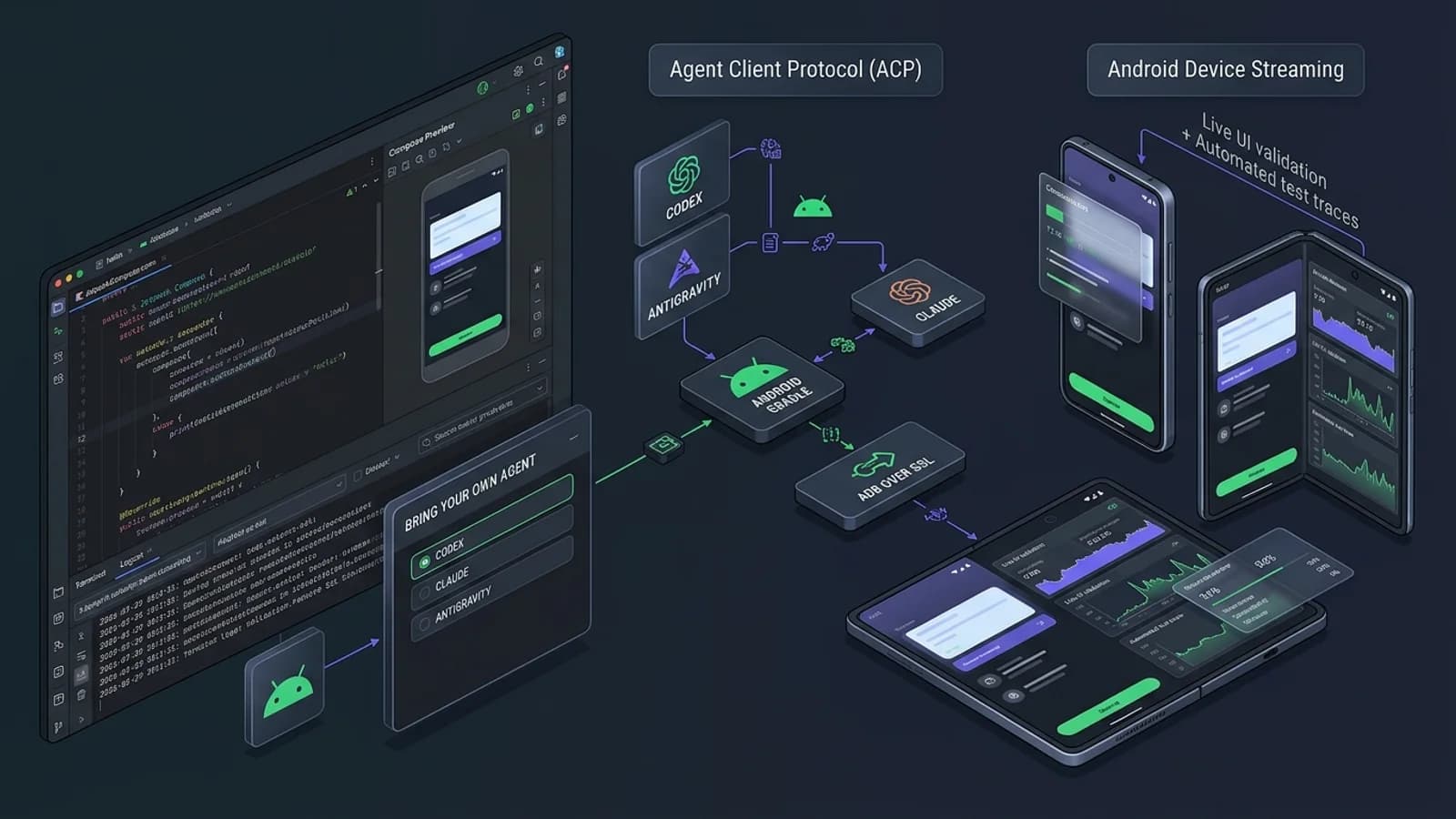
With Android Studio Rabbit 2, Google has formalized Bring Your Own Agent (BYOA) as a stable, production-ready paradigm built on the open Agent Client Protocol (ACP). Rather than forcing developers into a single closed assistant, Android Studio now functions as an intelligent host that provides external AI coding agents with deep, programmatic hooks into Android build systems, terminal runners, visual Compose previews, and remote physical hardware.
This guide provides an evidence-based, practical evaluation of Android Studio Rabbit 2 and the modern agent-driven Android development workflow. We examine how the ACP integration operates, walk through a step-by-step feature implementation, explore the terminal-native Android CLI, evaluate Android Device Streaming, and outline essential testing, profiling, and quality guardrails.
---
1. What Android Studio Rabbit 2 Introduces
Android Studio Rabbit 2 departs from conventional IDE release cycles by focusing primarily on agent interoperability, decoupled execution, and terminal-first workflows.
┌─────────────────────────────────────────────────────────────────────────────────────────┐
│                       ANDROID STUDIO RABBIT 2 TOOLING ECOSYSTEM                         │
├──────────────────────────────┬────────────────────────────┬─────────────────────────────┤
│ BRING YOUR OWN AGENT (BYOA)  │ ANDROID CLI RUNTIME        │ DEVICE TESTING INFRA        │
├──────────────────────────────┼────────────────────────────┼─────────────────────────────┤
│ • 40+ ACP-Compatible Agents  │ • Headless `android` CLI   │ • Android Device Streaming  │
│ • Google Antigravity         │ • Official Android Skills  │   (Firebase-backed cloud)   │
│ • Anthropic Claude Code      │   (`SKILL.md` bundles)     │ • Secure ADB-over-SSL       │
│ • OpenAI Codex               │ • Independent CI execution │ • Multi-OEM physical phones │
│ • JetBrains Junie            │ • Automated bundle audits  │ • Local QEMU emulator hooks │
└──────────────────────────────┴────────────────────────────┴─────────────────────────────┘
The Core Architectural Pillars
- Bring Your Own Agent (BYOA): Developers select their preferred agent and frontier reasoning model rather than relying on a fixed, built-in model. Support is governed by the open Agent Client Protocol (ACP).
- First-Party Agent Plugins: Official, certified integrations are available out of the box for Google Antigravity, Claude Code, and OpenAI Codex, with seamless credential management and workspace scoping.
- Android Skills Ecosystem: A standardized repository of over 30 modular instruction packs (
SKILL.md) covering more than 20 Android development domains—ranging from Jetpack Compose Material 3 and Navigation to Play Policy Insights and Perfetto profiling. - Android CLI (`android`): A standalone, lightweight command-line suite that allows autonomous agents running in terminal sessions or containerized CI sandboxes to build, test, and profile Android apps without opening the heavy desktop IDE.
- Android Device Streaming Expansion: Direct programmatic access to physical hardware hosted in Google data centers, supporting automated test deployment, log streaming, and annotated screenshot capture over ADB-over-SSL.
---
2. Understanding Bring Your Own Agent (BYOA) & ACP
To understand why Bring Your Own Agent represents a fundamental shift, developers must understand the technical boundary between the Agent Reasoning Engine and the IDE Host Services.
┌─────────────────────────────────────────────────────────────────────────────────────────┐
│                        AGENT CLIENT PROTOCOL (ACP) ARCHITECTURE                         │
├─────────────────────────────────────────────────────────────────────────────────────────┤
│                                                                                         │
│   ┌─────────────────────────────────────────────────────────────────────────────────┐   │
│   │                      AI CODING AGENT (Antigravity / Claude / Codex)             │   │
│   │  • LLM Reasoning Core (Gemini 2.5 Pro / Claude 3.5 Sonnet / GPT-4o)            │   │
│   │  • Active Android Skills (`compose-m3.skill`, `play-policy.skill`)              │   │
│   │  • User Intent & Multi-Turn Conversation State                                  │   │
│   └────────────────────────────────────────┬────────────────────────────────────────┘   │
│                                            │                                            │
│                      Two-Way JSON-RPC via ACP (Socket / Stdio / Pipe)                   │
│                                            │                                            │
│   ┌────────────────────────────────────────▼────────────────────────────────────────┐   │
│   │                   ANDROID STUDIO RABBIT 2 IDE HOST SERVICES                     │   │
│   ├─────────────────────────────────────────────────────────────────────────────────┤   │
│   │ • Project Model: Gradle sync graph, source sets, module dependencies            │   │
│   │ • Build Engine: Incremental Kotlin/Java compilation, AAPT2 packaging, AGP       │   │
│   │ • Diagnostic Feeds: Gradle errors, compiler warnings, lint inspections          │   │
│   │ • Runtime Surfaces: Logcat stream filters, Memory/CPU Profiler, Thread views   │   │
│   │ • UI Renderers: Jetpack Compose Preview pipeline, interactive previews          │   │
│   │ • Hardware Bridges: Local ADB daemon, remote Android Device Streaming SSL        │   │
│   └─────────────────────────────────────────────────────────────────────────────────┘   │
│                                                                                         │
└─────────────────────────────────────────────────────────────────────────────────────────┘
The Three Layers of Modern Android Agent Integration
A common point of confusion among engineers is conflating the model, the IDE tools, and the skills:
- The Model / Agent: Handles natural language reasoning, code synthesis, and diff planning. When using Antigravity, the agent reasons over multi-step instructions and coordinates subagents.
- The IDE Host (Android Studio): Houses the deterministic tooling: the Gradle daemon, Android Gradle Plugin (AGP), Kotlin compiler, Logcat daemon, and ADB connection pool. The agent queries these tools via ACP tool calls.
- Android Skills (`SKILL.md`): Specialized domain-specific instruction bundles that teach the agent specific Android platform guidelines. For example, the
wear-compose-material3skill prevents an agent from using deprecated Wear OS components, while ther8-analyzerskill provides step-by-step rules for diagnosing ProGuard shrinkage bugs.
---
3. Step-by-Step: Setting Up an Agent-Driven Android Workflow
Follow this verified, hands-on walkthrough to configure Android Studio Rabbit 2 with your chosen coding agent, implement a real-world Compose feature, and validate it using build diagnostics.
Step 1: Install or Update Android Studio Rabbit 2
Ensure your workstation meets the verified platform requirements:
- OS: Windows 10/11 64-bit, macOS 12+ (Apple Silicon or Intel), or 64-bit Linux.
- RAM: Minimum 16 GB (32 GB strongly recommended for running concurrent Gradle daemons, Compose renderers, and agent processes).
- Disk: Minimum 16 GB free SSD space for the Android SDK, build caches, and emulator system images.
Verify your installed version under Help > About (Windows/Linux) or Android Studio > About Android Studio (macOS). The version string should confirm Android Studio Rabbit 2 | 2026.x.
Step 2: Select and Authenticate Your Agent
Navigate to Settings > Tools > AI > Agents (or Android Studio > Settings > Tools > AI > Agents on macOS), or click the new Agent Manager icon in the right-hand tool window strip.
┌───────────────────────────────────────────────────────────────────────────┐
│ Settings > Tools > AI > Agents                                            │
├───────────────────────────────────────────────────────────────────────────┤
│ Available Agents (ACP Compliant):                                         │
│                                                                           │
│  [●] Google Antigravity     [Configure] [Default]   Status: Connected     │
│  [○] Anthropic Claude Code  [Configure]             Status: Disconnected  │
│  [○] OpenAI Codex           [Configure]             Status: Disconnected  │
│  [○] Custom ACP Agent...    [Add Endpoint]                                │
│                                                                           │
│ Agent Execution Mode: [x] Allow Gradle builds  [x] Allow Logcat inspection│
│                       [x] Prompt before file edits on release branches    │
└───────────────────────────────────────────────────────────────────────────┘
Select your agent (e.g., Google Antigravity or Claude Code), provide your authentication credentials or API key, and confirm that the tool connection test succeeds.
Step 3: Inspect Project Architecture Before Requesting Changes
Never begin by asking an agent to write massive chunks of code into an unfamiliar project. Always instruct the agent to run an architectural inspection first:
Inspect the project structure, active Gradle dependencies, and existing Compose themes.
Identify:
1. The version of Jetpack Compose and Android Gradle Plugin in use.
2. The package structure for UI screens, ViewModels, and repositories.
3. The existing theme definitions (Material 3 colors, typography, shapes).
Do not modify any files yet. Output a concise summary of conventions.
The agent executes ACP tool calls (project:read_structure, project:read_file), inspects build.gradle.kts and existing screens, and reports its findings.
Step 4: Implement a Scoped, Testable Feature
Prompt the agent to implement a discrete feature. For example, creating a network connectivity banner with Compose:
// Example feature: A production-ready OfflineWarningBanner in Jetpack Compose
package com.example.pathubs.ui.components

import androidx.compose.animation.AnimatedVisibility
import androidx.compose.animation.expandVertically
import androidx.compose.animation.shrinkVertically
import androidx.compose.foundation.background
import androidx.compose.foundation.layout.Row
import androidx.compose.foundation.layout.Spacer
import androidx.compose.foundation.layout.fillMaxWidth
import androidx.compose.foundation.layout.padding
import androidx.compose.foundation.layout.size
import androidx.compose.foundation.layout.width
import androidx.compose.material.icons.Icons
import androidx.compose.material.icons.filled.Warning
import androidx.compose.material3.Icon
import androidx.compose.material3.MaterialTheme
import androidx.compose.material3.Text
import androidx.compose.runtime.Composable
import androidx.compose.ui.Alignment
import androidx.compose.ui.Modifier
import androidx.compose.ui.res.stringResource
import androidx.compose.ui.unit.dp

@Composable
fun OfflineWarningBanner(
    isOffline: Boolean,
    modifier: Modifier = Modifier
) {
    AnimatedVisibility(
        visible = isOffline,
        enter = expandVertically(),
        exit = shrinkVertically()
    ) {
        Row(
            modifier = modifier
                .fillMaxWidth()
                .background(MaterialTheme.colorScheme.errorContainer)
                .padding(horizontal = 16.dp, vertical = 8.dp),
            verticalAlignment = Alignment.CenterVertically
        ) {
            Icon(
                imageVector = Icons.Default.Warning,
                contentDescription = null, // Decorative icon; text provides accessibility context
                tint = MaterialTheme.colorScheme.onErrorContainer,
                modifier = Modifier.size(18.dp)
            )
            Spacer(modifier = Modifier.width(8.dp))
            Text(
                text = "No internet connection. Cached data shown.",
                style = MaterialTheme.typography.labelMedium,
                color = MaterialTheme.colorScheme.onErrorContainer
            )
        }
    }
}
Step 5: Trigger Build Diagnostics & Review Code
Once the agent edits the file, direct it to trigger compilation via ACP:
Run the Gradle debug build. If there are compilation errors or deprecation warnings,
analyze the build diagnostics log, explain the root cause, and correct the code.
The IDE triggers an incremental Gradle build (./gradlew compileDebugKotlin), streams build warnings directly back into the agent's context, and allows the agent to self-correct missing imports or syntax mismatches automatically.
---
4. The Terminal-Native Workflow: Android CLI & Skills
For automated CI/CD pipelines, remote development servers, and developers who prefer terminal tools like Claude Code or Antigravity in headless mode, Google provides the standalone Android CLI (android).
┌─────────────────────────────────────────────────────────────────────────────────────────┐
│                                ANDROID CLI TERMINAL PIPELINE                            │
├─────────────────────────────────────────────────────────────────────────────────────────┤
│                                                                                         │
│   $ android init                                                                        │
│     ├── Downloads core Android agent skills into .android/skills/                       │
│     └── Detects SDK, NDK, and JDK 17/21 paths                                           │
│                                                                                         │
│   $ android skills add compose-m3-patterns --project=.                                  │
│     └── Injects targeted Compose Material 3 rules into the agent context                │
│                                                                                         │
│   $ ./gradlew assembleDebug                                                             │
│     └── Builds the application package (outputs APK at build/outputs/apk/debug/)         │
│                                                                                         │
│   $ adb devices                                                                         │
│     └── Queries local emulators and active ADB-over-SSL cloud sessions                  │
│                                                                                         │
│   $ android run --target=device-pixel-9 --package=com.example.pathubs                   │
│     └── Deploys APK, triggers main Activity, and captures Logcat diagnostic stream      │
│                                                                                         │
└─────────────────────────────────────────────────────────────────────────────────────────┘
Essential Android CLI Commands
The revitalized Android CLI standardizes agent operations into straightforward commands:
- Environment Initialization:
bash android init Validates local Android SDK components, build-tools, and platform-tools, creating an agent-readable workspace manifest.
- Discovering and Installing Android Skills:
`bash # Search available official skills android skills find compose
# Install the Compose Material 3 skill into the current project android skills add compose-m3-patterns --project=.
# List all currently active skills android skills list `
- Running Builds and Collecting Test Outputs:
`bash # Standard Gradle assembly ./gradlew assembleDebug
# Run automated unit tests with structured failure reports ./gradlew testDebugUnitTest --continue `
By packaging skills as standard markdown files, any agent (whether inside Android Studio or running in a bare Bash terminal) reads the same canonical rules for Kotlin coroutines, Room database migrations, and Jetpack Compose state hoisting.
---
5. Visual Validation: Jetpack Compose Previews
A major flaw in historical AI-assisted mobile development was "blind generation": agents wrote Compose code that compiled but looked broken at runtime. Android Studio Rabbit 2 bridges this gap by exposing the Compose Preview Renderer to the agent via ACP.
┌─────────────────────────────────────────────────────────────────────────────────────────┐
│                         COMPOSE PREVIEW VALIDATION PROTOCOL                             │
├──────────────────────────────┬────────────────────────────┬─────────────────────────────┤
│ 1. MULTI-DEVICE PREVIEWS     │ 2. DARK / LIGHT THEMES     │ 3. EDGE-CASE CONTENT        │
├──────────────────────────────┼────────────────────────────┼─────────────────────────────┤
│ • Small Phone (320dp width)  │ • Verify Dynamic Color     │ • Multi-line text overflow  │
│ • Standard Flagship (412dp)  │ • Contrast ratios (WCAG AA)│ • Empty state rendering     │
│ • Foldable Unfolded (840dp)  │ • Surface tint elevations  │ • Offline / Error banners   │
└──────────────────────────────┴────────────────────────────┴─────────────────────────────┘
Designing Robust `@Preview` Suites for AI Agents
When instructing an agent to write Compose components, mandate that it generate comprehensive multi-state previews:
import android.content.res.Configuration
import androidx.compose.material3.Surface
import androidx.compose.runtime.Composable
import androidx.compose.ui.tooling.preview.Preview
import androidx.compose.ui.tooling.preview.PreviewParameter
import androidx.compose.ui.tooling.preview.PreviewParameterProvider
import com.example.pathubs.ui.components.OfflineWarningBanner
import com.example.pathubs.ui.theme.PathubsTheme

class OfflineStateProvider : PreviewParameterProvider<Boolean> {
    override val values = sequenceOf(true, false)
}

@Preview(name = "Light Mode - Standard", showBackground = true)
@Preview(name = "Dark Mode - Standard", uiMode = Configuration.UI_MODE_NIGHT_YES, showBackground = true)
@Preview(name = "Small Screen Device", widthDp = 320, showBackground = true)
@Composable
fun OfflineWarningBannerPreview(
    @PreviewParameter(OfflineStateProvider::class) isOffline: Boolean
) {
    PathubsTheme {
        Surface {
            OfflineWarningBanner(isOffline = isOffline)
        }
    }
}
Through ACP, the agent can trigger preview rendering and inspect layout diagnostics (such as unexpected recompositions, text truncations, or touch targets smaller than 48x48dp) directly in its feedback loop.
---
6. Real-Device Testing: Android Device Streaming
Local emulators require substantial CPU and GPU virtualization overhead. For teams working on lightweight laptops or cloud-hosted development environments, Android Device Streaming (powered by Firebase Test Lab infrastructure) connects directly to physical hardware in Google data centers.
┌─────────────────────────────────────────────────────────────────────────────────────────┐
│                             ANDROID DEVICE STREAMING WORKFLOW                           │
├─────────────────────────────────────────────────────────────────────────────────────────┤
│                                                                                         │
│   DEVELOPER WORKSTATION / AGENT CLI                                                     │
│   $ adb connect remote-proxy.firebase.google.com:443                                   │
│              │                                                                          │
│              │ Encrypted ADB-over-SSL Tunnel (OAuth 2.0 / Firebase Project)         │
│              ▼                                                                          │
│   GOOGLE DATA CENTER (FIREBASE TEST LAB HARDWARE FARM)                                  │
│   ┌────────────────────────┬────────────────────────┬────────────────────────┐          │
│   │ Google Pixel 9 Pro     │ Samsung Galaxy S24     │ Google Pixel Fold      │          │
│   │ Physical Hardware      │ Physical Hardware      │ Physical Foldable      │          │
│   │ Real Camera / GPS / OEM│ Exynos / OneUI OEM stack│ Hinge Sensor / Multi-W │          │
│   └────────────────────────┴────────────────────────┴────────────────────────┘          │
│                                                                                         │
└─────────────────────────────────────────────────────────────────────────────────────────┘
Emulator vs. Local Physical Device vs. Device Streaming
| Dimension | Local QEMU Emulator | Connected Physical USB Device | Android Device Streaming |
|---|---|---|---|
| Hardware Fidelity | Simulated generic x86/ARM image | High (single specific device) | High (broad OEM catalog) |
| Local Resource Usage | High (4–8 GB RAM, heavy CPU/GPU) | Extremely Low | Minimal (lightweight SSL stream) |
| Agent Automation | Direct via local ADB port | Direct via local ADB port | Direct via ADB-over-SSL tunnel |
| OEM Variety | Standard Google AOSP / Google APIs | Limited to hardware you own | Access to Pixels, Samsungs, Foldables |
| Prerequisites / Cost | Free; local hardware required | Cost of physical device | Firebase/GCP project required (quotas apply) |
Setting Up Device Streaming
- Link an active Firebase or Google Cloud project with billing enabled in Android Studio under Tools > Device Streaming.
- Open the Device Manager tool window and select the Device Streaming tab.
- Choose your target physical device (e.g., Pixel 9 Pro or Samsung Galaxy S24) and initiate a reservation.
- The remote device connects to your local ADB daemon over an encrypted SSL tunnel. Your agent can deploy builds, run instrumentation tests, and pull screenshots using standard ADB commands without physical hardware on your desk.
---
7. Quality Analysis, Debugging, and Profiling
Using an AI coding agent does not automatically guarantee fast, battery-efficient, or memory-safe code. Android Studio Rabbit 2 integrates advanced diagnostics to verify runtime quality:
┌─────────────────────────────────────────────────────────────────────────────────────────┐
│                             DIAGNOSTIC & QUALITY ANALYSIS SUITE                         │
├──────────────────────────────┬────────────────────────────┬─────────────────────────────┤
│ 1. LOGCAT & CRASH TRACES     │ 2. PERFETTO SYSTEM TRACING │ 3. LEAKCANARY & HEAP DUMPS  │
├──────────────────────────────┼────────────────────────────┼─────────────────────────────┤
│ Filter by tag, package, or   │ Trace jank, 120Hz frame    │ Detect retained Activity or │
│ fatal stack traces with ACP  │ drops, and heavy operations│ Composable context memory   │
│ auto-capture on crash        │ on the Android main thread │ leaks automatically         │
└──────────────────────────────┴────────────────────────────┴─────────────────────────────┘
1. Logcat Stream Filtering
Modern Logcat supports expressive key-value queries:
package:mine level:ERROR tag:PathubsNetworkWhen an app crashes, Android Studio's ACP integration captures the unhandled exception and full stack trace, passing line-numbered references to the agent to propose a minimal, verified fix.
2. Perfetto-Based System Tracing
If an agent generates a complex LazyColumn or heavy image-processing pipeline, static code review cannot prove frame stability. Running a Perfetto trace reveals whether recomposition is causing frame drops below the 60fps/120fps display threshold.
3. LeakCanary Memory Inspection
When managing Android lifecycles, agents frequently introduce memory leaks by passing an Activity context into long-lived coroutines or singletons. Integrating LeakCanary allows the test harness to immediately detect leaked instances and provide the agent with the exact GC reference root chain.
---
8. A Production-Ready AI Agent Prompt for Android
To obtain predictable, high-quality code from coding agents like Antigravity, Claude Code, or Codex in Android Studio Rabbit 2, use a structured prompt that mandates architectural inspection, test execution, and strict safety guardrails:
Act as a senior Android engineer working in this project.
Task: Implement a pull-to-refresh mechanism for the user activity timeline.

Execution Protocol:
1. Architectural Grounding:
   - Inspect existing UI state models in `ui/timeline/TimelineState.kt`.
   - Verify the current Material 3 PullToRefreshBox conventions used in our codebase.
   - Do not invent custom layout components where official Material 3 primitives exist.

2. Minimal, Idiomatic Implementation:
   - Make the smallest surgical change required to fulfill the user requirement.
   - Hoist all state transitions into `TimelineViewModel.kt`.
   - Handle loading, success, empty, and network-error states explicitly.

3. Verification Gates:
   - Run `./gradlew compileDebugKotlin` via the terminal tool to verify zero build errors.
   - Run unit tests in `TimelineViewModelTest.kt`. If missing, generate deterministic tests.
   - Inspect Compose previews across light and dark configurations.

4. Change Summary:
   - List all modified files with a one-sentence rationale for each edit.
   - Highlight any newly added permissions or third-party dependencies.
   - Confirm that no unrelated files or Gradle configurations were altered.
---
9. Real Limitations and Technical Trade-Offs
While Android Studio Rabbit 2 represents a major leap forward, development teams must remain aware of critical constraints:
┌─────────────────────────────────────────────────────────────────────────────────────────┐
│                                 CRITICAL AGENT LIMITATIONS                              │
├──────────────────────────────┬─────────────────────────────┬────────────────────────────┤
│ 1. API DEPRECATION RISKS     │ 2. GRADLE COMPLEXITY        │ 3. INFRASTRUCTURE COSTS    │
├──────────────────────────────┼─────────────────────────────┼────────────────────────────┤
│ Agents may generate outdated │ Multi-module build graphs,  │ Cloud device streaming,    │
│ Android APIs without active  │ custom Gradle plugins, and  │ high-token agent reasoning,│
│ domain skills installed.     │ ProGuard/R8 rules can break.│ and seats incur real costs.│
└──────────────────────────────┴─────────────────────────────┴────────────────────────────┘- Deprecated API Hallucinations: Android's rapid API evolution means foundational models often suggest deprecated APIs (such as legacy
AsyncTask, outdated Accompanist libraries, or superseded Navigation primitives) unless constrained by official Android Skills (compose-m3.skill). - Gradle Build Cache & Sync Fragility: Agents that attempt broad refactorings across multi-module projects can easily break Gradle version catalogs (
libs.versions.toml) or introduce circular module dependencies that require manual developer intervention. - ACP Protocol Variance: While ACP standardizes communication, different agents have varying reasoning capabilities. An agent optimized for Python or web development may struggle with nuanced Kotlin coroutine cancellation exceptions or Jetpack Compose recomposition lifecycles.
- Cloud Streaming Quotas: Android Device Streaming connects to real cloud infrastructure that carries quota limits and cloud project billing requirements. It is a supplement to local development, not a completely free unlimited resource.
- Security and Trust Boundaries: Agents must never be granted unrestricted authority to commit code or push releases. Developers must rigorously review Android Manifest permissions (
uses-permission), network security configs, cryptographic implementations, and third-party dependency additions.
---
10. Frequently Asked Questions (FAQ)
What is Android Studio Rabbit 2?
Android Studio Rabbit 2 is the major October 2026 stable update to Google's official Android IDE. It establishes Bring Your Own Agent (BYOA) as a native platform capability via the Agent Client Protocol (ACP), enabling external coding agents to interact directly with Android build, preview, and testing tools.
How does Bring Your Own Agent (BYOA) differ from a standard AI plugin?
Traditional plugins operate as isolated text generation sidecars with limited access to internal IDE state. BYOA communicates over the open Agent Client Protocol (ACP), exposing high-fidelity project models, real-time Gradle compiler diagnostics, Logcat crash streams, Compose preview renderers, and remote device ADB tunnels as structured, bidirectional tool calls.
Can I run the Android CLI without opening Android Studio?
Yes. The standalone Android CLI (android) runs in terminal environments, headless continuous integration runners, and agent sandboxes. It enables agents to inspect environments, install Android skills, trigger Gradle builds, and execute tests on both local emulators and cloud-streamed physical devices.
What are Android Skills, and why are they formatted as `SKILL.md`?
Android Skills are curated instruction packages formatted in open-standard Markdown (SKILL.md). They inject up-to-date platform conventions, code patterns, and anti-pattern checklists directly into an agent's context window on demand, preventing hallucinations without requiring fine-tuned models.
Is Android Device Streaming free to use?
Android Device Streaming provides introductory quotas through Firebase and Google Cloud projects, but extended usage across enterprise device fleets and heavy testing pipelines requires an active Google Cloud billing configuration.
---
Conclusion: The Professional Android Engineering Workflow
The launch of Android Studio Rabbit 2 marks the end of isolated, single-vendor AI assistants and the beginning of open, agentic software engineering in mobile development. By pairing the speed of frontier reasoning agents (such as Google Antigravity, Claude Code, and Codex) with deterministic Android SDK compilers, Compose preview rendering, and cloud device streaming, mobile teams can build higher-quality applications faster than ever.
However, the golden rule of engineering remains unchanged: an AI coding agent is an accelerator, not an architect. The durability, accessibility, security, and elegance of an Android application ultimately rest in the hands of the developer who guides, reviews, and tests the code.
---
*Explore related mobile and AI engineering guides on Pathubs: master CI/CD for AI Coding Agents with Dagger 1.0, understand Anti-Generic UI Workflows with the Hallmark Design Skill, or dive into the Full-Stack Development Roadmap.*