In One Minute: Why Prompt Caching Fails Silently
When an engineering team enables prompt caching on OpenAI, Anthropic Claude, Google Gemini, or a self-hosted vLLM cluster, the expectation is straightforward: repeated system instructions, tool definitions, and few-shot examples should cost 50% to 90% less and return answers with a fraction of the time-to-first-token (TTFT) latency.
Yet teams regularly inspect their billing dashboards or OpenTelemetry traces and discover a baffling reality:
The prompt cache hit rate is near zero, and every request is being billed at full prefill price.
Prompt caching is not conversational memory. The model does not "remember" that it saw a similar prompt five seconds ago. Prompt caching is the physical reuse of computed Key-Value (KV) attention tensors generated during the transformer's prefill phase. Because modern large language models use causal (autoregressive) self-attention, the mathematical representation of token $N$ depends strictly on the exact sequence of tokens from index $0$ to $N-1$.
If a single byte or token changes at index $12$—such as a dynamic timestamp, a unique request UUID, or a reordered JSON tool schema—every single computed token from index $13$ through $5,000$ is mathematically invalidated. The inference engine cannot reuse the stored KV tensors. The request misses the cache, the provider recomputes the entire prompt from scratch, and your system pays full price.
---
What Exactly Gets Cached (and What Doesn't)?
To understand why prompt cache misses happen, we must demystify what an inference engine actually stores in memory.
When an LLM processes an incoming prompt, it runs the prefill phase. During prefill, the model processes all input tokens in parallel through its transformer layers, projecting each token into Key (K) and Value (V) vectors across all attention heads. These vectors form the KV cache, which allows the model to compute attention during subsequent token generation without recomputing past states.
Incoming Request Payload
┌────────────────────────────────────────────────────────┐
│ Tokens 0..1,400: System Prompt + Tools + Documentation  │ ──► Prefill Phase ──► Compute & Store KV Tensors
└────────────────────────────────────────────────────────┘
┌────────────────────────────────────────────────────────┐
│ Tokens 1,401..1,550: Dynamic User Query                │ ──► Autoregressive Generation
└────────────────────────────────────────────────────────┘
When prompt caching is active:
- The inference engine computes the KV tensors for the prompt prefix.
- It generates a deterministic hash of the exact token sequence (or blocks of tokens) and stores the resulting KV tensors in high-speed GPU/host memory (or an offloaded fast cache tier).
- When a subsequent request arrives, the engine compares the beginning of the incoming token stream against its cache index.
- If the tokens match from index $0$ up to a cache boundary, the engine loads the precomputed KV tensors directly into GPU memory, skipping the matrix multiplications for those tokens entirely.
What is Eligible for Prefix Caching?
- System instructions and developer guidelines: The core behavioral rules that govern your assistant.
- Tool definitions and function schemas: The JSON schemas describing available function calls.
- Few-shot examples: Input/output demonstrations provided to steer formatting.
- Static reference documentation: Long policy documents, knowledge base manuals, or codebases embedded in the context.
- Append-only conversation history: Prior user and assistant message turns, provided they have not been edited, summarized, or reordered.
What Cannot Be Cached in Isolation?
You cannot cache an identical block of text that appears in the *middle* or *end* of a prompt if the text preceding it has changed.
If Request A has: [Timestamp: 10:00:01] + [5,000 tokens of API Documentation] + [Query: "How do I authenticate?"]
And Request B has: [Timestamp: 10:00:04] + [5,000 tokens of API Documentation] + [Query: "How do I rotate keys?"]
Even though the 5,000 tokens of API documentation are 100% identical, zero tokens of documentation will hit the cache. Because the timestamp differed at token 0, the KV states for the documentation cannot be reused.
Prompt Caching vs. Response Caching vs. Generation KV Cache
These three concepts are frequently conflated in engineering discussions, but they solve entirely different problems:
| Mechanism | Where It Operates | What It Stores | Determinism Required | Output Dynamism |
|---|---|---|---|---|
| Prompt (Prefix) Caching | Inference Server / GPU Engine | Intermediate KV tensors of the prompt prefix | Exact prefix match from token 0 | Dynamic: Model generates fresh, unique completions every time |
| Response Caching (Semantic Cache) | Application Gateway / Redis | Final generated text string or JSON output | Exact match or vector cosine similarity on query | Static: Returns previously generated answer verbatim |
| Generation KV Cache | Model Runtime (Single Stream) | KV tensors accumulated during autoregressive token decoding | Request-local memory | Local: Discarded once the single response stream finishes |
Understanding this distinction is vital: prompt caching does not constrain your model to deterministic or canned answers. You can set temperature: 0.7, introduce non-deterministic sampling, and ask completely new user questions while still achieving a 95% prompt cache hit rate on your system instructions.
---
Visualizing Prefix Divergence: Why Identical Prompts Miss
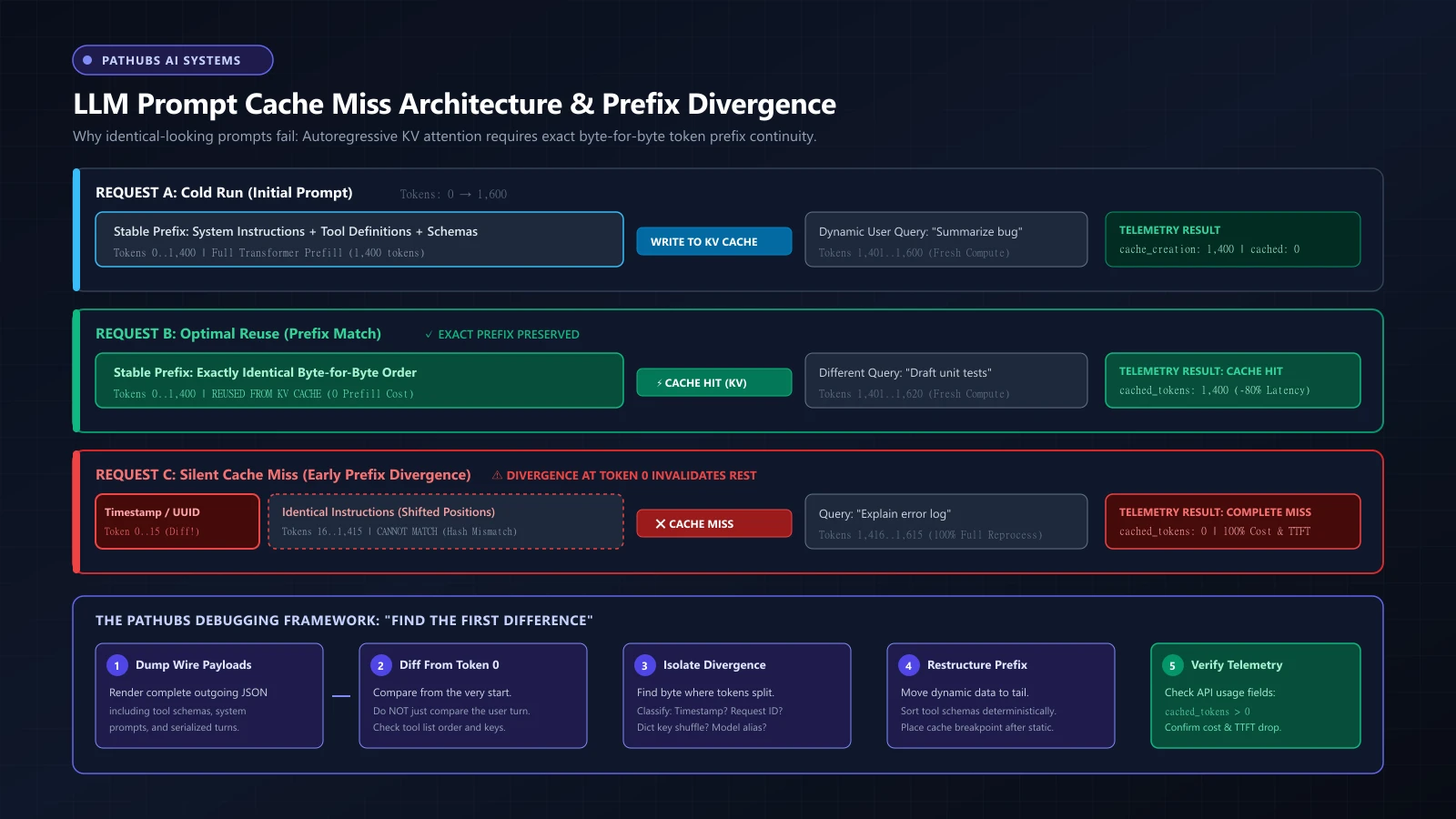
The following architectural diagram illustrates the three fundamental execution paths of prompt caching: a cold cache write, an optimal warm cache hit, and a silent cache miss caused by early prefix divergence.
!LLM Prompt Cache Miss Architecture and Prefix Divergence Diagram *Figure 1: Visual comparison of cold cache creation, optimal prefix cache hits, and silent cache misses caused by dynamic metadata at token 0.*
Notice Request C in Figure 1: the system instructions and tool definitions are identical to Request A and Request B. However, because a 15-token timestamp and request UUID were injected at the very beginning of the payload, the token sequence diverged at token 0. The hash lookup failed, the cached KV tensors were ignored, and the system incurred 100% prefill compute costs.
---
Taxonomy of Cache Misses: 12 Real-World Engineering Causes
When teams experience unexpected prompt cache misses, the root cause almost always falls into one of twelve concrete engineering failure modes.
1. Volatile Timestamps in System Prompts
Many prompt templates inject current time for temporal grounding:
# ANTI-PATTERN: Breaks prefix cache on every request
system_prompt = f"You are an assistant. Current time: {datetime.utcnow().isoformat()}. Follow these rules..."
Because the ISO timestamp changes every second, every request generates a unique token sequence starting at token 10. No two requests ever share a prefix.
2. Request IDs and Distributed Tracing Headers
Frameworks or logging middleware frequently inject correlation IDs into prompt context:
# ANTI-PATTERN: Injects dynamic UUID at the beginning of the prompt
prompt = f"[Trace-ID: {uuid.uuid4()}]\nSystem Instructions: {STABLE_INSTRUCTIONS}"
This guarantees a 0% cache hit rate across all requests.
3. Dynamic User Profile Metadata
Injecting user-specific parameters early in the prompt:
# ANTI-PATTERN: Cache isolated per user, zero cross-user sharing
system_prompt = f"User: {user.id}, Tier: {user.subscription_plan}, Org: {user.org_id}\n{BASE_SYSTEM_PROMPT}"
While this might achieve intra-user caching if the same user sends rapid requests, it completely destroys global cross-tenant prefix caching.
4. Non-Deterministic JSON Tool Ordering
In Python, dictionary iteration order was historically non-deterministic across processes. While modern Python preserves insertion order, building tool arrays dynamically from plugins or microservices often results in unstable ordering:
- Request A sends:
tools: [search_database, send_email, execute_code] - Request B sends:
tools: [execute_code, search_database, send_email]
To a human developer, the available tools are identical. To the tokenizer, the sequence of tokens representing the tool definitions is completely different. Result: an instant cache miss.
5. Generated Schema Drift (Pydantic / Zod Serialization)
When defining structured outputs (response_format) or function schemas using libraries like Pydantic, subtle differences in how schemas are serialized—such as unordered JSON key outputs, differing field descriptions, or dynamic default values—alter the underlying token string.
6. Dynamic Few-Shot Example Selection
Some retrieval-augmented systems dynamically select few-shot examples using vector similarity:
- User query X retrieves examples
[Ex 4, Ex 12, Ex 89] - User query Y retrieves examples
[Ex 12, Ex 4, Ex 99]
Because the examples are positioned inside the system prompt or early in the context, every variation in example selection destroys prefix continuity.
7. Conversation History Compaction & Rolling Windows
In multi-turn chat applications, long conversations eventually exceed token budgets. Teams implement summarization or compaction routines:
- Turn 5: Full history of turns 1 through 4.
- Turn 6: Summary of turns 1 through 3 + Turn 4 + Turn 5.
The moment turns 1 through 3 are replaced by a summary paragraph, the entire historical prefix is rewritten. Turn 6 experiences a complete cache miss, requiring a full rewrite of the cache.
8. Falling Below Minimum Token Thresholds
All major providers enforce minimum prompt lengths before prompt caching activates. If your prompt falls short by even a single token, caching is silently skipped:
- OpenAI: Requires at least 1,024 prompt tokens. Prompts with 1,023 tokens will never be cached.
- Anthropic Claude: Requires at least 1,024 tokens for Claude 3.5 Sonnet / Claude 3 Opus, and 2,048 tokens for Claude 3.5 Haiku.
- Google Gemini (Explicit Caching): Requires large contexts (typically $\ge$ 32,768 tokens depending on the specific model and API endpoint).
9. Cache TTL Expiration (Traffic Lulls)
Prompt caches are ephemeral. They exist in high-speed GPU or host memory and are subject to eviction policies:
- OpenAI: Uses an LRU-style eviction policy with an active cache lifetime typically spanning 5 to 10 minutes of inactivity (extending up to an hour during low platform load).
- Anthropic: Ephemeral cache breakpoints feature a standard 5-minute Time-To-Live (TTL).
- Google Gemini: Explicit caches use a developer-specified TTL (e.g., 1 hour, renewable).
If your application receives one request every 12 minutes, every single request will arrive after the prior cache entry has been evicted. You will experience a 100% cache miss rate despite sending identical prompts.
10. Multi-Tenant Cluster Routing (Node Sharding)
In distributed inference clusters (such as private vLLM or TensorRT-LLM deployments behind an AWS ALB or round-robin reverse proxy), Request A hits GPU Worker Node 1, and Request B hits GPU Worker Node 2. Unless your cluster implements cache-aware routing (routing requests with the same prompt hash to the same physical GPU instance), each worker maintains an independent, isolated KV cache.
11. Model Alias and Version Drifts
Invoking different model aliases or versions invalidates the cache:
- Request A targets
gpt-4o(which may resolve to a specific snapshot behind the scenes). - Request B targets
gpt-4o-2024-08-06.
Even if the model weights are identical, providers partition cache pools strictly by model ID. Similarly, switching temperature or top-p does not usually invalidate prompt KV caches, but changing structural generation parameters (like Anthropic's thinking budget) alters model initialization and invalidates prefix matching.
12. Mid-Prompt Thinking / Reasoning Configurations
In modern reasoning models (such as Claude 3.7 Sonnet with extended thinking or OpenAI o-series models), altering the reasoning configuration between requests or toggling thinking modes modifies the underlying prompt envelope, causing cache misses.
---
Summary Matrix: Common Cache-Miss Causes
| Root Cause | What Changed | Where Divergence Occurred | Impact | Immediate Fix |
|---|---|---|---|---|
| Volatile Timestamps | Current date/time string | Token index 0–50 | 100% cache miss | Move timestamp to dynamic user message tail |
| Request / Trace UUIDs | Random 36-char string | Token index 0–20 | 100% cache miss | Remove from prompt; pass via HTTP headers |
| Unsorted Tool Arrays | Order of functions in tools list | Tool block | 100% cache miss | Sort tool array alphabetically by name before calling API |
| Unsorted Schema Keys | JSON key order in tool schemas | Tool parameters | 100% cache miss | Use deterministic JSON serialization (sort_keys=True) |
| Sub-Threshold Length | Prompt length < 1,024 tokens | Total sequence | 100% cache miss | Verify token count; combine instructions or omit caching |
| TTL Inactivity Expiration | Time elapsed > 5–10 min | Time domain | Cache evicted | Send scheduled heartbeat or accept cold starts |
| Context Compaction | Summarized chat history | Turn 0 of conversation | 100% history miss | Keep stable system prefix untouched; summarize only suffix |
| Unpinned Model Aliases | gpt-4o vs pinned snapshot | Header / Routing | Miss across aliases | Pin exact model snapshot across all services |
---
The Pathubs Debugging Framework: "Find the First Difference"
When an engineering team discovers that an apparently stable prompt is missing the cache, the instinct is often to stare at the user prompt or tweak prompt text at random.
To solve this systematically, Pathubs uses a structured engineering diagnostic workflow called "Find the First Difference."
                     ┌───────────────────────────────────┐
                     │ 1. DUMP WIRE PAYLOADS             │
                     │ Capture raw JSON sent to API      │
                     └─────────────────┬─────────────────┘
                                       │
                                       ▼
                     ┌───────────────────────────────────┐
                     │ 2. ALIGN & DIFF FROM TOKEN 0      │
                     │ Scan tokens sequentially from top │
                     └─────────────────┬─────────────────┘
                                       │
                                       ▼
                     ┌───────────────────────────────────┐
                     │ 3. PINPOINT FIRST DIVERGENCE      │
                     │ Isolate exact index of mismatch   │
                     └─────────────────┬─────────────────┘
                                       │
                                       ▼
                     ┌───────────────────────────────────┐
                     │ 4. CLASSIFY ROOT CAUSE            │
                     │ Timestamp? Tool sort? Schema bug? │
                     └─────────────────┬─────────────────┘
                                       │
                                       ▼
                     ┌───────────────────────────────────┐
                     │ 5. RESTRUCTURE PROMPT PAYLOAD     │
                     │ [Stable Prefix] -> [Dynamic Tail] │
                     └─────────────────┬─────────────────┘
                                       │
                                       ▼
                     ┌───────────────────────────────────┐
                     │ 6. VERIFY TELEMETRY METRICS       │
                     │ Confirm cached_tokens > 0 in logs │
                     └───────────────────────────────────┘
The Inspection Sequence: 10 Elements to Check in Order
When comparing two requests that should have shared a cache, compare the serialized payload in this strict sequence:
- Model ID: Verify the exact string matches (e.g.,
claude-3-5-sonnet-20241022vsclaude-3-5-sonnet-latest). - Tool Definitions List: Confirm the number of tools is identical.
- Tool Order: Confirm the tools appear in the exact same array order.
- Tool Parameter Schemas: Confirm property keys, descriptions, and default values are identical.
- System / Developer Messages: Compare character-for-character, including invisible whitespace, trailing newlines (
\n\nvs\n), and line endings (\r\nvs\n). - Multi-Modal Blocks: If images or documents are included, confirm the base64 or media hash is identical and positioned in the same block.
- Append-Only History: Check whether any historical message turn was truncated, edited, or had its role changed.
- Structured Output Configurations: Verify that
response_formator grammar constraints match exactly. - Hyperparameters: Check if reasoning budgets, temperature settings, or top-k rules altered model envelope headers.
- Dynamic Variables: Confirm that zero timestamps, session IDs, user IDs, or environment names appear before the cache boundary.
---
Stable Prefix Design: Structuring Prompts for High Hit Rates
Achieving high cache hit rates requires designing your prompt architecture with an intentional boundary between static and dynamic data.
The Anti-Pattern: Mixed Volatile Layout
In an unoptimized layout, dynamic variables are scattered throughout the prompt:
[
  {
    "role": "system",
    "content": "You are a customer support AI for Acme Corp.\nSession ID: 9481a-44\nCurrent Time: 2026-10-07T14:22:00Z\nUser Tier: Enterprise\n\n### Core System Instructions\n[3,000 tokens of complex enterprise support guidelines, refund policies, and compliance rules...]"
  },
  {
    "role": "user",
    "content": "How do I upgrade my seat count?"
  }
]
Why this fails: Because Session ID and Current Time sit at lines 2 and 3, the prompt diverges after approximately 15 tokens. The 3,000 tokens of enterprise guidelines that follow are completely reprocessed on every interaction.
The Production Standard: Strict Prefix Partitioning
In an optimized layout, all static content is front-loaded to form an impenetrable Stable Prefix. All variable content is pushed into the Dynamic Suffix:
[
  {
    "role": "system",
    "content": "You are a customer support AI for Acme Corp.\n\n### Core System Instructions\n[3,000 tokens of complex enterprise support guidelines, refund policies, and compliance rules...]\n\n### Available Tools & Schema Rules\n[Deterministic, sorted tool specifications]"
  },
  {
    "role": "user",
    "content": "Context Metadata:\n- User Tier: Enterprise\n- Current Time: 2026-10-07T14:22:00Z\n- Session ID: 9481a-44\n\nUser Question: How do I upgrade my seat count?"
  }
]
Why this succeeds:
- The entire system prompt (3,000+ tokens) is 100% identical for all users across the entire company.
- On Request 1, the 3,000 tokens are written to the cache.
- On Request 2 (even from a completely different customer in a different department), the first 3,000 tokens match the cache index perfectly.
- Only the user message (120 tokens) is processed as fresh prefill.
┌────────────────────────────────────────────────────────────────────────┐
│ STABLE PREFIX (100% Identical Across All Requests)                    │
│ 1. Core Persona & Safety Rules                                         │
│ 2. Detailed Business Logic & Compliance Guidelines                     │
│ 3. Deterministically Sorted Tool Definitions & Schemas                 │
│ 4. Standard Few-Shot Examples                                          │
│ 5. Static Reference Knowledge Base Articles                            │
└───────────────────────────────────┬────────────────────────────────────┘
                                    │
                         [CACHE BREAKPOINT BOUNDARY]
                                    │
┌───────────────────────────────────▼────────────────────────────────────┐
│ DYNAMIC SUFFIX (Changes Per Request)                                   │
│ 1. Append-Only Prior Turns (in multi-turn sessions)                    │
│ 2. Dynamic Timestamps & Request UUIDs                                  │
│ 3. User Identity & Tenant Metadata                                     │
│ 4. Fresh Retrieved Search Snippets (RAG)                               │
│ 5. Current User Question                                               │
└────────────────────────────────────────────────────────────────────────┘
---
Practical Tool: Python Request Diffing & Telemetry Inspector
To operationalize the "Find the First Difference" framework, here is a production-ready Python utility. It serializes two API requests, enforces deterministic tool key sorting, finds the exact character and token where divergence occurs, and inspects response telemetry to verify cache hits.
"""
Pathubs Prompt Cache Diagnostic Utility
Compares two LLM API request payloads, pinpoints prefix divergence,
and verifies provider cache telemetry.
"""

import json
from typing import Any, Dict, Optional, Tuple


def normalize_payload(payload: Dict[str, Any]) -> str:
    """
    Deterministically normalizes a request payload.
    Sorts dictionary keys in tools and system prompts to eliminate
    spurious serialization differences.
    """
    normalized = {}

    # 1. Normalize model
    normalized["model"] = payload.get("model", "")

    # 2. Normalize and sort tools deterministically by function name
    if "tools" in payload and payload["tools"]:
        sorted_tools = sorted(
            payload["tools"],
            key=lambda t: t.get("function", {}).get("name", "")
        )
        normalized["tools"] = sorted_tools
    else:
        normalized["tools"] = []

    # 3. Normalize messages
    normalized["messages"] = payload.get("messages", [])

    # Serialize to deterministic JSON string
    return json.dumps(normalized, sort_keys=True, ensure_ascii=False)


def find_first_difference(str_a: str, str_b: str) -> Optional[Dict[str, Any]]:
    """
    Scans two strings from index 0 and returns the exact location
    and context of the first diverging character.
    """
    min_len = min(len(str_a), len(str_b))

    for idx in range(min_len):
        if str_a[idx] != str_b[idx]:
            snippet_start = max(0, idx - 40)
            snippet_end_a = min(len(str_a), idx + 40)
            snippet_end_b = min(len(str_b), idx + 40)

            return {
                "divergence_index": idx,
                "char_a": repr(str_a[idx]),
                "char_b": repr(str_b[idx]),
                "context_a": str_a[snippet_start:snippet_end_a],
                "context_b": str_b[snippet_start:snippet_end_b],
                "divergence_snippet": f"...{str_a[snippet_start:idx]} >>>MISMATCH<<< {str_a[idx:snippet_end_a]}..."
            }

    if len(str_a) != len(str_b):
        return {
            "divergence_index": min_len,
            "error": "One payload is an exact prefix of the other, but lengths differ.",
            "len_a": len(str_a),
            "len_b": len(str_b)
        }

    return None  # Identical payloads


def verify_cache_telemetry(response_json: Dict[str, Any]) -> Dict[str, Any]:
    """
    Extracts provider-specific prompt caching telemetry fields.
    Supports OpenAI, Anthropic, and generic formats.
    """
    usage = response_json.get("usage", {})

    # OpenAI Telemetry Format
    prompt_details = usage.get("prompt_tokens_details", {})
    openai_cached = prompt_details.get("cached_tokens", 0)

    # Anthropic Telemetry Format
    anthropic_read = usage.get("cache_read_input_tokens", 0)
    anthropic_write = usage.get("cache_creation_input_tokens", 0)

    total_input = usage.get("prompt_tokens", usage.get("input_tokens", 0))

    is_hit = False
    cached_tokens = 0

    if openai_cached > 0:
        is_hit = True
        cached_tokens = openai_cached
    elif anthropic_read > 0:
        is_hit = True
        cached_tokens = anthropic_read

    hit_rate = (cached_tokens / total_input) if total_input > 0 else 0.0

    return {
        "cache_hit": is_hit,
        "cached_tokens": cached_tokens,
        "total_input_tokens": total_input,
        "uncached_tokens": total_input - cached_tokens,
        "token_hit_rate_pct": round(hit_rate * 100, 2),
        "anthropic_cache_write_tokens": anthropic_write
    }


# =====================================================================
# Example Demonstration
# =====================================================================
if __name__ == "__main__":
    # Request A: System prompt has timestamp at the top (ANTI-PATTERN)
    req_a = {
        "model": "gpt-4o",
        "messages": [
            {"role": "system", "content": "Timestamp: 14:00:01\nYou are an enterprise SQL agent. Always use LIMIT 100."},
            {"role": "user", "content": "Show recent transactions"}
        ]
    }

    # Request B: Same prompt sent 3 seconds later
    req_b = {
        "model": "gpt-4o",
        "messages": [
            {"role": "system", "content": "Timestamp: 14:00:04\nYou are an enterprise SQL agent. Always use LIMIT 100."},
            {"role": "user", "content": "Show customer signups"}
        ]
    }

    norm_a = normalize_payload(req_a)
    norm_b = normalize_payload(req_b)

    diff = find_first_difference(norm_a, norm_b)

    if diff:
        print("[!] CACHE MISMATCH DETECTED AT EARLIEST PREFIX:")
        print(f"    Divergence Index: {diff['divergence_index']}")
        print(f"    Payload A Char:   {diff['char_a']}")
        print(f"    Payload B Char:   {diff['char_b']}")
        print(f"    Snippet:          {diff['divergence_snippet']}")
    else:
        print("[✓] Payloads share an identical prefix!")
When run, the script outputs the exact character position where the timestamp diverged, proving to the developer that the system prompt was never identical in the first place.
---
Telemetry: How to Prove Caching Actually Happened
A common mistake in AI engineering is relying on wall-clock latency to determine whether prompt caching is working.
Wall-clock latency is not reliable telemetry. Network congestion, TLS handshakes, queuing delays on the provider's GPU clusters, and slow output generation (decoding) can easily cause a request that hit the cache to take 2.5 seconds, while a cold request takes 1.8 seconds.
To verify caching, you must inspect the raw API response usage object.
Provider-Specific Telemetry Fields
1. OpenAI
OpenAI returns cache metrics nested inside the usage object:
{
  "usage": {
    "prompt_tokens": 2048,
    "completion_tokens": 85,
    "total_tokens": 2133,
    "prompt_tokens_details": {
      "cached_tokens": 1920
    }
  }
}cached_tokens: Number of prompt tokens read directly from the cache. These tokens are billed at a 50% discount on supported models.- If
cached_tokens == 0, the request missed the cache completely.
2. Anthropic Claude
Anthropic reports granular cache writes and reads in its usage object:
{
  "usage": {
    "input_tokens": 128,
    "cache_creation_input_tokens": 0,
    "cache_read_input_tokens": 1920,
    "output_tokens": 64
  }
}cache_read_input_tokens: Tokens successfully retrieved from the cache (billed at 10% of standard input price).cache_creation_input_tokens: Tokens written to the cache for the first time (billed at 125% of standard input price to account for cache generation overhead).input_tokens: Tokens appearing *after* the last cache breakpoint (fresh prefill).- Total Prompt Tokens Formula:
$$\text{Total Input Tokens} = \text{cache\_read\_input\_tokens} + \text{cache\_creation\_input\_tokens} + \text{input\_tokens}$$
3. Google Gemini (Vertex AI / Gemini API)
Google Gemini exposes cache metadata under usage_metadata:
{
  "usage_metadata": {
    "prompt_token_count": 35000,
    "candidates_token_count": 210,
    "total_token_count": 35210,
    "cached_content_token_count": 32768
  }
}cached_content_token_count: The explicit context tokens served from the active context cache.
4. AWS Bedrock (Converse API)
AWS Bedrock returns caching activity in the invocation metrics:
{
  "usage": {
    "inputTokens": 2200,
    "outputTokens": 95,
    "totalTokens": 2295,
    "cacheReadInputTokens": 2048,
    "cacheWriteInputTokens": 0
  }
}
5. Open-Source Inference (vLLM Automatic Prefix Caching)
When running self-hosted models with vLLM (--enable-prefix-caching), vLLM tracks cache metrics in Prometheus:
vllm:num_cached_tokens: Gauge of tokens served from APC.vllm:num_total_tokens: Total tokens evaluated across prefill and decoding.- Server logs will show
Prefix cache hit: X blocks reused.
---
Defining the Right Metrics: Beyond a Single "Hit Rate"
Saying *"our cache hit rate is 80%"* can be deeply misleading. In production AI systems, you must track three distinct metrics to understand your true operational efficiency:
1. Token Cache Hit Rate
The percentage of total input tokens that were served from cache: $$\text{Token Hit Rate} = \frac{\sum \text{Cached Input Tokens}}{\sum \text{Total Input Tokens}}$$ *Why it matters:* This directly correlates with cost savings and GPU prefill compute reduction. A 50% token hit rate on a 100,000-token prompt saves far more compute and money than a 99% token hit rate on a 200-token prompt.
2. Request Cache Hit Rate
The percentage of requests that experienced any cache read: $$\text{Request Hit Rate} = \frac{\text{Requests with Cached Tokens } > 0}{\text{Total Requests}}$$ *Why it matters:* This reflects user experience and latency consistency. A high request hit rate means the vast majority of users are benefiting from reduced Time-to-First-Token (TTFT).
3. Cache Write-to-Read Ratio
The ratio of tokens read from the cache compared to tokens written: $$\text{Write-to-Read Ratio} = \frac{\sum \text{Cache Read Tokens}}{\sum \text{Cache Write Tokens}}$$ *Why it matters:* On providers that charge a write surcharge (like Anthropic's 1.25x write rate), if this ratio falls below 1.5, prompt caching is actually costing you more money than leaving it disabled.
---
Partial Cache Hits: How Incremental Chunking Works
Many engineers assume that prompt caching is all-or-nothing: either the entire prompt hits, or the entire prompt misses.
In reality, modern inference engines implement longest common prefix matching. If the beginning of your prompt matches, but diverges at token 1,500 of a 2,000-token prompt:
- Tokens 0 through 1,500 hit the cache. The engine reuses the precomputed KV tensors for those 1,500 tokens.
- Tokens 1,501 through 2,000 are processed as fresh prefill.
- You receive a partial discount and partial latency reduction.
Incoming Request (2,000 tokens total):
[ Tokens 0 ........................ 1,500 ] [ Tokens 1,501 .... 2,000 ]
  ▲                                           ▲
  │ Matches stored cache entry                │ Diverges (New content)
  └───────────────┬───────────────────────────┴───────────────┬────────────┘
                  │                                           │
         PARTIAL CACHE HIT                          FRESH PREFILL
      (Reused KV states, 50-90% discount)         (Full compute & billing)
Provider Granularity Rules
- OpenAI: Operates in 128-token chunk increments. If you have 1,024 cached tokens and append 70 new static tokens, only the initial 1,024 tokens are reused until you reach the next 128-token boundary (1,152 tokens).
- Anthropic: Operates at explicit cache breakpoints (
cache_control). The model caches up to the exact breakpoint block specified. You can define up to four breakpoints per request. - vLLM (APC): Operates on discrete PagedAttention KV blocks (typically 16 or 32 tokens per block). Any continuous sequence of full blocks that matches an existing hash in the global block table is reused.
---
Production Incident Walkthrough: "The Midnight Hit Rate Collapse"
To see how subtle prompt cache misses manifest in production, consider a real-world incident postmortem from a high-throughput SaaS platform.
Incident Background
- System: Enterprise Customer Support Agent handling 350,000 queries per day via OpenAI
gpt-4o. - Prompt Size: ~4,200 tokens (3,800 tokens of company policy and tool schemas + 400 tokens of user message).
- Baseline Performance:
- Token Cache Hit Rate: 89.2% - Average Time-to-First-Token (TTFT): 340 ms - Daily API Spend: $1,420
The Incident
At 11:30 PM on a Tuesday, an automated CI/CD deployment went live. By 8:00 AM the following morning:
- The daily API burn rate surged to $3,680 (a 2.6x cost explosion).
- p95 Time-to-First-Token degraded from 380 ms to 1,840 ms.
- The Datadog observability dashboard showed that the token cache hit rate had plunged from 89.2% to 0.3%.
The Investigation (Applying "Find the First Difference")
The on-call engineer pulled raw JSON payloads from production logs before and after the deployment:
- Step 1: Check Model ID: Both before and after used
gpt-4o. - Step 2: Check Token Count: Both were approximately 4,200 tokens (above the 1,024 threshold).
- Step 3: Run the Diff Script: The engineer ran the Python request normalizer on Request
A_pre_deployand RequestB_post_deploy:
[!] CACHE MISMATCH DETECTED:
    Divergence Index: 42
    Context A: "You are an enterprise support assistant.\n\n### POLICIES"
    Context B: "You are an enterprise support assistant.\n[TZ: America/New_York] [Req-ID: f81d4]\n\n### POLICIES"
The Root Cause
A frontend developer had submitted a PR to improve agent localization. The PR added a helper function that prepended the user's local timezone and an internal tracing UUID right after the first sentence of the system prompt.
Because every user had a different timezone or UUID, the prompt diverged at character 42. The 3,800 tokens of identical company policies that followed were completely recomputed on all 350,000 requests.
Remediation
- Immediate Hotfix: The timezone and tracing UUID were moved from the system prompt into the user turn metadata at the very end of the payload.
- Architecture Standard: A pre-commit hook was added requiring all tool schemas to be sorted alphabetically by key.
- CI/CD Regression Gate: Added an automated evaluation test asserting
usage.prompt_tokens_details.cached_tokens >= 3800on consecutive test runs.
Results
Within 5 minutes of deploying the hotfix:
- Cache hit rate rebounded to 91.4%.
- p95 TTFT dropped back to 330 ms.
- Over $2,200/day in unnecessary compute spend was eliminated.
---
The Unit Economics: When Does Prompt Caching Actually Cost MORE?
A dangerous misconception in AI engineering is that enabling prompt caching is an automatic cost reduction. In certain production configurations, prompt caching actually increases your total cloud bill.
The Break-Even Equation
Consider providers like Anthropic Claude that charge a write surcharge to store tokens in the cache:
- Standard Input Tokens: $1.00 \times \text{Base Price}$ ($C_i$)
- Cache Write Tokens: $1.25 \times \text{Base Price}$ ($C_w = 1.25 C_i$)
- Cache Read Tokens: $0.10 \times \text{Base Price}$ ($C_r = 0.10 C_i$)
- Cache TTL: 5 minutes of inactivity
To achieve net financial savings, the total discount earned on subsequent cache reads must exceed the 25% premium paid on the initial cache write:
$$\text{Net Savings} = (N \times (C_i - C_r)) - (C_w - C_i)$$
Where:
- $N$ is the number of subsequent cache reads before the cache entry expires.
- $(C_i - C_r) = 1.00 - 0.10 = 0.90 \times \text{Base Price}$ (the per-token savings on each read).
- $(C_w - C_i) = 1.25 - 1.00 = 0.25 \times \text{Base Price}$ (the upfront write surcharge).
Setting $\text{Net Savings} > 0$: $$N \times 0.90 > 0.25 \implies N > \frac{0.25}{0.90} \approx 0.28$$
Mathematically, you need at least one subsequent cache read ($N \ge 1$) within the 5-minute TTL window to break even.
The Negative ROI Scenario: Sparse Traffic
Now consider a real-world edge case: a specialized internal compliance tool used by compliance officers.
- Prompt Size: 20,000 tokens of regulatory guidelines.
- Query Volume: 4 queries per hour, spaced roughly 15 minutes apart.
- Cache TTL: 5 minutes.
What happens:
- Query 1 arrives at 10:00 AM. Cache miss. The system writes 20,000 tokens to cache ($20,000 \times 1.25 = 25,000$ billed token units).
- The cache sits idle. At 10:05 AM, the 5-minute TTL expires. The cache entry is evicted.
- Query 2 arrives at 10:15 AM. Cache miss. The system writes 20,000 tokens to cache again ($25,000$ billed token units).
- At 10:20 AM, the cache is evicted again.
The Economic Result:
- With Prompt Caching Enabled: Billed for $4 \times 25,000 = \mathbf{100,000\text{ token units}}$.
- With Prompt Caching DISABLED: Billed for $4 \times 20,000 = \mathbf{80,000\text{ token units}}$.
Prompt caching increased this team's monthly bill by 25%!
---
Agentic Workflows and RAG: High-Value, High-Risk Environments
Autonomous AI agents and Retrieval-Augmented Generation (RAG) systems represent both the greatest opportunity and the most common failure points for prompt caching.
Why Agents Need Prompt Caching
In an agentic loop (e.g., ReAct, Plan-and-Execute, multi-turn coding agents), an LLM executes a continuous cycle:
- Turn 1: System prompt (2,000 tokens) + Tools (1,500 tokens) + User goal (100 tokens) $\rightarrow$ Tool Call A
- Turn 2: Turn 1 context + Tool Call A Output (500 tokens) $\rightarrow$ Tool Call B
- Turn 3: Turn 2 context + Tool Call B Output (800 tokens) $\rightarrow$ Tool Call C
- ... Turn 10: Accumulating thousands of historical tokens.
Without prompt caching, an agent that takes 10 turns reprocesses the 3,500-token system instructions and tools 10 separate times, paying for 35,000 input tokens. With prompt caching, those 3,500 tokens are cached on Turn 1; Turns 2 through 10 reuse the prefix, cutting agent execution costs by up to 80%.
How Agents Silently Break Caching
- Dynamic Tool Injection: If your orchestrator dynamically injects or removes tools based on the current state (e.g., giving the agent file-editing tools only after it reads a directory), the tool definitions block changes, invalidating the cache.
- Context Compaction in Mid-Loop: When agents truncate intermediate tool outputs (e.g., trimming large bash outputs from Turn 2 to fit context limits), the historical prefix is modified. Every turn after the edit misses the cache.
- Non-Deterministic Tool Output Formatting: Tool responses that include transient timestamps or unformatted memory dumps alter token counts unpredictably.
RAG and Prompt Caching: The Ordering Dilemma
In traditional RAG pipelines, retrieved chunks are placed before or inside the system instructions:
[System Instructions] + [RETRIEVED CHUNKS (Changes every query!)] + [User Query]If retrieved chunks appear before your few-shot examples or reference guidelines, the cache breaks every time retrieval returns a different set of documents.
The Solution for RAG:
- Tier 1 (Global Stable Prefix): System instructions, persona, and static tool schemas (cached across all users).
- Tier 2 (Document Partition Caching): If multiple users ask questions about the *same* large PDF (e.g., a 50-page financial report), place the document in the prompt *immediately after the stable prefix* and place the unique user question at the end:
[System Prompt (Cached)] ──► [50-Page PDF (Cached for all queries on this doc)] ──► [User Query (Dynamic)]This architecture allows hundreds of concurrent users to query the same uploaded document with a 98% prompt cache hit rate.
---
Cross-Provider Comparison Matrix
Different AI providers implement prompt caching with radically different semantics, token minimums, and eviction rules. The following matrix reflects verified provider behavior as of October 2026:
| Provider | Mechanism | Minimum Token Threshold | Default TTL / Eviction | Telemetry Field | Critical Caveat |
|---|---|---|---|---|---|
| OpenAI | Automatic | 1,024 tokens | LRU (5–10 min inactivity; up to 1 hr during off-peak) | usage.prompt_tokens_details.cached_tokens | Caches in 128-token increments. Prompts with 1,023 tokens are never cached. |
| Anthropic Claude | Explicit (cache_control) | 1,024 tokens (Sonnet/Opus) / 2,048 tokens (Haiku) | 5 minutes (ephemeral TTL) | usage.cache_read_input_tokens, usage.cache_creation_input_tokens | Max 4 breakpoints. Writes incur a 1.25x surcharge; reads get a 90% discount. |
| Google Gemini | Explicit & Implicit | $\ge$ 32,768 tokens (Explicit) | Configurable TTL (hours/days for explicit) | usage_metadata.cached_content_token_count | Explicit caching charges storage per hour. Best suited for massive codebases or long video/audio contexts. |
| AWS Bedrock | Explicit (Converse API checkpoints) | Model-dependent (typically 1,024–2,048) | 5 minutes of inactivity | usage.cacheReadInputTokens, usage.cacheWriteInputTokens | Model support varies. Checkpoint markers must be placed manually in message history. |
| vLLM (Open Source) | Automatic (APC - Automatic Prefix Caching) | 16–32 tokens (PagedAttention block size) | LRU eviction tied to GPU memory budget | Prometheus gauge vllm:num_cached_tokens | Requires --enable-prefix-caching. Needs cache-aware proxy routing across multi-GPU worker nodes. |
---
Production CI/CD Release Checklist
To prevent prompt cache regressions from reaching production, incorporate this verification checklist into your engineering workflows:
Pre-Deployment Verification (CI Gate)
- Prefix Audit: Verify that zero dynamic timestamps, request UUIDs, or user IDs exist in the system prompt.
- Deterministic Tool Sorting: Confirm that tool arrays and JSON schemas are sorted alphabetically by function name and parameter keys prior to serialization.
- Threshold Assertion: Ensure the static prefix exceeds the provider's minimum token threshold (e.g., > 1,024 tokens).
- Deterministic Serialization Test: Run an automated unit test comparing two consecutive serialized request payloads. Assert
find_first_difference(payload_a, payload_b) is Nonefor identical system configurations. - Synthetic Hit Rate Test: Execute an automated staging test with two consecutive identical requests. Assert that the second response returns
cached_tokens > 0.
Post-Deployment Monitoring (Observability Alerts)
- Token Hit Rate Alert: Configure a Datadog / OpenTelemetry alert that triggers if the service-level token cache hit rate drops by more than 15% over a 15-minute window.
- Write-to-Read Ratio Alert: Monitor the ratio of cache writes to cache reads. Alert if the ratio falls below 1.5 for workloads on providers with write surcharges.
- TTFT Spike Alert: Track p95 Time-to-First-Token. A sudden 3x spike in TTFT is an immediate indicator of a cache invalidation bug.
- Cost Per Request Anomaly: Alert on abnormal increases in input token billing per transaction.
---
Conclusion: The Path to Resilient AI Serving
LLM prompt caching is one of the most effective tools available for scaling generative AI applications. It transforms bloated multi-thousand-token system prompts and massive tool registries from a crippling latency bottleneck into an efficient, reusable asset.
However, because prompt caching operates at the physical level of transformer KV tensors, it demands strict software engineering discipline:
- Understand prefix continuity: Autoregressive attention does not forgive early divergences.
- Enforce deterministic serialization: Treat prompt payloads like compiled code—unstable dictionary ordering is a bug.
- Inspect telemetry, not latency: Rely on explicit API usage counters to verify that tokens were read from cache.
- Calculate unit economics: Ensure traffic frequency justifies cache retention before accepting write surcharges.
By adopting the "Find the First Difference" methodology and structuring prompts into strict static prefixes and dynamic suffixes, engineering teams can eliminate silent cache misses, stabilize response latency, and drastically reduce production inference costs.
---
Frequently Asked Questions
What is an LLM prompt cache miss?
An LLM prompt cache miss occurs when an inference request fails to reuse previously computed Key-Value (KV) tensor activations for its prompt prefix. Instead of skipping the expensive transformer prefill step for repeated tokens, the inference engine is forced to reprocess the entire input sequence from scratch, charging standard input token rates and increasing time-to-first-token (TTFT) latency.
Why am I getting cache misses when my prompt looks identical?
Prompt caching operates on exact token and byte sequences from the very beginning of the payload (token 0). Prompts that appear identical to human developers often contain subtle prefix divergences: unpinned dynamic timestamps, randomized request UUIDs, unstable dictionary key ordering during JSON serialization of tool definitions, hidden whitespace differences, or different model alias versions.
How does causal attention cause a single early token difference to break caching?
In causal transformer architectures, the self-attention representation of token $N$ depends strictly on tokens $0$ through $N-1$. If a single token changes at position 10, the mathematical attention context for tokens 11 through 2,000 is permanently altered. The inference engine cannot match the previously computed KV cache keys for subsequent tokens, causing an immediate cache miss from the point of divergence forward.
What is the difference between prompt caching and response caching?
Prompt caching stores the intermediate Key-Value (KV) attention states of the input prompt prefix, allowing the LLM to skip redundant prefill computation while still generating a fresh, non-deterministic, dynamic completion. Response caching (or semantic caching) stores the final generated text output for identical user queries, bypassing model inference entirely.
Does prompt caching always reduce cost?
No. Providers that charge an upfront cache write premium (like Anthropic's 1.25x write rate) or require minimum token thresholds can actually increase costs if your traffic is sparse. If requests arrive outside the cache's Time-To-Live window (typically 5 to 10 minutes), every request triggers a costly cache write without subsequent reads, resulting in negative return on investment.
Can dynamic content break prompt caching in multi-turn chat?
Yes. If dynamic content (such as timestamps, user metadata, or compaction summaries) is injected into early message turns or the system prompt, all subsequent turns will miss the cache. In multi-turn chat applications, always keep the initial system prompt strictly static, append new turns sequentially without modifying past turns, and place dynamic request variables in the latest user message.